Hydra: Authentication Auditing
A widely used tool for auditing authentication strength through brute-force testing — identify weak or default credentials before real attackers do.
Written by the PasswordGeeks team · Tested on Kali Linux 2026.1 · Last updated August 2026 · ~13 min read
⚠️ Legal Notice: Only run Hydra against systems and accounts you own or have explicit written permission to test. Attempting to guess credentials on systems you don't control is illegal in most countries, even with a short password list. The example below uses a private, non-routable lab IP address for illustration only.
What is Hydra?
Hydra is an open-source password auditing tool that systematically tests credential combinations against login systems. It supports many protocols and is fast, making it a standard tool in authorized penetration testing and password-policy audits.
Originally developed by members of the security research group THC (The Hacker's Choice), it remains one of the most widely referenced tools in cybersecurity training and certification courses.
Supported Services
- FTP
- HTTP (GET/POST forms)
- SSH
- Telnet
- SMTP
- MySQL
- HTTP Proxy
- RDP and VNC
Why Hydra Matters
Hydra demonstrates how weak passwords can be quickly identified through automated guessing. A password shorter than 8 characters with no special characters is highly vulnerable to this kind of testing.
Many devices — routers, modems, CCTV systems — ship with default credentials. If unchanged, an authorized tester (or an attacker) can identify access using tools like Hydra, which is exactly why auditing for this matters.
How Hydra Actually Works Internally
Hydra isn't just a loop that tries passwords one at a time — understanding its architecture explains both why it's fast and why it triggers specific defensive signatures.
Modular protocol design
Hydra is built around individual "service modules" — separate pieces of code, one per protocol (SSH, FTP, HTTP-POST-FORM, RDP, and so on). Each module knows the specific handshake and response format for that protocol, which is why adding support for a new service historically meant writing a new module rather than modifying a generic core. This matters practically: an SSH module has to negotiate a full cryptographic handshake per attempt, which is comparatively slow, while an FTP or Telnet module can fire attempts much faster since the protocol overhead is lower.
Threading model
The -t flag controls how many login attempts Hydra runs in parallel via worker threads, not how many total attempts it makes. Each thread independently pulls the next username/password pair from the queue and tests it against the target, which is why raising thread count increases speed roughly linearly — up to the point where the target service itself becomes the bottleneck (CPU-bound authentication, or a hard connection limit).
Why this matters for the "why is my test slow" question
The most common misunderstanding we see from students is assuming a stalled Hydra run means the tool is broken. In practice, a stalled or crawling run against a real service is nearly always the target pushing back — a firewall dropping repeated connections from the same source, a lockout policy silently rejecting attempts, or a rate limiter inserting artificial delay. Hydra rarely fails silently for no reason; a healthy authorized test against an unprotected lab service should show a steady, predictable attempt rate.
Hydra Commands Explained
- -l → single username
- -L → file of multiple usernames
- -P → password list file
- -t → number of parallel threads
- -s → non-default port
- -V → verbose mode, shows each attempt
Example Workflow (Illustrative Only)
Uses a private, non-routable lab IP (RFC 1918 range) — illustrates syntax only, won't function against any real target:
In a real authorized audit, the target would be inside your own lab or a system explicitly covered by a signed testing agreement.
Full Lab Walkthrough: Setting Up a Legal Test
Here's the complete process we use when demonstrating Hydra in a controlled lab environment — not just the single command, but the setup around it that makes the test meaningful and safe.
Step 1 — Build an isolated target
Spin up a throwaway VM (VirtualBox or VMware works fine) on a host-only or NAT network so it has no route to the internet or your production LAN. Install a service you're allowed to attack — a fresh vsftpd or OpenSSH install with a deliberately weak test account works well for a first run.
Step 2 — Build a realistic wordlist, not a giant one
New users often reach straight for rockyou.txt (14 million entries) and are surprised the test takes hours. For a policy-audit demonstration, a curated list of 50–200 entries covering common patterns (seasons + year, "password123", company name variants, known default device credentials) tests the realistic threat far faster and more usefully than brute-forcing the entire keyspace.
Step 3 — Run a baseline test and record the timing
The -V flag prints every attempt live, which is useful the first time you run this so you can see exactly what "in progress" looks like rather than staring at a blank terminal.
Step 4 — Compare against a hardened configuration
Repeat the same test after enabling an account lockout policy (e.g., 5 failed attempts locks the account for 15 minutes) or fail2ban. The second run should fail quickly or stall entirely — this before/after comparison is the actual deliverable of a password-policy audit, not the raw "did it crack" result.
Hydra Command Output
When Hydra runs, it attempts multiple login combinations and reports successful matches, along with attempt count and duration — helping testers document weak credentials and helping defenders understand what an attacker would see.
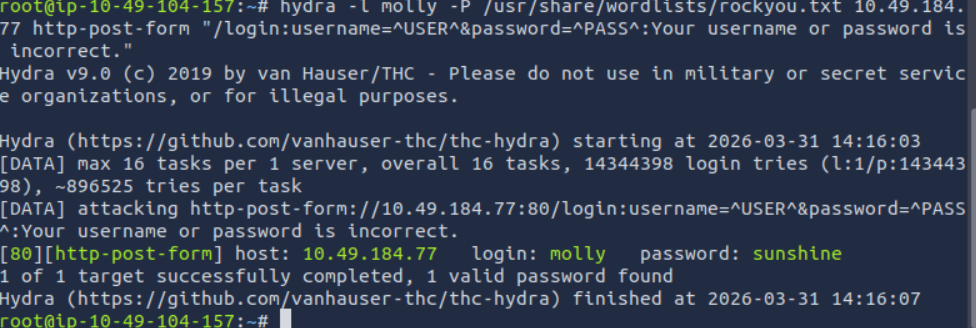
A typical summary line at the end of a run reports total attempts, elapsed time, and any valid pairs found — this is the line you'd screenshot and attach to an audit report, along with the account lockout or rate-limit behavior observed in Step 4 above.
Tuning Threads & Timing
Thread count is the setting most audit reports get wrong — either too aggressive (crashes the target service or trips every alarm) or too conservative (the test takes so long nobody re-runs it after remediation).
| Thread count | Typical effect | When we use it |
|---|---|---|
| 1–4 | Slow, quiet, unlikely to trip lockouts mid-test | Testing against production-adjacent systems, or services with strict lockout policies |
| 8–16 (Hydra's default is 16) | Balanced speed, moderate load on target | Standard lab audits on services built to handle normal traffic |
| 32+ | Fast, but can crash weaker services or single-threaded daemons | Rarely — only against services explicitly load-tested beforehand |
The -W flag also sets a per-attempt timeout, useful when a service responds slowly and you want to avoid Hydra hanging on individual connections instead of moving through the list.
Real-World Use Cases
- Password policy audits: Confirming minimum requirements resist automated guessing
- Default credential checks: Verifying devices had defaults changed before deployment
- Penetration testing: Testing authentication within a broader authorized assessment
- Security awareness training: Demonstrating how quickly weak passwords are found
Hydra is typically used after reconnaissance, not as a first step — Nmap identifies which login services are actually running before you test them. For credentials obtained through other means (like a breached hash dump), offline tools such as John the Ripper or Hashcat are the more appropriate choice, since Hydra is built for testing live services, not cracking hashes.
Hydra vs. Other Password Tools
| Tool | Primary Use | Best For |
|---|---|---|
| Hydra | Online brute-force testing | Testing live login services across protocols |
| John the Ripper | Offline password cracking | Cracking hashes already obtained legitimately |
| Hashcat | Offline cracking, GPU-accelerated | Cracking large hash sets quickly |
| Medusa | Online brute-force testing | Similar to Hydra, some protocol differences |
Common Mistakes We See From Beginners
Testing without a signed scope
Even in training environments, running Hydra against a shared school/work network without explicit sign-off is the single most common way students accidentally cross a legal line — most institutions treat any unauthorized authentication attempt, successful or not, as a policy violation regardless of intent.
Using enormous wordlists as a default habit
Defaulting to a multi-million-line list on every test wastes hours and produces noisy, hard-to-read logs. Match the wordlist to the actual threat model you're auditing for (see the Step 2 walkthrough above).
Ignoring the target's response codes
Hydra's output is only as good as your read of it — a wave of connection resets partway through a run usually means the target started rate-limiting, not that Hydra malfunctioned. Treat that as a finding in itself (the rate limit is working) rather than a bug to troubleshoot.
Forgetting to test the "after" state
An audit that only reports the initial weak-credential finding is half a report. The more useful version documents that the fix (lockout policy, MFA, rate limiting) actually stopped the same attack from working a second time.
Detecting Hydra: The Blue Team Perspective
If you're on the defensive side, here's what a Hydra run actually looks like in your logs — this is the half of the picture most brute-force tutorials skip.
Signature in SSH/auth logs
A Hydra run against SSH produces a distinctive burst pattern in /var/log/auth.log (or the journal on systemd systems): many "Failed password for [user]" lines from the same source IP within a very short window, often sub-second apart at higher thread counts, and — because Hydra recycles connections — a cluster of near-identical connection timestamps from one IP.
A basic detection query
A simple log-correlation rule catches most unsophisticated brute-force attempts, whether from Hydra or a similar tool:
fail2ban as a practical countermeasure
For self-managed Linux services, fail2ban watching the relevant auth log with a jail like the one below stops most default-configuration Hydra runs after a handful of attempts:
This doesn't stop a determined, distributed attacker rotating source IPs — but it neutralizes the single-source brute-force pattern that Hydra produces by default, which is the overwhelming majority of real-world attempts against small and mid-sized infrastructure.
Security Best Practices (Defender's Perspective)
- Use strong passwords (12+ characters, mixed case, numbers, symbols)
- Disable default credentials on all devices before deployment
- Enable account lockout policies after a small number of failed attempts
- Use multi-factor authentication (MFA) wherever possible
- Monitor authentication logs for unusual failed-login volume
- Rate-limit login endpoints
Frequently Asked Questions
Is Hydra legal to use?
Yes, when used against systems you own or have written authorization to test.
Is Hydra free?
Yes, free and open-source, pre-installed on Kali Linux.
Hydra vs. Hashcat — what's the difference?
Hydra tests live login attempts over a network. Hashcat cracks hashes offline, after they've already been obtained.
How do I defend against brute-force tools?
Account lockouts, rate limiting, strong passwords, and MFA are the most effective defenses.
Where can I practice legally?
TryHackMe, Hack The Box, or a self-hosted lab with deliberately vulnerable VMs.
Why does my Hydra scan say "0 valid passwords found" even against a weak password?
Check the module name matches the actual protocol (e.g. http-post-form needs the exact form field names and failure string, which is the single most common cause of false negatives), and confirm the target service isn't silently rate-limiting after the first few attempts.
Does Hydra work through a VPN or proxy?
Yes, for HTTP-based modules Hydra supports routing through a proxy via the HYDRA_PROXY environment variable, though this is rarely needed for authorized internal testing and mainly relevant for testing web app logins across network boundaries.
Will a lockout policy fully stop Hydra?
It stops the specific account from being cracked, but an attacker can still burn through a username list at a rate just under the lockout threshold. Lockouts should be paired with monitoring and MFA, not relied on alone.
Is Hydra still relevant given how common MFA is now?
Yes — most internal services, IoT devices, legacy systems, and admin panels still rely on password-only auth, and auditing those remains a standard part of a penetration test scope even in MFA-heavy organizations.
What's the difference between Hydra and a credential-stuffing attack?
Brute-forcing (what Hydra classically does) tries many passwords against one or few usernames. Credential stuffing instead tries username/password pairs already leaked from other breaches against a new target — different technique, same underlying tool can be used for both depending on the wordlist and username list supplied.
Conclusion
Hydra is useful for understanding brute-force attacks and auditing password strength — always within a legal, authorized scope.