What Is Offensive Security? A Complete Beginner's Guide (2026)
Offensive security is about thinking like an attacker — responsibly and with permission — so weaknesses can be discovered and fixed before real attackers exploit them. This guide takes you from the fundamentals to penetration testing, red teaming, vulnerability assessment, tools, methodologies, ethics, and a practical learning roadmap.
What is offensive security?
Offensive security is a proactive cybersecurity discipline that uses authorized attack techniques, security testing, and adversary simulations to identify weaknesses before malicious actors can exploit them.
The simplest way to understand offensive security is: security professionals think and operate from an attacker's perspective, but they do so legally, within an agreed scope, and with the goal of improving security.
Imagine an organization has a web application, an internal network, employee accounts, cloud infrastructure, and hundreds of laptops. A defensive team can deploy firewalls, endpoint protection, logging, identity controls, and monitoring.
Those controls are important, but another question remains: "If a real attacker tried to get in, where could they succeed?"
Offensive security attempts to answer that question before a criminal does.
Offensive security is more than "hacking"
Beginners sometimes think offensive security means opening a tool such as Metasploit and trying random exploits. Professional offensive security is much more disciplined.
A real engagement usually involves planning, authorization, reconnaissance, testing, validation, evidence collection, risk analysis, reporting, and remediation.
Understand the target
Determine what systems, applications, people, and assets are within the authorized scope.
Find potential weaknesses
Use reconnaissance, scanning, configuration review, and other techniques to identify possible attack paths.
Validate the risk
Safely determine whether a weakness is actually exploitable and what access or impact it could provide.
Report and improve
Document evidence, explain business impact, and give defenders actionable remediation guidance.
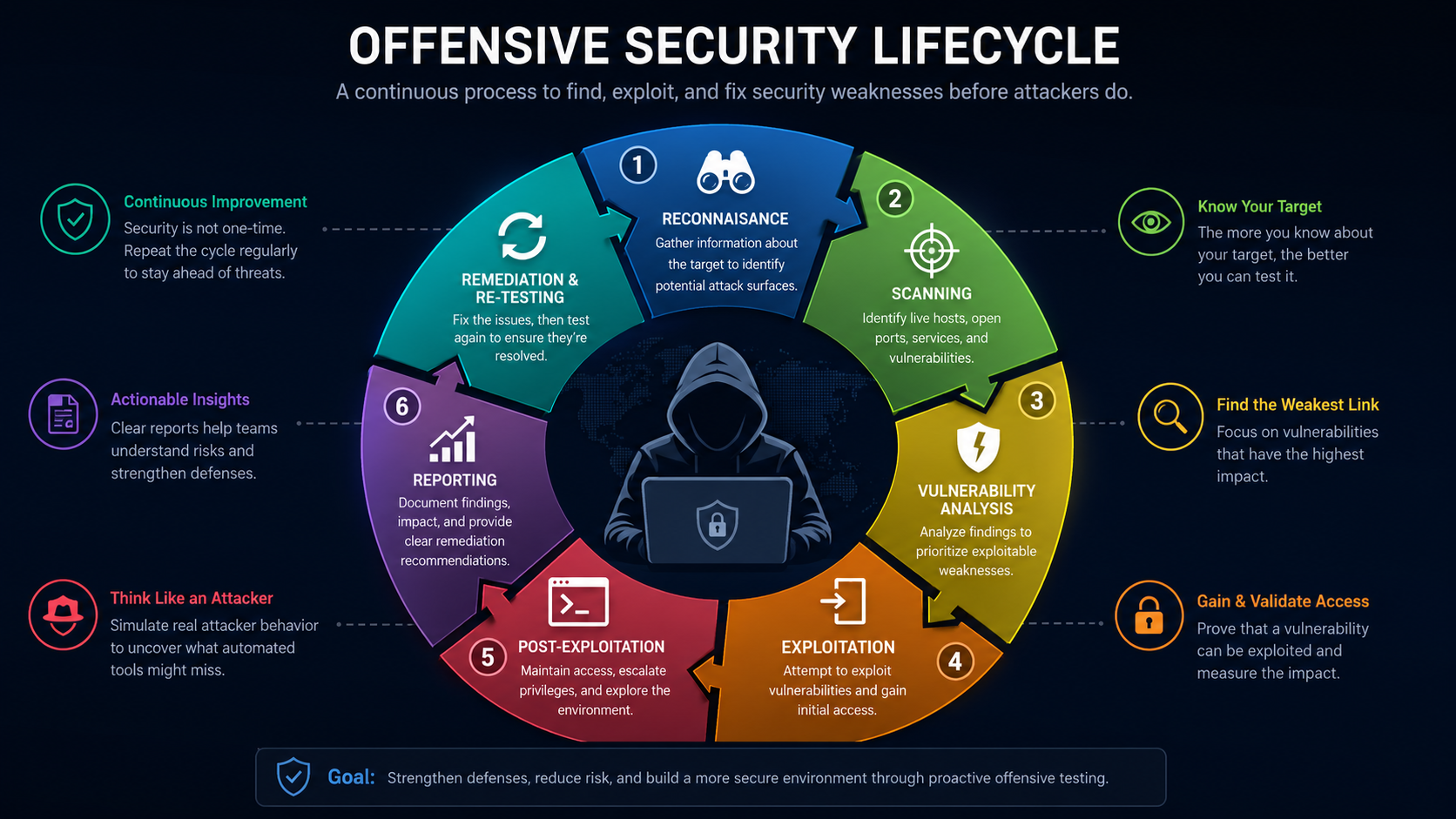
Offensive Security Lifecycle
File: images/offensive-security-lifecycle.png — shows reconnaissance → discovery → validation → reporting → remediation → retesting
Why is offensive security important?
Organizations can deploy excellent defensive controls and still have weaknesses. A firewall may be misconfigured. A web application may contain an authorization flaw. An employee may fall for a phishing simulation. A cloud resource may be exposed because of incorrect permissions.
Offensive security gives organizations a controlled way to discover these problems.
Find unknown weaknesses
Testing can reveal security gaps that are not visible through normal monitoring or automated defenses.
Understand real risk
A theoretical vulnerability becomes easier to prioritize when testers can safely demonstrate realistic impact.
Improve defenses
Findings can become better configurations, detection rules, patches, access controls, and response procedures.
Offensive security therefore complements defensive security rather than replacing it. Strong security programs use both perspectives.
Offensive security vs defensive security
Offensive and defensive security have different objectives, but they are closely connected.
| Area | Offensive security | Defensive security |
|---|---|---|
| Primary question | How could an attacker compromise this environment? | How can we prevent, detect, contain, and recover from attacks? |
| Approach | Proactive and adversary-focused | Protective, monitoring-focused, and response-oriented |
| Examples | Pen testing, red teaming, vulnerability validation | SOC monitoring, SIEM, EDR, firewalls, incident response |
| Desired outcome | Discover and demonstrate weaknesses safely | Reduce successful attacks and limit their impact |
Why both sides need each other
Imagine a red team successfully reaches a sensitive application because a particular network path was not monitored. That result is useful not because the red team "won," but because it revealed a defensive gap.
The blue team can then improve monitoring, segmentation, access controls, detection logic, and incident-response procedures. This collaboration is often associated with Purple Teaming.
The main methods of offensive security
Offensive security is an umbrella discipline. Several testing methods exist, and each answers a different security question.
Vulnerability Assessment
Finds and catalogs potential weaknesses across systems, applications, configurations, and software.
Penetration Testing
Uses controlled attack techniques to validate whether identified weaknesses can actually be exploited.
Red Teaming
Simulates a realistic adversary to evaluate technology, people, detection, response, and organizational resilience.
Vulnerability assessment
Vulnerability assessment is the process of identifying and cataloging weaknesses in systems, applications, networks, devices, configurations, or software components.
It often combines automated scanners with manual analysis. A scanner may identify a potentially vulnerable software version, outdated component, exposed service, weak configuration, or missing security control.
What vulnerability scanners do
Depending on the product and configuration, vulnerability scanners can inspect assets for known weaknesses, configuration problems, missing patches, exposed services, and other security issues.
Some tools can perform more active checks, but organizations must carefully control the scope because aggressive testing can affect systems or applications.
Vulnerability assessment vs penetration testing
| Question | Vulnerability assessment | Penetration test |
|---|---|---|
| What does it find? | Potential weaknesses | Exploitable weaknesses and attack paths |
| Automation | Often heavily automated | Usually requires significant human analysis |
| Main output | Findings and prioritized vulnerabilities | Validated vulnerabilities, evidence, and impact |
| Primary value | Broad visibility | Depth and realistic validation |
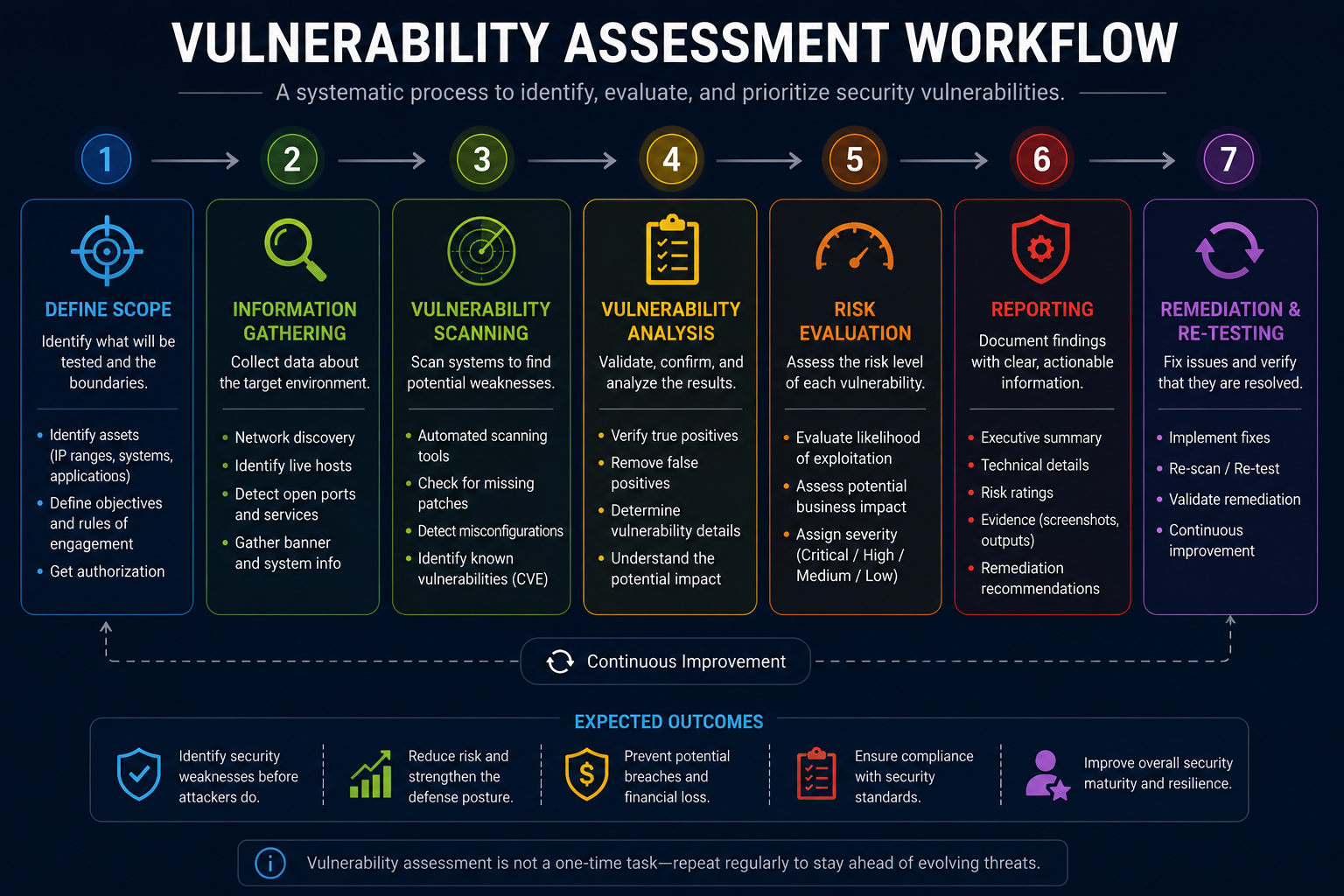
Vulnerability Assessment Workflow
File: images/vulnerability-assessment-workflow.png — shows asset discovery → scanning → findings → validation → risk rating → remediation → rescan
Penetration testing
Penetration testing, commonly called pen testing, is an authorized simulation of cyberattacks designed to identify and validate security weaknesses.
A penetration tester approaches a system from an attacker's perspective. The goal is not simply to generate a long list of scanner findings. The tester tries to understand whether weaknesses can be combined into meaningful attack paths.
A simplified penetration-testing lifecycle
Planning & scope
Define authorized targets, testing windows, limitations, contacts, objectives, and rules of engagement.
Reconnaissance
Collect information about the authorized environment and identify potential attack surfaces.
Discovery & enumeration
Identify hosts, ports, services, applications, accounts, technologies, and relevant attack-surface information.
Validation
Safely validate important weaknesses while respecting the agreed rules and avoiding unnecessary impact.
Evidence & impact
Record sufficient evidence to demonstrate the issue and explain what an attacker could potentially achieve.
Reporting & remediation
Deliver findings, risk ratings, evidence, remediation guidance, and retesting recommendations.
Start learning network reconnaissance
One of the foundational skills in penetration testing is understanding how systems expose services on a network. Nmap is widely used for network discovery and service identification.
Continue with the PasswordGeeks Nmap Tutorial: Network Scanning & Port Scanning to learn the fundamentals in a controlled environment.
Red teaming
Red teaming is a broader adversary simulation designed to test how well an organization can prevent, detect, investigate, and respond to a realistic attack.
A penetration test may focus on specific applications, networks, or systems. A red-team exercise can have a wider objective: determine whether an organization can detect and respond when an adversary attempts to achieve a defined objective.
Red team vs penetration test
| Characteristic | Penetration test | Red team exercise |
|---|---|---|
| Primary focus | Find and validate weaknesses | Test realistic adversary behavior and organizational resilience |
| Scope | Usually specific assets or applications | Can span technology, people, physical security, and processes |
| Detection testing | May be included | Usually a major objective |
| Stealth | Depends on engagement | Often important for adversary realism |
| Outcome | Security findings and remediation | Assessment of attack paths, detection, response, and resilience |
What can a red-team exercise test?
- External attack surface and exposed services
- Identity and access controls
- Security monitoring and alerting
- Incident-response procedures
- Employee security awareness
- Physical security controls, when explicitly authorized
- Security-team communication and escalation
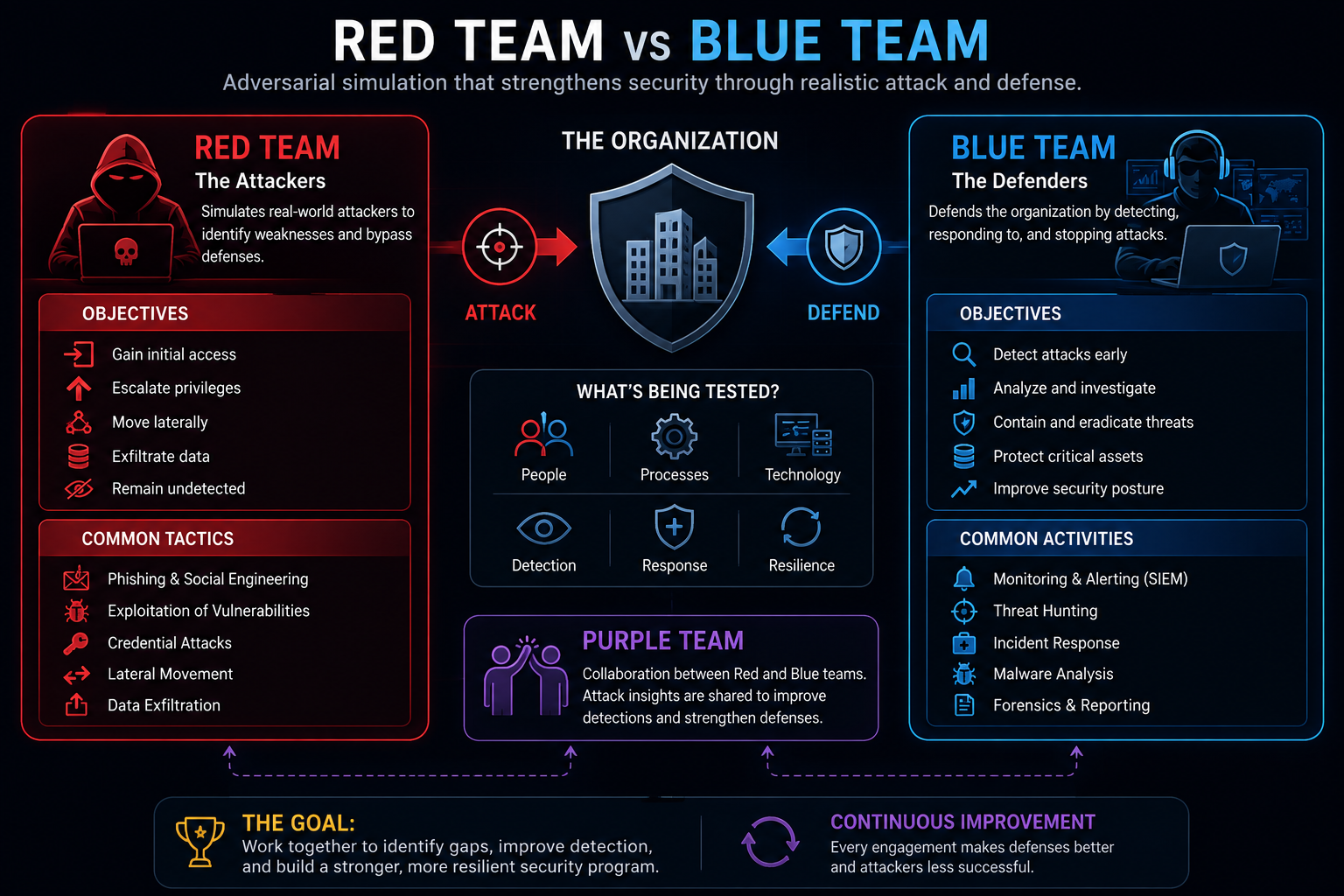
Red Team vs Blue Team
File: images/red-blue-team.png — shows Red Team simulates the adversary → Blue Team detects and responds → Purple Team shares findings and improves defenses
White-box, black-box, and gray-box testing
Offensive security assessments can also be classified by how much information the tester receives before testing begins.
White-box testing
Testers receive extensive information about the environment, potentially including architecture, source code, documentation, or internal details.
Black-box testing
Testers receive little or no internal information and approach the target more like an external attacker.
Gray-box testing
Testers receive partial knowledge, simulating an attacker who has obtained limited information or a low-privilege foothold.
These approaches are not automatically better or worse. The right choice depends on the objective of the assessment.
Common offensive security tools
Tools help offensive security professionals work efficiently, but a tool does not replace understanding. Learning what a tool is doing is more valuable than memorizing commands.
Kali Linux
A Linux distribution designed for security testing and digital forensics that packages many security tools into one environment.
Nmap
A network discovery and scanning tool used to identify hosts, open ports, services, and other network characteristics.
Metasploit
A security-testing framework used by professionals to research, validate, and demonstrate vulnerabilities in authorized environments.
Burp Suite
A web-application security testing platform for inspecting, intercepting, and analyzing HTTP requests and responses.
Wireshark
A network protocol analyzer used to capture and inspect network traffic and understand how systems communicate.
John the Ripper
A password-auditing tool used to evaluate password strength from authorized password-hash datasets.
Start with Nmap
If you are new to offensive security, Nmap is a useful first tool because it connects networking fundamentals with security reconnaissance.
Read the PasswordGeeks Nmap Tutorial →Offensive security methodologies
Professional security testing is guided by structured methodologies and standards. These frameworks help testers plan engagements, maintain consistency, and produce useful results.
PTES
The Penetration Testing Execution Standard provides a structured way to approach penetration-testing activities from pre-engagement through reporting.
OSSTMM
The Open Source Security Testing Methodology Manual provides a methodology for security testing across different operational areas.
OWASP guidance
OWASP resources are particularly valuable when testing web applications, APIs, authentication, authorization, and application-security areas.
MITRE ATT&CK
ATT&CK provides a knowledge base of adversary tactics and techniques and is useful for connecting offensive activity with defensive detection.
Why methodology matters
A structured methodology reduces the chance that important parts of an assessment are overlooked. It also helps customers understand what was tested, what was not tested, what was discovered, and what should be fixed first.
Ethics, authorization, and rules of engagement
Offensive security is legitimate when it is authorized and responsibly conducted. The same technical action can be a valid security test in one context and unauthorized activity in another.
What is a rules-of-engagement document?
Before a professional engagement begins, the tester and customer should agree on what is allowed and what is prohibited.
- Authorized targets and IP ranges
- Applications, domains, devices, or accounts in scope
- Testing dates and permitted time windows
- Techniques that are allowed or prohibited
- Emergency contacts and stop-testing procedures
- Data-handling and privacy requirements
- Reporting and evidence requirements
Why safe labs matter for beginners
Beginners should practice offensive security inside intentionally vulnerable labs, virtual machines, training platforms, or other environments where testing is explicitly authorized.
A home lab can include isolated virtual machines running Linux, Windows, intentionally vulnerable applications, and security tools. This lets you learn how attacks work without risking somebody else's systems.
Skills needed for offensive security
Offensive security is a broad discipline. You do not need to master everything immediately, but strong fundamentals make advanced work much easier.
Networking
Learn TCP/IP, ports, DNS, HTTP, routing, subnetting, NAT, firewalls, VPNs, and network protocols.
Operating systems
Understand Linux and Windows processes, users, permissions, services, filesystems, authentication, and logs.
Web security
Learn HTTP, cookies, sessions, authentication, authorization, APIs, input validation, and common web vulnerabilities.
Programming and scripting
You can begin offensive security without being an expert programmer. However, scripting becomes increasingly valuable because it lets you automate repetitive tasks, parse results, understand proof-of-concepts, and build custom testing utilities.
Python, Bash, PowerShell, JavaScript, and SQL are particularly useful as you progress.
Certifications
Certifications are not a substitute for practical ability, but they can provide structure and demonstrate knowledge to employers.
- OSCP: a practical offensive-security certification associated with hands-on penetration-testing skills.
- CEH: a certification focused on ethical-hacking concepts and techniques.
- Security+: a broad foundational security certification that can help build the concepts needed before specializing in offensive security.
How to start learning offensive security
The biggest mistake beginners make is jumping directly into exploit tools without understanding the technology being tested.
A better approach is to build from fundamentals toward practical security testing.
Learn networking
Study IP addresses, subnetting, TCP/UDP, ports, DNS, HTTP, routing, NAT, firewalls, and common network services.
Learn Linux and Windows
Understand users, permissions, processes, services, files, command-line tools, logs, and basic administration.
Learn security fundamentals
Understand vulnerabilities, threats, risk, authentication, authorization, encryption, hashing, malware, and the CIA Triad.
Learn reconnaissance and enumeration
Begin with safe network and service discovery in your own lab. Nmap is an excellent tool for learning this stage.
Learn web application security
Study HTTP, authentication, sessions, authorization, input handling, APIs, and common application vulnerabilities.
Build a controlled lab
Practice against intentionally vulnerable systems and applications inside an isolated environment.
Learn vulnerability validation
Understand how professionals distinguish scanner findings from genuinely exploitable weaknesses.
Learn reporting
Practice writing clear findings that explain the vulnerability, evidence, impact, severity, and remediation.
Explore specialization
Eventually choose web application testing, network penetration testing, cloud security, wireless security, mobile security, or red teaming.
Ready to continue learning?
Explore more cybersecurity guides and tutorials from PasswordGeeks.
Offensive Security FAQ
What is offensive security?
Offensive security is a proactive cybersecurity discipline that uses authorized attack simulations and security testing to discover weaknesses before malicious attackers can exploit them.
Is offensive security the same as ethical hacking?
The terms overlap, but offensive security is broader. Ethical hacking is one important activity within offensive security, alongside vulnerability assessment, penetration testing, red teaming, social-engineering assessments, and other security testing activities.
What is the difference between vulnerability scanning and penetration testing?
Vulnerability scanning identifies potential weaknesses, often using automated tools. Penetration testing adds human analysis and controlled validation to determine whether important weaknesses can actually be exploited.
What is the difference between penetration testing and red teaming?
Penetration testing focuses on finding weaknesses within a defined scope. Red teaming is a broader adversary simulation testing attack paths, detection, response, and organizational resilience.
Is offensive security legal?
Authorized offensive-security testing is legitimate. Testing systems without permission can be illegal. Beginners should practice only in environments they own or are explicitly authorized to test.
Do I need programming to start offensive security?
No. You can start with networking, operating systems, security concepts, and basic command-line skills. Programming and scripting become increasingly useful as you progress.
What should I learn first for penetration testing?
Start with networking, Linux and Windows fundamentals, security concepts, HTTP and web basics, reconnaissance, enumeration, and safe lab practice. Then gradually move into vulnerability validation and specialized testing.
What is the best offensive security tool?
There is no single best tool. Different tools solve different problems. Nmap is useful for network discovery, Burp Suite for web testing, Wireshark for traffic analysis, and Metasploit for authorized security validation and research.
Can I practice offensive security on random websites?
No. A website being publicly accessible does not mean you have permission to test it. Use intentionally vulnerable labs, authorized training environments, bug-bounty programs that explicitly permit the activity, or systems you own.
Test Your Understanding
Answer all 5 questions below. If you get one wrong, don't worry — you'll get another chance to pick the correct answer. This chapter is only marked complete when all 5 answers are correct.
What is the main purpose of offensive security?
What is the key difference between a vulnerability assessment and a penetration test?
What distinguishes a red team exercise from a typical penetration test?
When is offensive security legal?
Which skills are the most important to build first for offensive security?
Chapter Complete
All 5 questions solved. This chapter is now marked complete in Module 1.
Social engineering in offensive security
Not every attack begins with a software vulnerability. Attackers frequently target people because humans make decisions, trust messages, reuse credentials, and can be manipulated.
Offensive security teams can conduct authorized social-engineering exercises to measure how well an organization handles these risks.
Common controlled exercises
The purpose is to identify weaknesses in awareness and processes, not to embarrass individual employees.