Core Security Principles Explained for Beginners
Firewalls, passwords, and antivirus tools are just the surface. Underneath, almost every serious security decision is guided by five core principles. Learn them once and you'll understand why security works the way it does — not just what to click.
Security isn't one wall. It's a set of habits.
New learners often picture cybersecurity as a single strong wall: one good password, one antivirus program, one firewall. In practice, professionals design systems around a handful of principles that work together — limiting what people can access, checking identity constantly, and never relying on just one safeguard.
These five principles show up everywhere: in how a hospital protects patient records, how a bank approves a wire transfer, and even in how your own home network should be set up. Understanding them will help you make better decisions long after any specific tool becomes outdated.
Least Privilege
Least Privilege means every user, app, and system account is given the smallest amount of access it needs to do its job — nothing more. A person who only needs to read a spreadsheet should never also have the power to delete the entire folder it lives in.
If an attacker steals a low-privilege account, the damage is contained. They might read one folder, but they can't reconfigure the network, install software, or reach other departments' data. Least privilege turns a potential company-wide breach into a small, manageable incident.
A regular staff member can open and read shared files, but only IT administrators can change system settings or install new software. If that staff member's laptop gets infected with malware, the malware inherits the same limited permissions — it can't touch the servers.
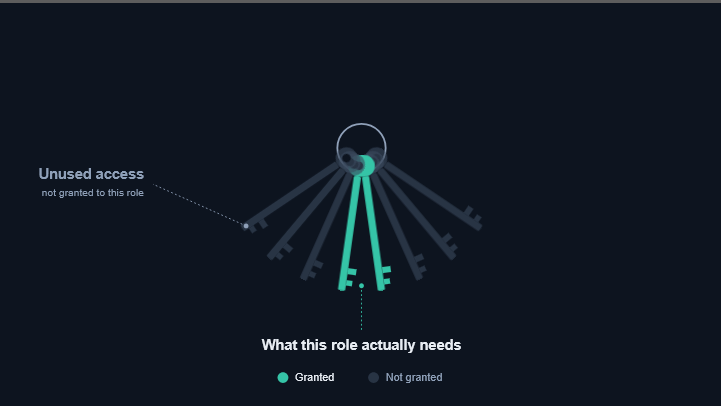
In practice, least privilege is applied through role-based access control — access is tied to a job role (e.g. "Marketing Editor") rather than granted person by person. When someone changes roles or leaves the company, their access should be reviewed and reduced immediately, not left over from their old job.
Defense in Depth
Defense in Depth means stacking multiple, independent layers of security instead of trusting a single control. Think of it like a castle: a moat, a wall, a locked gate, and guards — an attacker has to get past all of them, not just one.
No single security tool is perfect. Antivirus software can miss a new virus; a firewall can be misconfigured. When layers are combined, one layer's failure doesn't mean total compromise — the next layer is still standing guard.
A company might use a firewall to filter incoming network traffic, require strong passwords for every account, and run antivirus software on every device — all at the same time. A phishing email that slips past the spam filter can still be caught by antivirus software before the attached file can run.

A useful way to think about layers is to sort them by what they protect: the network (firewalls, VPNs), the device (antivirus, automatic updates), the account (passwords, multi-factor authentication), and the data itself (encryption, backups). A well-designed setup has at least one control at each level.
Zero Trust
Zero Trust flips the old assumption that anything "inside" the network is automatically safe. Instead, no user or device is trusted by default — everyone has to prove who they are, every time, regardless of whether they're on the office network or working from a coffee shop.
Older security models assumed attackers were always outsiders trying to break in. But stolen laptops, compromised employee accounts, and insider mistakes all happen "inside" the network. Zero Trust closes that gap by verifying identity continuously, not just at the front door.
An employee is asked to enter a one-time security code from their phone even when logging in from their usual desk at the office. The system doesn't assume "this is the office, so it must be fine" — it checks identity the same way it would for a login from another country.
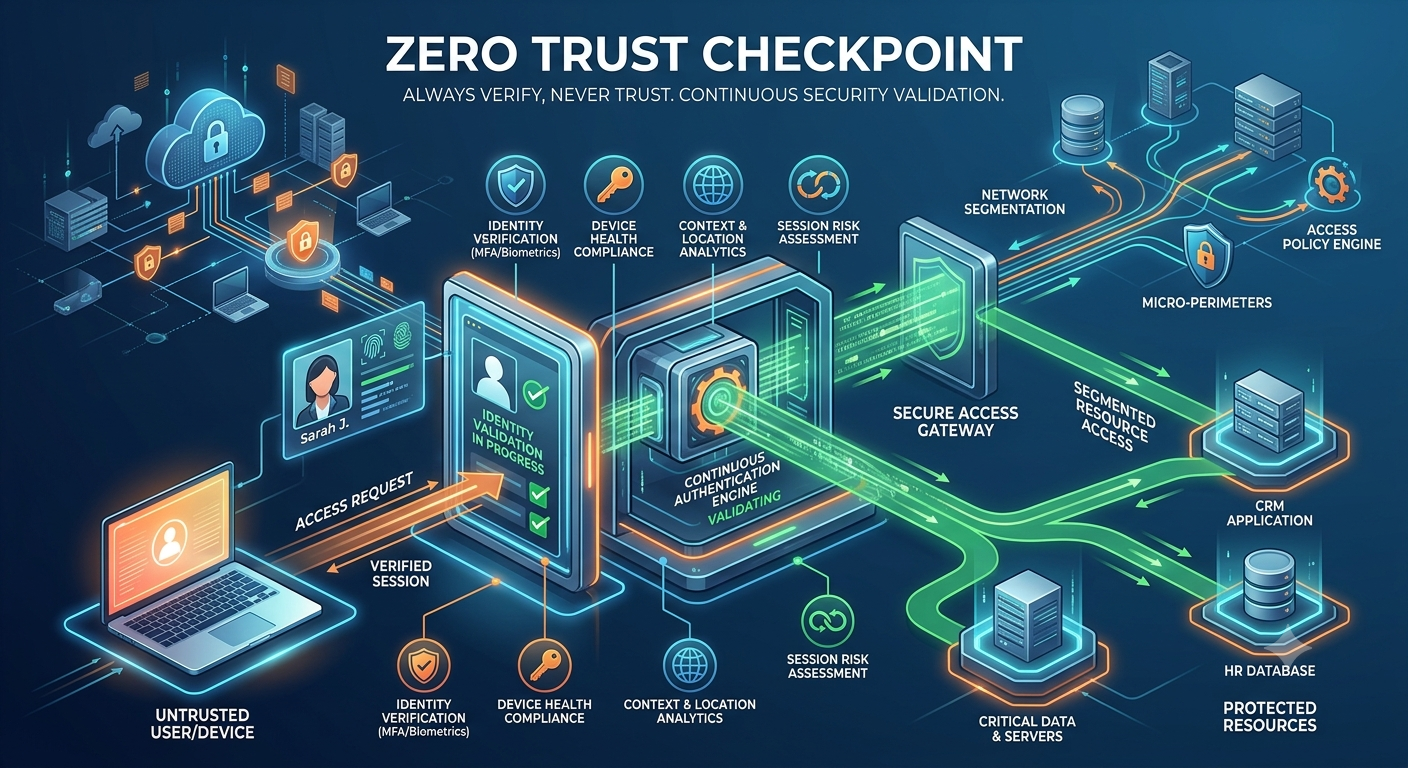
The most common everyday form of Zero Trust is multi-factor authentication (MFA) — proving your identity with something you know (a password) plus something you have (a phone) or something you are (a fingerprint). If you only take one habit from this section, turning on MFA everywhere it's offered is the highest-impact one.
Separation of Duties
Separation of Duties splits a critical task between two or more people so that no single individual has complete, unchecked control over a sensitive process.
It protects against both fraud and honest mistakes. A single person acting alone — whether maliciously or by accident — can't complete a high-risk action without someone else reviewing it first. It also makes it far easier to trace back what happened if something goes wrong.
One employee creates a financial payment request, but a second, different employee must review and approve it before the money actually moves. Neither person can send funds on their own.
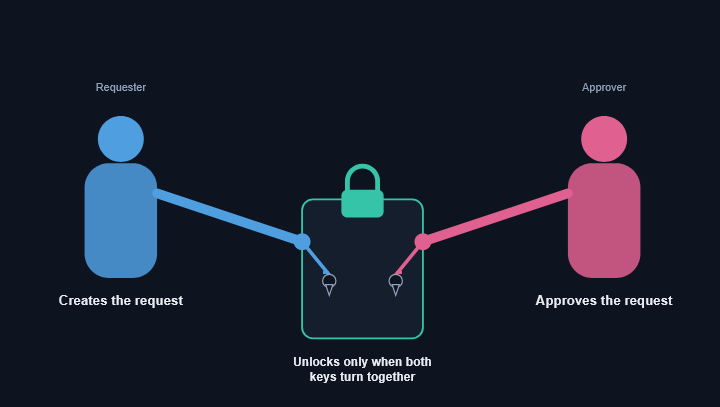
You'll see this pattern outside of finance too: one developer writes code, but a different developer has to review and approve it before it goes live. This "two-person rule" is one of the oldest and most reliable ideas in security.
Need to Know
Need to Know limits access to specific pieces of information to only the people who genuinely need that exact information to do their current task — even if they'd otherwise be allowed into the same system.
It's a narrower, more precise cousin of least privilege. A person might have valid, authorized access to a system as a whole, but that doesn't mean they should be able to see every record inside it. This limits how much sensitive information is exposed if any single account is ever misused or compromised.
Human resources staff can see individual employee pay rates because it's part of their job. A team lead in another department, who technically has a company system login, does not get access to that same salary information — they simply don't need it.

Least Privilege asks "what can this account do?" Need to Know asks "what can this account see?" Both questions matter — a system can restrict actions perfectly while still oversharing data, so they're applied together.
None of these principles work alone
These five ideas overlap on purpose. Least Privilege and Need to Know both shrink what any one account can reach. Defense in Depth assumes any single control — including the other four principles — might one day fail, so it backs everything up with additional layers. Zero Trust keeps checking identity continuously instead of trusting a login once. Separation of Duties adds a human check on top of all of it for the most sensitive actions.
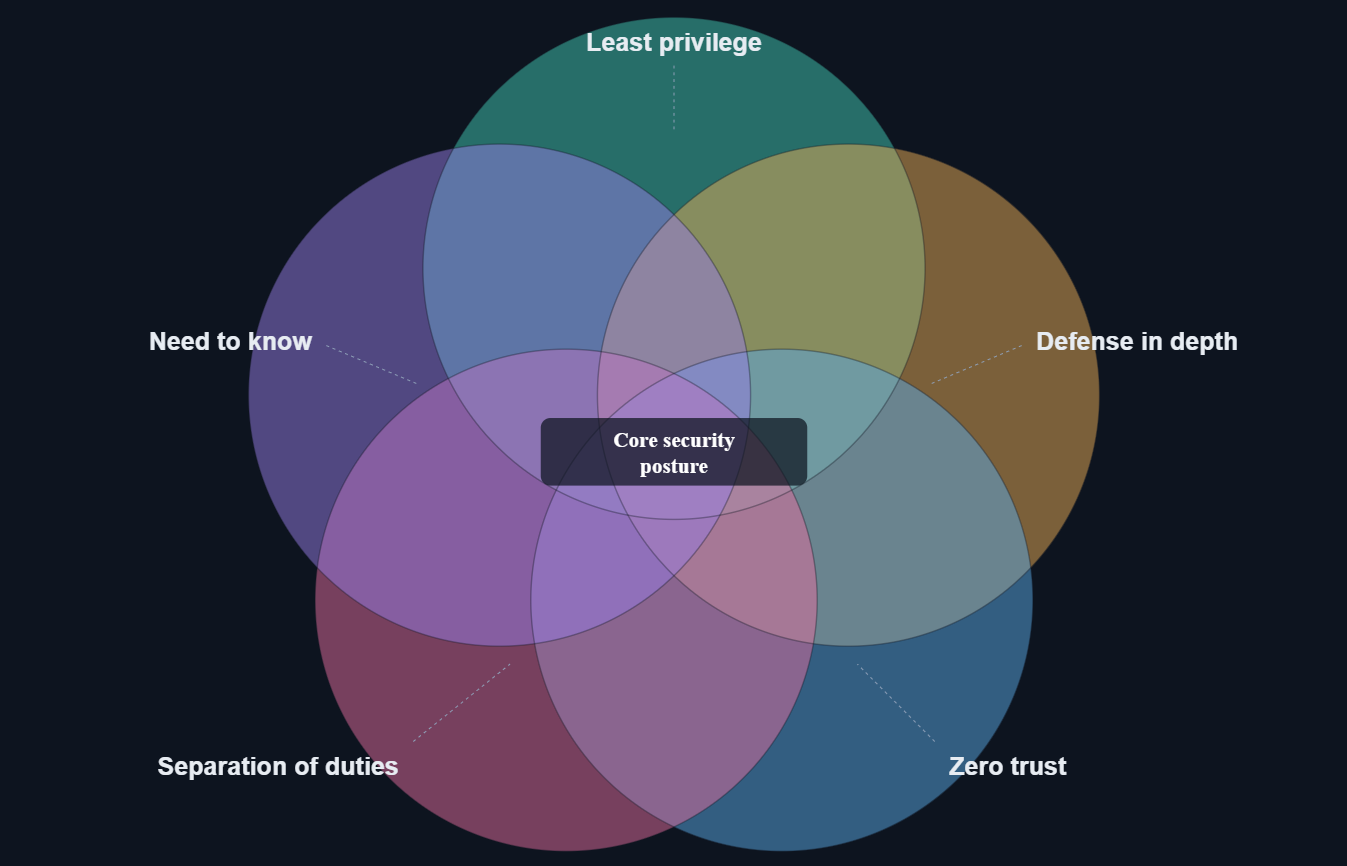
A well-run organization doesn't pick one of these principles — it applies all five, at every layer, all the time. That's what security professionals mean when they talk about a "security posture": not one product, but a set of ongoing habits.
Quick reference table
| Principle | Core idea | Key benefit |
|---|---|---|
| Least Privilege | Give the minimum access needed to do the job | Limits damage from a compromised account |
| Defense in Depth | Stack multiple independent security layers | One failed layer doesn't mean total failure |
| Zero Trust | Trust no one by default; verify every time | Catches threats already inside the network |
| Separation of Duties | Split sensitive tasks across two or more people | Prevents fraud and single-person mistakes |
| Need to Know | Show only the specific data required for a task | Reduces exposure of sensitive information |
Mistakes beginners make with these principles
Treating "trusted" employees as an exception
Zero Trust and Need to Know only work if they apply to everyone, including managers and long-tenured staff. Exceptions become the weakest link.
Granting broad access "just in case"
It's tempting to give new hires wide access so they're never blocked from something. This quietly defeats Least Privilege — access should expand only when a real need appears.
Relying on a single security tool
A great antivirus program is not a full defense strategy on its own. Defense in Depth means combining tools — device protection, network protection, and account protection together.
Forgetting to remove old access
Access granted for a past project or a previous role often never gets revoked. Regularly reviewing and removing unused permissions is part of Least Privilege, not a one-time setup step.
Core Security Principles FAQ
Do I need to apply these principles at home, or is this only for businesses?
These ideas scale down well. At home, Least Privilege might mean giving a shared family computer a separate "guest" account instead of full admin access. Zero Trust shows up as enabling multi-factor authentication on your email and banking apps. You don't need a company to benefit from them.
Which of these five principles should a beginner focus on first?
Zero Trust, in the form of turning on multi-factor authentication on your important accounts, gives the fastest real-world protection for the least effort. From there, Least Privilege (using separate accounts for separate purposes) is the next highest-value habit.
Is Zero Trust the same thing as not trusting your employees?
No. Zero Trust is about not trusting a network location or a login session by default — it verifies identity and device health continuously. It's a technical design choice, not a statement about anyone's honesty.
How is Need to Know different from Least Privilege?
Least Privilege is about what actions an account can perform. Need to Know is about what specific information an account can view. A person can have the right level of system access but still not need to see every record inside it.
Can small teams really use Separation of Duties?
Yes, even a two-person team can apply a lighter version — for example, one person makes changes to a shared document while the other reviews them before they're finalized. The goal is simply that no single point of failure controls the entire task.
Test your understanding
Answer all 5 questions below. If you get one wrong, you'll get another chance to pick the correct answer. This chapter is only marked complete when all 5 answers are correct.
A junior employee can view shared documents but cannot change server settings. Which principle is this?
A company uses a firewall, antivirus, and strong passwords together. Which principle is this?
Requiring a one-time code even when logging in from a trusted office computer illustrates:
One person requests a payment and a different person must approve it. This is:
HR can see salary data, but team leads in other departments cannot, even though they use the same system. This is:
Chapter Complete
All 5 questions solved. This chapter is now marked complete in Module 1.