Authentication, Authorization and Accounting (AAA)
Learn the three security questions every protected system needs to answer: Who are you? What are you allowed to do? and What did you do? AAA is the foundation of identity and access control across cybersecurity.
What is AAA?
AAA stands for Authentication, Authorization and Accounting — a fundamental security framework used to control access to systems and resources and to keep a record of activity.
AAA is not a single product. It is a way of thinking about access control. A secure system needs to establish a user's identity, determine the permissions associated with that identity, and maintain useful records of what happened.
Authentication = Who are you?
Authorization = What are you allowed to do?
Accounting = What did you do?
The three parts of AAA
Authentication
Verifies that a user, device or system is really who or what it claims to be.
Authorization
Determines which resources and actions an authenticated identity is permitted to access.
Accounting
Records activity such as logins, sessions, commands, resource usage and other security-relevant events.
These functions are closely related but they are not interchangeable. A person can successfully authenticate and still be denied access to a resource because they do not have the required authorization.
1. Authentication — Who are you?
Authentication is the process of verifying identity. Before a system can decide what someone is allowed to access, it needs confidence about who is making the request.
Common authentication methods include passwords, PINs, hardware security keys, authenticator applications, smart cards, certificates and biometrics.
Example: logging into a company laptop
You enter your username and password. The operating system checks the supplied credentials against an identity system. If they are valid, the system has authenticated you.
Authentication is used everywhere
- Logging into Windows or Linux
- Signing into an email account
- Accessing a VPN
- Connecting to a corporate Wi-Fi network
- Accessing cloud applications
- Connecting to network devices such as routers and switches
- Signing into a banking or shopping application
Authentication factors
Authentication becomes stronger when systems use different categories of evidence rather than relying on one secret.
| Factor | Meaning | Examples |
|---|---|---|
| Something you know | A secret stored in your memory | Password, PIN, passphrase |
| Something you have | A physical or digital object you possess | Security key, smart card, authenticator app, token |
| Something you are | A biometric characteristic | Fingerprint, face, iris |
| Somewhere you are | A location-based condition | Approved geographic location or network |
| Something you do | A behavioral characteristic | Typing or interaction patterns |
Not every system uses every factor. The appropriate combination depends on risk, usability, cost and the sensitivity of the resource being protected.
Multi-Factor Authentication (MFA)
MFA requires two or more authentication factors from different categories. The goal is to reduce the damage caused when one authentication factor, such as a password, is compromised.
For example, a user may provide a password and then approve a sign-in with an authenticator application or use a hardware security key.
Enter your username
The application identifies the account being used.
Provide the first factor
For example, a password or passphrase.
Provide another factor
For example, a security key, authenticator approval or biometric factor.
Authentication succeeds
The system can now create an authenticated session and apply authorization policies.
See also the PasswordGeeks guide to password managers for a broader look at password security and credential management.
Common authorization and access-control models
Role-Based Access Control (RBAC)
Permissions are assigned to roles, and users receive those roles. For example, a help-desk role might be allowed to reset passwords but not modify firewall policies.
Attribute-Based Access Control (ABAC)
Access decisions can use attributes such as the user's department, device security state, resource classification, time or location.
Discretionary Access Control (DAC)
The owner of a resource can generally determine who can access it. File permissions on many operating systems provide familiar examples.
Mandatory Access Control (MAC)
Access is governed by centrally defined security labels and policies. Users cannot simply override the rules because they own the resource.
Least privilege
Regardless of the access-control model, a key security principle is least privilege: give an identity only the access required to perform its legitimate task.
3. Accounting — What did you do?
Accounting is the process of recording and tracking activity. In many modern security environments, this function overlaps with auditing and security logging.
Accounting data can help organizations understand who accessed a system, when a session occurred, what resources were used and what actions were performed.
Examples of accounting information
- Login and logout timestamps
- Source IP address
- Session duration
- Commands executed
- Resources accessed
- Files transferred
- Network or service usage
- Authentication failures
- Administrative changes
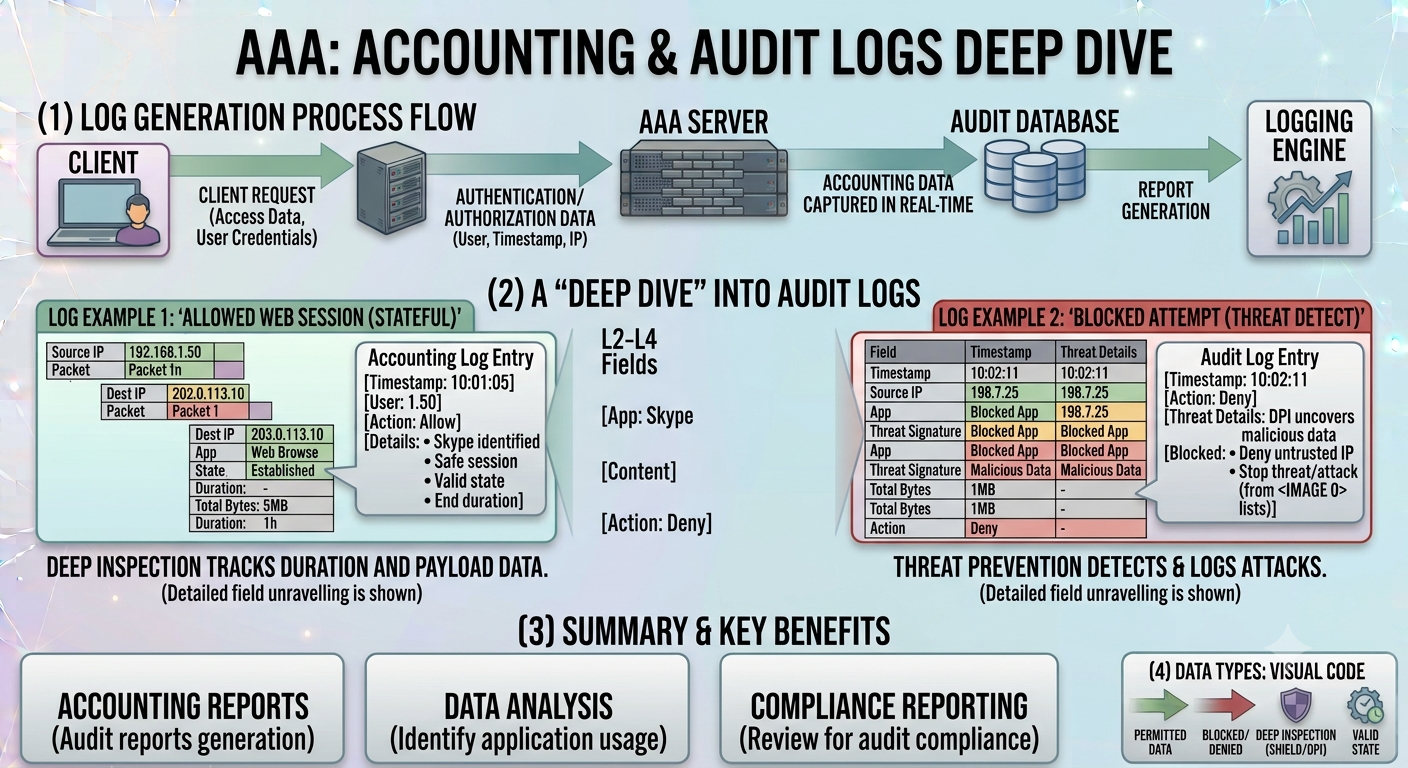
Audit Trail Example
File: images/aaa-accounting-audit-logs.png
Why accounting matters
Imagine an administrator account makes a major configuration change at 2:15 AM. Without useful logs, an investigator may have no reliable way to determine who made the change or what happened immediately before it.
With good accounting and centralized logging, analysts can correlate events and reconstruct a timeline. This is especially important for security monitoring and incident response.
How AAA works together
AAA is easiest to understand when you follow a complete access request from beginning to end.
A user requests access
The user attempts to access an application, server, VPN, wireless network or network device.
Authentication occurs
The system verifies the user's identity using one or more authentication factors.
Authorization is evaluated
The system checks roles, permissions and security policies to determine what the authenticated identity may do.
Access is allowed or denied
The requested action is permitted only when the applicable authorization policy allows it.
Activity is recorded
Relevant events are logged so they can support monitoring, auditing, troubleshooting and investigations.
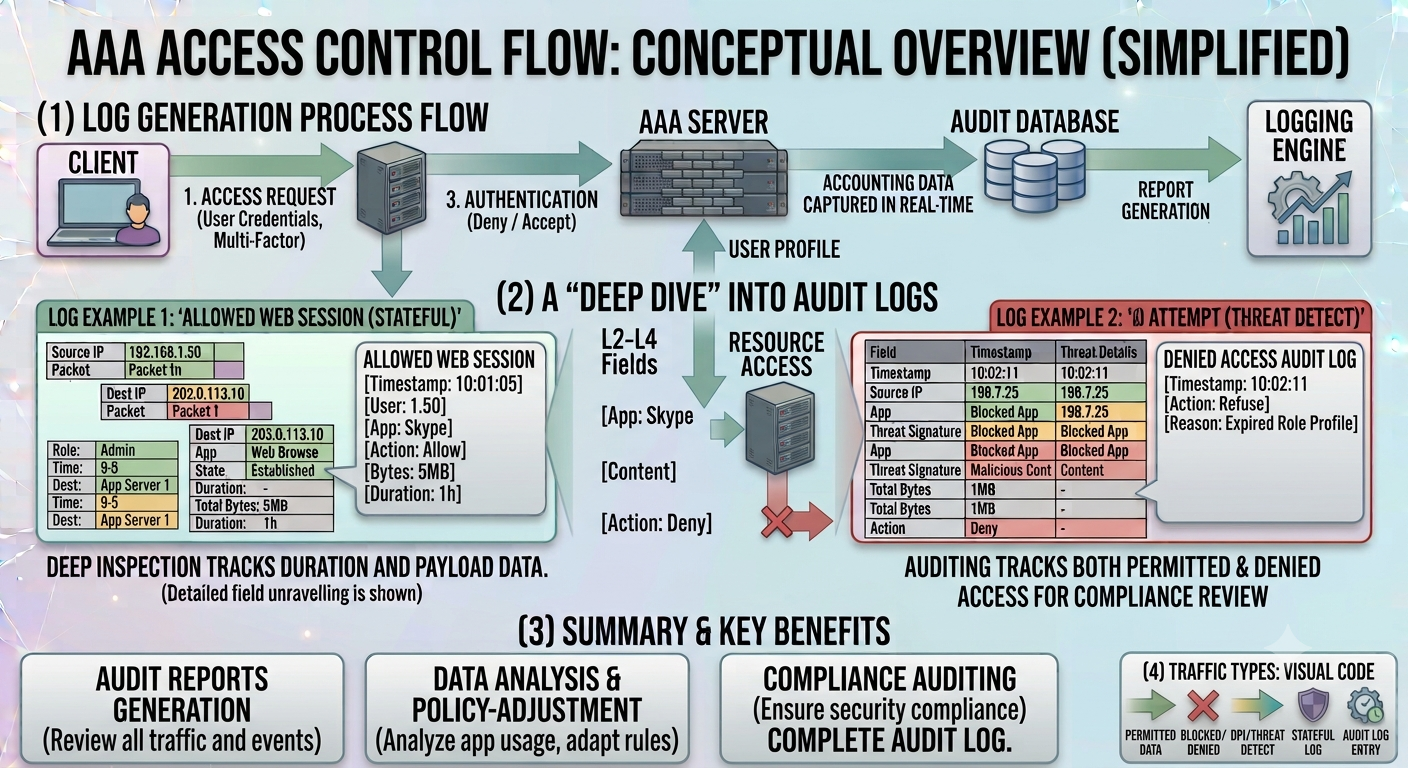
Access Control Flow
File: images/aaa-access-control-flow.png
AAA in network security
AAA is particularly important in network environments where many users and administrators need controlled access to routers, switches, VPNs, wireless networks and other infrastructure.
Instead of storing a separate local username and password on every network device, an organization can use a centralized AAA service. Network devices communicate with that service when users attempt to authenticate.
Example: administrator access to a router
- An administrator connects to the router.
- The router asks for authentication credentials.
- The credentials are checked against a centralized AAA service.
- The administrator is assigned an appropriate authorization level.
- The session and administrative activity can be recorded.
This centralized approach makes access control easier to manage and can provide better visibility than relying entirely on local accounts.
RADIUS vs TACACS+
Two important protocols you will encounter when learning network AAA are RADIUS and TACACS+.
| Feature | RADIUS | TACACS+ |
|---|---|---|
| Common use | Network access, VPN and wireless authentication | Network device administration and centralized access control |
| Transport | UDP | TCP |
| Authorization | Supported through attributes and policy | Strong separation of authentication, authorization and accounting |
| Command authorization | Less granular for device administration | Can support granular control over administrative commands |
| Typical environment | Enterprise Wi-Fi, VPN and network access | Administrative access to routers, switches and other network devices |
These protocols are not interchangeable in every deployment. The appropriate choice depends on the type of access being controlled and the organization's architecture.
Common attacks against AAA systems
Because AAA protects access to valuable systems, attackers frequently target authentication and authorization mechanisms.
Password attacks
Brute force, password spraying, credential stuffing and phishing can compromise authentication secrets.
Session attacks
Attackers may attempt to steal or abuse authenticated sessions instead of directly obtaining a password.
Privilege escalation
An attacker who gains a low-privilege account may attempt to obtain permissions intended for administrators.
Account takeover
Compromised credentials can allow an attacker to operate as a legitimate user.
Broken authorization
A software flaw may allow a user to access resources or functions they were never authorized to use.
Insider abuse
A legitimate user may misuse authorized access to steal information or alter systems.
For a broader introduction to these threats, continue with the PasswordGeeks guide to Types of Cybersecurity Attacks.
AAA security best practices
- Use strong, unique passwords and passphrases.
- Enable MFA for important accounts whenever possible.
- Apply least privilege and avoid unnecessary administrator access.
- Use role-based permissions where appropriate.
- Remove or disable unused accounts.
- Review privileged accounts regularly.
- Centralize authentication and authorization where practical.
- Protect administrative interfaces with strong authentication.
- Collect and protect authentication and administrative logs.
- Monitor failed logins, unusual access and privilege changes.
- Synchronize system clocks so security events have reliable timestamps.
- Keep AAA servers and related infrastructure patched and securely configured.
Hands-on AAA practice
You can understand AAA much faster by seeing it in a controlled lab environment.
Lab 1 — Linux users and permissions
Create multiple test users and groups on a Linux virtual machine. Give each group different file permissions and observe the authorization differences.
Lab 2 — Investigate authentication logs
Generate successful and failed login attempts in a lab and inspect the relevant Linux or Windows logs. Identify usernames, timestamps, source information and results.
Lab 3 — Network device AAA
In a legal lab environment, explore centralized AAA concepts using a network simulator or virtual network infrastructure. Compare local authentication with centralized authentication.
Lab 4 — Connect AAA to SOC monitoring
Forward authentication and authorization events into a SIEM such as Splunk or Wazuh. Create a simple detection for repeated failed logins or an unusual privileged login.
Continue with the SOC module
See how AAA events feed into real SIEM detection, alert triage and incident investigations.
Where AAA fits in your cybersecurity learning path
AAA should be learned early because identity and access control appear throughout cybersecurity.
Learn networking
Understand IP addresses, ports, protocols, routers, switches and network services.
Learn authentication
Understand credentials, authentication factors, MFA and identity verification.
Learn authorization
Study permissions, RBAC, least privilege and access-control models.
Learn accounting and logs
Understand how authentication and administrative activity becomes security evidence.
Apply it to security operations
Use AAA events in SIEM monitoring, alert triage and incident investigations.
If you are following the PasswordGeeks course, this lesson naturally connects the Networking for Cybersecurity fundamentals with later topics such as defensive security, SOC monitoring and incident response.
AAA FAQ
Is AAA a protocol?
No. AAA is a security framework or model describing three related functions. Protocols such as RADIUS and TACACS+ can be used to implement AAA services in network environments.
What is the difference between authentication and authorization?
Authentication verifies identity. Authorization determines what that authenticated identity is allowed to access or do.
Does authorization happen before authentication?
In the normal AAA access flow, authentication establishes the identity first and authorization then evaluates permissions for that identity. Some modern systems can perform additional policy checks throughout a session.
Is a password authentication?
A password is an authentication factor, specifically something you know. Authentication is the broader process of verifying identity using one or more factors.
Why is accounting important to cybersecurity?
Accounting creates useful records of activity. These records support monitoring, troubleshooting, compliance, auditing and incident investigations.
What are RADIUS and TACACS+ used for?
Both can support centralized AAA in network environments. RADIUS is widely used for network access such as wireless and VPN authentication, while TACACS+ is commonly associated with administrative access to network devices.
Does MFA replace authorization?
No. MFA strengthens authentication. Authorization is still required to determine which resources and actions the authenticated user can access.
Test your understanding
Answer all 5 questions below. If you get one wrong, don't worry — you'll get another chance to pick the correct answer. This chapter is only marked complete when all 5 answers are correct.
What does AAA stand for in cybersecurity?
What is the main purpose of authentication?
Which of these is an example of the "something you have" authentication factor?
Which AAA function determines what an authenticated user is allowed to do?
What is the main difference between RADIUS and TACACS+?
Chapter Complete
All 5 questions solved. This chapter is now marked complete in Module 1.