Proton Pass Review (2026): The Complete Guide
An in-depth look at Proton Pass's security architecture, privacy features, pricing, migration process, and real screenshots of the web and mobile apps — everything you need to decide if it can replace Bitwarden or 1Password.
Privacy-focused users, Proton ecosystem users, students, professionals, remote workers, and families.
What Is Proton Pass?
Proton Pass is an end-to-end encrypted password manager developed by Proton — the same team behind Proton Mail, Proton VPN, and Proton Drive. It securely stores passwords, secure notes, payment cards, and identity information, and synchronizes that vault across your browser, desktop, and mobile devices.
Unlike password managers built by companies whose core business is advertising or data brokerage, Proton's business model is subscriptions — which shapes its default posture toward privacy: no ad tracking, no data resale, and a stated policy of minimal data collection baked into the product from the start.
Why Proton Pass Stands Out
Open-source applications, end-to-end encryption, built-in email aliases (Hide-My-Email), passkey support, cross-platform synchronization, and deep integration with Proton's broader privacy ecosystem (Proton Mail, Proton VPN, Proton Drive) — all under one subscription and one account.
The alias feature in particular is a genuine differentiator: instead of bolting on a separate alias service, Proton Pass lets you generate a disposable email address for any signup directly inside the password entry, and mail sent to that alias forwards straight to your real inbox.
Key Features
- End-to-end encryption for every vault item, including notes and card details
- Email aliases (Hide-My-Email) — generate disposable addresses without leaving the app
- Built-in password generator with configurable length, character sets, and passphrase mode
- Passkey support — create and store FIDO2 passkeys alongside traditional passwords
- Built-in 2FA authenticator — store TOTP codes next to the login they belong to (Plus/paid tiers)
- Secure item sharing for individuals and Proton Pass for Business vaults
- Dark web monitoring to flag when saved addresses appear in known breaches
- Cross-platform support — browser extensions, desktop apps, and iOS/Android apps
Security
Proton Pass encrypts vault data end-to-end using well-established, publicly reviewed cryptographic primitives, meaning data is unreadable to Proton's own servers — a zero-knowledge architecture. Applications are open source, so the encryption implementation itself is inspectable rather than taken on faith.
Proton has a track record of commissioning independent, third-party security audits of its products, and Proton Pass has gone through this process as part of its release cycle. Two-factor authentication is available on the Proton account level, adding a second layer of protection on top of your master password.
Proton is headquartered in Switzerland, which brings the added benefit of strong Swiss data protection law governing how the company can be compelled to share user data — a meaningfully different legal environment than jurisdictions with broader compelled-disclosure powers.
Privacy
Vault data is encrypted on your device before it's transmitted to Proton's servers, so only someone with your master password can decrypt it — Proton itself cannot read stored logins, notes, or card numbers. Combined with the email alias feature, Proton Pass also reduces how much of your real identity gets exposed across the sites and services you sign up for in the first place.
Ease of Use
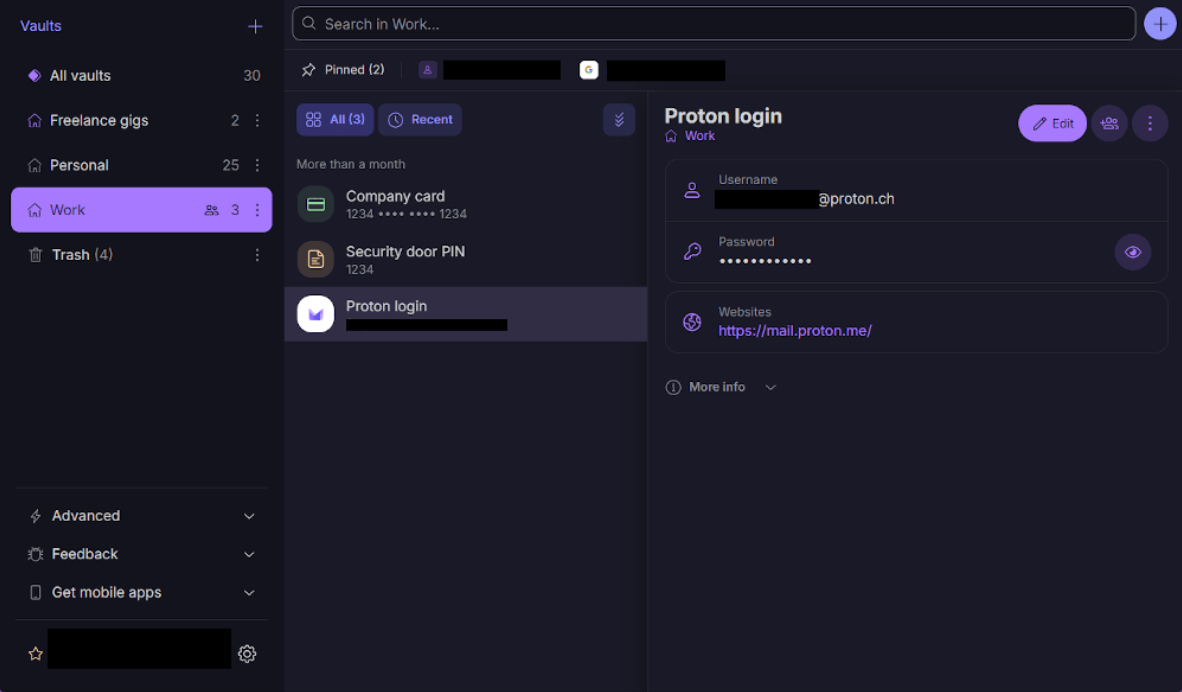
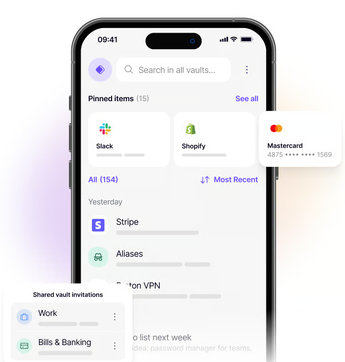
A modern, intuitive interface makes it simple to organize credentials into vaults, generate strong passwords, and autofill supported logins in the browser and on mobile. New users coming from Proton Mail or Proton VPN will recognize the same visual language, which shortens the learning curve if you're already inside the ecosystem.
Web & Mobile App Interface
What Proton Pass actually looks like day to day — the web/browser vault and the mobile app.
Performance
Sync between devices is fast enough that a password saved on desktop is typically available on mobile within a few seconds, and the browser extension's autofill responds without any noticeable delay during normal daily use.
Pricing: Free vs. Plus vs. Proton Unlimited
Proton Pass pricing sits inside Proton's broader plan structure rather than as a fully standalone product:
| Plan | What You Get | Best For |
|---|---|---|
| Free | Unlimited logins on one active device, core password manager features, limited aliases | Casual users trying it out |
| Pass Plus | Unlimited devices, unlimited email aliases, built-in 2FA authenticator, vault sharing, dark web monitoring | Primary password manager users |
| Proton Unlimited | Pass Plus features bundled with Proton Mail, Proton VPN, and Proton Drive under one subscription | Users who want the whole Proton ecosystem |
Check Proton's pricing page for current rates, since subscription pricing and included storage/features are revised from time to time.
Migrating to Proton Pass
Switching password managers is the single biggest friction point for most people — here's the general path:
- Export your existing vault from your current password manager, typically as a CSV or JSON file (check that manager's export settings).
- Import into Proton Pass via Settings → Import, selecting the matching source format.
- Verify the import by spot-checking a handful of logins, especially any with custom fields or attachments that don't always map cleanly between formats.
- Securely delete the exported file — an unencrypted CSV of every password you own is exactly the kind of file that shouldn't sit in a Downloads folder.
- Update saved logins gradually as you naturally log into each site, rather than trying to force a one-day cutover.
Pros & Cons
Pros
- Strong privacy focus and Swiss jurisdiction
- Open-source applications
- End-to-end encryption, zero-knowledge architecture
- Integrated email aliases (Hide-My-Email)
- Passkey and built-in 2FA support
- Clean, modern interface
Cons
- Some advanced features require a paid plan
- Best experience is within the Proton ecosystem
- Younger product than Bitwarden or 1Password, so third-party integrations are still catching up
Proton Pass vs. Bitwarden
Bitwarden emphasizes value and a generous free plan with unlimited devices at no cost, while Proton Pass focuses on privacy-specific features like email aliases, passkeys, and deeper ecosystem integration with Proton Mail and Proton VPN. Bitwarden's longer track record also means broader third-party and self-hosting support. Read our full Bitwarden review for a closer look at that comparison.
Proton Pass vs. 1Password
1Password is widely regarded as the most polished password manager for teams and businesses, with mature admin controls and Travel Mode for crossing borders with sensitive vaults hidden. Proton Pass counters with a genuinely usable free tier and the email alias feature built in at no extra cost — something 1Password doesn't offer natively. For individuals and privacy-focused users, Proton Pass is the more budget-friendly option; for larger teams needing granular admin tooling, 1Password still has the edge.
Who Should Buy It?
Privacy-conscious users, existing Proton customers, professionals, students, families, and anyone looking for a modern password manager with strong privacy defaults and built-in email alias support.
Frequently Asked Questions
Is Proton Pass safe?
Yes — it's designed with end-to-end encryption, a zero-knowledge architecture, and has gone through independent security audits.
Can it generate passwords?
Yes, with a built-in password generator that supports both random passwords and passphrases.
Does it sync across devices?
Yes, across all supported platforms — browser, desktop, and mobile.
Is the free version enough?
For many users, yes — it covers core password management without a subscription, though it's limited to one active device and a capped number of aliases.
Do I need a Proton Mail account to use it?
You need a Proton account, but that account works across all Proton products — you're not required to actively use Proton Mail to use Proton Pass.
Can I import passwords from another manager?
Yes — Proton Pass supports importing from most major password managers via CSV/JSON export, though field mapping should always be spot-checked after import.
Final Verdict
Proton Pass is a strong privacy-first password manager that combines secure password storage with genuinely useful extras like email aliases and passkeys, backed by Proton's Swiss jurisdiction and open-source track record. It's an easy recommendation for privacy-conscious users and anyone already inside the Proton ecosystem, and a credible alternative to Bitwarden or 1Password for individuals.
Learn More About Proton Pass →