Bitwarden Review 2026: Pricing, Security and Is It Worth It?
Last updated:
Quick answer: is Bitwarden worth it?
Yes, for most people. Bitwarden is open source, zero-knowledge, independently audited, and its free plan includes unlimited passwords and unlimited devices. Premium costs $19.80 a year and Families (up to 6 users) costs $47.88 a year, per Bitwarden's pricing page when we checked on October 17, 2026.
The trade-offs: the interface is plainer than some rivals, and the free plan leaves out the built-in authenticator, emergency access and vault health reports. Our score is 4.9/5.
Bitwarden has built its reputation around a rare combination of open-source transparency, strong encryption, a genuinely useful free tier, affordable premium plans, and broad cross-platform support.
In this review, we look beyond the marketing language and examine what Bitwarden actually offers in 2026: security architecture, encryption, independent audits, passkeys, autofill, Premium features, Families, emergency access, self-hosting, and everyday usability. It is one of the picks in our best password managers comparison.
| Best for | Most users who want strong security, excellent value, open-source transparency, and support across many devices. |
|---|---|
| Free plan | Yes — unlimited passwords and unlimited devices. |
| Premium | $19.80/year ($1.65/month billed annually). |
| Families | Up to 6 users, $47.88/year ($3.99/month billed annually). |
| Encryption | AES-256-CBC with HMAC-SHA256 for vault data. |
| Architecture | Zero-knowledge, end-to-end encryption. |
| Open source | Yes (source code is public). |
| Independent audits | Yes — regular third-party security assessments. |
Students, families, professionals, developers, businesses, and privacy-conscious users looking for a secure password manager without premium pricing.
Quick Navigation
What Is Bitwarden?
Bitwarden is a password manager that stores passwords, passkeys, secure notes, payment cards, identities, and other sensitive information inside an encrypted vault. The vault can then synchronize across supported browser, desktop, and mobile applications.
Instead of remembering a different complex password for every account, you remember one strong master password and let Bitwarden generate and store unique credentials for the individual websites and applications you use.
Why Password Managers Matter
Humans are not good at memorizing dozens of long, completely unique passwords. Without a password manager, people commonly compensate by reusing passwords, selecting predictable variations, or storing credentials in insecure places.
A password manager changes the model. The software can create and remember high-entropy passwords while you only need to protect your master password and Bitwarden account.
- Unique password for every important account.
- Built-in password and username generation.
- Autofill reduces manual typing.
- Passkey storage and use.
- Encrypted storage for notes, cards, and identities.
- Synchronization across devices.
You can check how strong an existing password is with our free password strength checker, or see whether an email address has appeared in a breach with the email breach checker.
Key Bitwarden Features
Unlimited Passwords
The free plan supports unlimited stored passwords rather than imposing a small vault limit.
Unlimited Devices
Use your vault across supported desktop, browser, and mobile clients.
Password Generator
Generate strong randomized passwords instead of creating predictable passwords manually.
Passkeys
Store and use passkeys for supported websites and services.
Autofill
Fill login information through supported browser extensions and mobile operating systems.
Bitwarden Send
Share encrypted text or files securely with another person.
Secure Notes
Store sensitive text that does not belong in a traditional username/password entry.
Email Alias Integration
Integrate supported email-forwarding services into the username generator.
Is Bitwarden Safe? Security & Encryption
Bitwarden's security model starts on your local device. Vault data is encrypted before it is transmitted to Bitwarden's servers. The server stores encrypted data rather than a readable copy of your vault.
AES-256-CBC + HMAC-SHA256
Bitwarden documents the use of AES with 256-bit keys in CBC mode for vault encryption, combined with HMAC-SHA256 to provide authentication and integrity.
Key derivation
Your master password is not used directly as the vault encryption key. A key derivation function transforms it into cryptographic material. Bitwarden supports PBKDF2 and Argon2id configurations.
Two-step login
Bitwarden supports multiple forms of two-step login. Depending on account type and configuration, these can include authenticator applications and hardware security keys.
Independent Audits & Open-Source Transparency
Bitwarden's open-source model is one of its strongest differentiators. Its code can be inspected publicly, which makes independent scrutiny easier than it is for completely closed-source password managers. Some business features are covered by a separate commercial license, so check the project's repository for the exact licensing of each component.
Bitwarden also commissions regular third-party security assessments. According to its audit page, 2025 work included:
- Cure53: browser extension and autofill overlay, core application, desktop application, web vault, and RustCrypto components.
- ETH Zurich (Applied Cryptography Group): a cryptography report.
- Unit 42 by Palo Alto Networks: the mobile app.
- Fracture Labs: the web app and network.
Earlier years include assessments by IOActive, Mandiant, Insight Risk Consulting and further Cure53 reviews. Bitwarden also says it has completed SOC 2 Type 2 and SOC 3 reports, holds ISO 27001 certification, undergoes an annual third-party HIPAA Security Rule audit, and runs a private bug bounty program on HackerOne.
Why audits matter
No security audit can guarantee that software will never have a vulnerability. Repeated independent review is still valuable because it gives external experts an opportunity to examine implementation, identify weaknesses, and verify important security claims.
Source: Bitwarden: Is Bitwarden audited?
Privacy & Zero-Knowledge Architecture
Bitwarden describes itself as a zero-knowledge encrypted password manager. Vault encryption occurs locally, and Bitwarden says it does not possess the keys required to decrypt the contents of a properly secured vault.
This distinction is important. Your encrypted vault can be synchronized through cloud infrastructure without the server needing a plaintext copy of the passwords stored inside it.
Can Bitwarden be hacked?
No software is unhackable. Because vault data is encrypted on your device, someone who obtained Bitwarden's stored data would get encrypted vaults rather than readable passwords, and the protection then depends mainly on each user's master password and key-derivation settings. In practice the bigger risks are weak master passwords, phishing, and malware on your own device.
Passkeys & Phishing Resistance
Bitwarden supports storing and using passkeys on compatible websites. Passkeys can improve resistance to traditional credential phishing because they rely on public-key cryptography rather than a shared secret that users type into arbitrary login forms.
Password managers can also reduce phishing risk during password-based logins because autofill is associated with the saved website domain. A fake domain does not automatically match the original saved login.
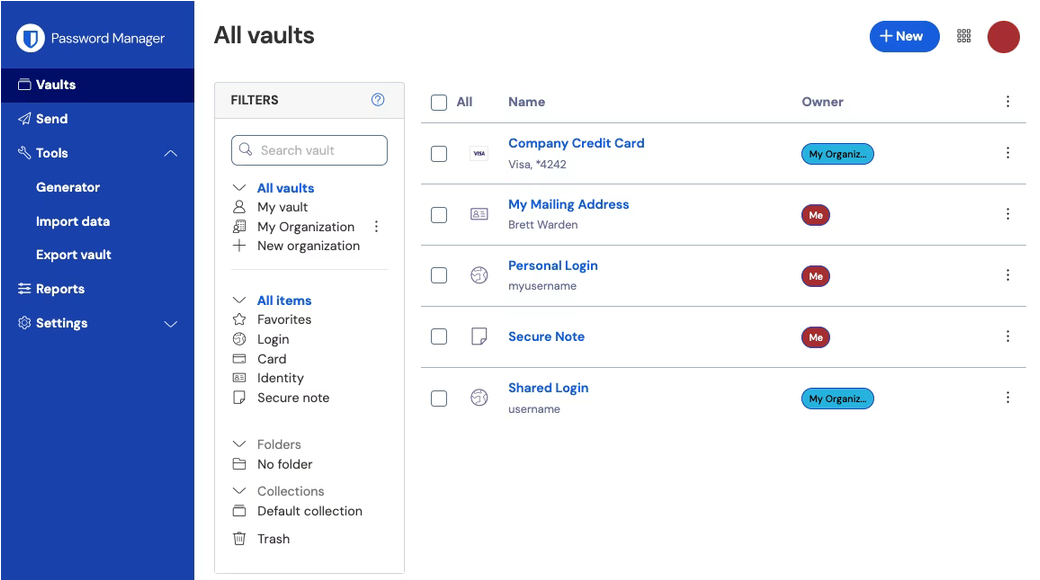
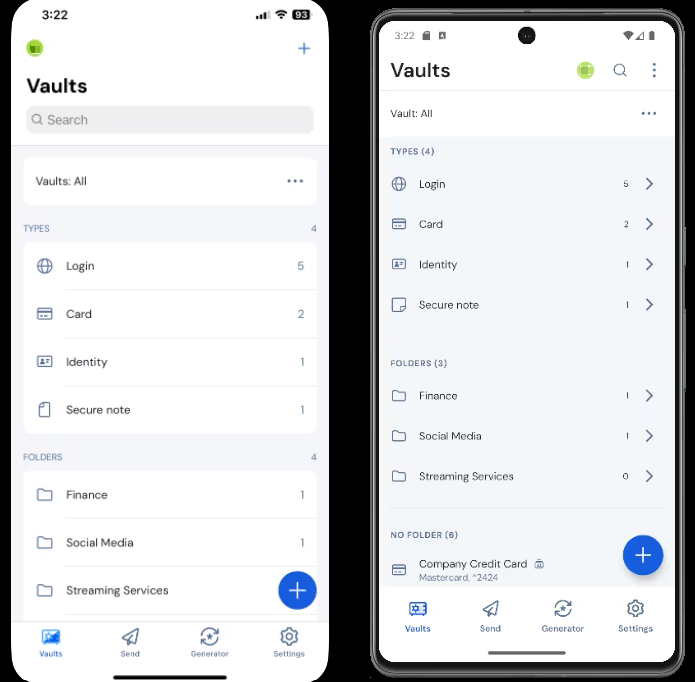
Bitwarden Web & Mobile App Interface
The web vault provides a larger workspace for organizing passwords and changing account settings, while the mobile app is designed for quick access, biometric unlock, and autofill while using apps and websites on a phone.
Performance & Everyday Ease of Use
Password-manager performance is less about benchmark numbers and more about whether the software stays out of the user's way. The important tasks are vault unlock, synchronization, search, password generation, and autofill.
Bitwarden's interface has traditionally prioritized function over visual luxury. That is a positive for users who want a direct, information-dense password manager, although some competitors provide a more polished onboarding experience.
Browser extensions
Browser extensions are central to the everyday experience. They provide quick access to saved logins, password generation, and autofill without requiring the web vault to remain open.
Mobile
On mobile, biometric unlock and operating-system autofill integration make Bitwarden substantially more convenient than manually copying passwords between applications.
Bitwarden Pricing: Free vs Premium vs Families
Bitwarden remains unusually competitive because its free plan includes the core functionality many users actually need: unlimited passwords, unlimited devices, browser and mobile applications, passkey management, password generation, and encrypted vault storage.
| Feature | Free | Premium | Families |
|---|---|---|---|
| Unlimited passwords | Yes | Yes | Yes |
| Unlimited devices | Yes | Yes | Yes |
| Passkeys | Yes | Yes | Yes |
| Integrated authenticator (TOTP) | No | Yes | Yes |
| Emergency Access | No | Yes | Yes |
| Vault health reports | No | Yes | Yes |
| Encrypted file attachments | No | Yes (5 GB) | Yes (5 GB personal + 5 GB family) |
| Support | Priority | Priority | |
| Users | 1 (share with one other user) | 1 | Up to 6 |
| Annual price | $0 | $19.80 | $47.88 |
Is Bitwarden free?
Yes. The free plan is permanent and includes unlimited passwords and devices. Its main limits are that sharing is restricted to one other user, support is by email only, and it leaves out the premium extras listed above.
Premium
Premium currently costs $1.65 per month when billed annually at $19.80. It adds features such as the integrated authenticator, encrypted file attachments, Emergency Access, vault health reports, and priority support.
Families
The Families plan currently costs $3.99 per month when billed annually at $47.88 and covers up to six users. It includes six premium accounts and family sharing features.
Prices checked October 17, 2026, in USD and excluding taxes. They can change, so confirm on Bitwarden's pricing page before buying.
Emergency Access
Emergency Access is a Premium feature that allows you to designate trusted Bitwarden users who may request access to your vault if an emergency occurs.
Bitwarden supports two emergency-access models: View, which provides read access after approval, and Takeover, which allows the emergency contact to assume permanent account access.
The account owner selects a waiting period. A request can be approved manually or become available after the configured waiting period if the owner does not reject it.
Self-Hosting
Bitwarden offers self-hosting options. This allows technically experienced users and organizations to run Bitwarden server components on infrastructure they control.
Self-hosting can provide more control over infrastructure and data location, but it also transfers significant operational responsibility to the person or organization managing the server.
Bitwarden Pros & Cons
Pros
- Excellent permanent free plan.
- Unlimited passwords and devices.
- Open-source codebase.
- Zero-knowledge encryption.
- Strong independent-audit history.
- Affordable Premium pricing.
- Passkey support.
- Emergency Access on paid plans.
- Cross-platform support.
- Self-hosting available.
Cons
- Interface is more functional than luxurious.
- Free plan lacks the built-in authenticator, Emergency Access, and vault health reports.
- Free sharing is limited to one other user.
- Self-hosting can create security problems if administered poorly.
- Bitwarden cannot recover a vault if you forget the master password.
- Storing TOTP codes in the same vault is a convenience/security trade-off.
Who Should Use Bitwarden?
- Students: excellent core functionality without a paid subscription.
- Families: affordable sharing for up to six users.
- IT professionals and developers: open-source transparency and self-hosting options appeal to technical users.
- Privacy-conscious users: zero-knowledge architecture and public source code provide strong transparency.
- Businesses: Teams and Enterprise plans add centralized administration and business controls.
Bitwarden Alternatives
Bitwarden is not the right fit for everyone. If you want a more polished interface, a tighter ecosystem, or extra monitoring features, these are the closest alternatives. Read each full review for details.
| Password Manager | Best for | Main difference |
|---|---|---|
| Bitwarden | Overall value | Open source + excellent free plan. |
| 1Password | Premium experience | Highly polished interface and family/business tools. |
| Proton Pass | Privacy ecosystem | Strong integration with Proton services. |
| NordPass | Simplicity | Straightforward interface and security ecosystem. |
| Dashlane | Security extras | Broader monitoring and security-related features. |
For a side-by-side ranking, see our best password managers guide.
Frequently Asked Questions
Is Bitwarden safe?
Bitwarden uses zero-knowledge, end-to-end encryption, open-source software, strong cryptographic controls, two-step login options, and recurring third-party security assessments. No software is risk-free, but Bitwarden has a strong security model. A strong master password and two-step login still matter.
Is Bitwarden free?
Yes. Bitwarden offers a permanent free personal account with unlimited passwords and unlimited devices. Paid tiers add premium features such as the integrated authenticator, Emergency Access, and file attachments rather than removing core functionality.
How much does Bitwarden cost?
Per Bitwarden's pricing page, Premium is $1.65 per month billed annually at $19.80, and Families (up to six users) is $3.99 per month billed annually at $47.88. The Free plan costs nothing. Prices can change, so check the current pricing before buying.
Is Bitwarden open source?
Bitwarden publishes its source code publicly so researchers can inspect it. Some business features are covered by a separate commercial license, so check the project's repository for licensing details.
Does Bitwarden know my passwords?
Bitwarden states that vault data is encrypted on your device before being sent to its servers. Under its zero-knowledge model, the service does not possess the keys needed to decrypt your vault contents.
Can Bitwarden be hacked?
No software is unhackable. Because vault data is encrypted on your device, an attacker who obtained Bitwarden's stored data would get encrypted vaults rather than readable passwords, and the protection then depends mainly on each user's master password and key-derivation settings. The more common risks are weak master passwords, phishing, and malware on your own device.
Does Bitwarden support passkeys?
Yes. Passkey management and use are part of Bitwarden's current password-manager feature set, including on the free plan.
Is Bitwarden Premium worth it?
For many people, yes. Premium is inexpensive and adds the integrated authenticator, encrypted attachments, Emergency Access, vault health reports, and priority support. The free tier is still sufficient for many individual users.
Can I self-host Bitwarden?
Yes. Bitwarden provides self-hosting options, but running your own server also makes you responsible for patching, availability, backups, and server security.
Is Bitwarden better than 1Password?
It depends on your priorities. Bitwarden stands out for value, open-source transparency, and its free plan. 1Password is generally regarded as more polished. See our 1Password review and best password managers comparison for details.
Final Verdict
Bitwarden remains one of the strongest all-round password managers in 2026. The free tier is unusually capable, Premium remains inexpensive, and the product combines open-source transparency with zero-knowledge encryption, passkeys, broad platform support, independent audits, and useful advanced features.
The interface may not feel as premium as some competitors, and the free plan leaves out a few conveniences, but those are relatively small trade-offs considering the security model and value.
For most people asking where to start with a password manager, Bitwarden is one of the easiest products to recommend.