NordPass Review (2026): The Complete Guide
An in-depth look at NordPass's security architecture, XChaCha20 encryption, privacy model, features, usability, pricing, migration process, and overall value — with real screenshots of the web and mobile apps — to help you decide whether NordPass is the right password manager for you.
Last updated: October 2026
Users who want a modern password manager with strong encryption, cross-platform support, useful security monitoring tools, and a straightforward interface.
What Is NordPass?
NordPass is a password and passkey manager designed to securely store credentials and other sensitive information inside an encrypted vault.
The service can store passwords, passkeys, credit card information, personal details, secure notes, and other sensitive data. It also provides password generation, autofill, and synchronization across supported devices.
NordPass is developed by Nord Security, the company behind other consumer security products including NordVPN. The password manager is available for personal users as well as organizations.
Why Password Managers Matter
Modern users can easily accumulate dozens or even hundreds of online accounts. Reusing the same password across those accounts creates a serious security problem: if one service suffers a credential breach, attackers may attempt the same credentials elsewhere.
A password manager addresses this problem by generating and storing unique passwords for individual accounts.
Instead of remembering every password, you primarily need to protect your password-manager account while allowing the software to handle the individual credentials.
Key Features
- Encrypted password and credential storage
- XChaCha20 encryption for vault data
- Zero-knowledge architecture
- Password and passkey management
- Strong password generator
- Autofill and autosave
- Password Health monitoring
- Data Breach Scanner
- Email Masking
- Secure document storage
- Built-in authenticator for supported accounts
- Biometric authentication
- Multi-factor authentication
- Security-key support
Security
Security is one of NordPass's strongest selling points. Unlike many conventional applications that rely on the widely used AES family of encryption algorithms, NordPass uses XChaCha20 to encrypt password-vault data.
NordPass states that it uses 256-bit XChaCha20 encryption for vault data. XChaCha20 is a modern stream cipher designed to provide strong cryptographic protection while also working efficiently across different hardware platforms.
The encryption itself is only one component of a password manager's security model. How keys are handled and where encryption takes place are equally important.
NordPass states that data is encrypted and decrypted at the device level and that the Master Password and encryption and decryption keys do not reach its servers. This forms part of its zero-knowledge architecture.
NordPass also supports multi-factor authentication through authenticator applications and security keys. Security keys can provide an additional hardware-based authentication factor for the Nord Account.
Independent security testing is another important factor. NordPass states that its desktop application and browser extension have undergone an independent security audit by Cure53.
Privacy
NordPass uses a zero-knowledge architecture designed so that the contents of a user's vault remain inaccessible to the service itself.
According to NordPass, vault data is encrypted before being stored, while the user's Master Password and encryption and decryption keys are not sent to its servers.
This architecture is important because a password manager should not operate like an ordinary cloud database containing readable copies of your passwords.
Instead, the goal is for sensitive credentials to remain cryptographically protected throughout their lifecycle.
NordPass also provides privacy-oriented features such as Email Masking, which can allow users to avoid giving their primary email address directly to online services.
Ease of Use
NordPass takes a relatively straightforward approach to password management. The basic workflow is simple: install the application or browser extension, sign in, import or add credentials, and allow NordPass to handle saving and autofilling passwords.
The browser extension is particularly important because most password-manager interactions happen while browsing. NordPass supports autosave and autofill so that credentials can be inserted without manually copying passwords from the vault.
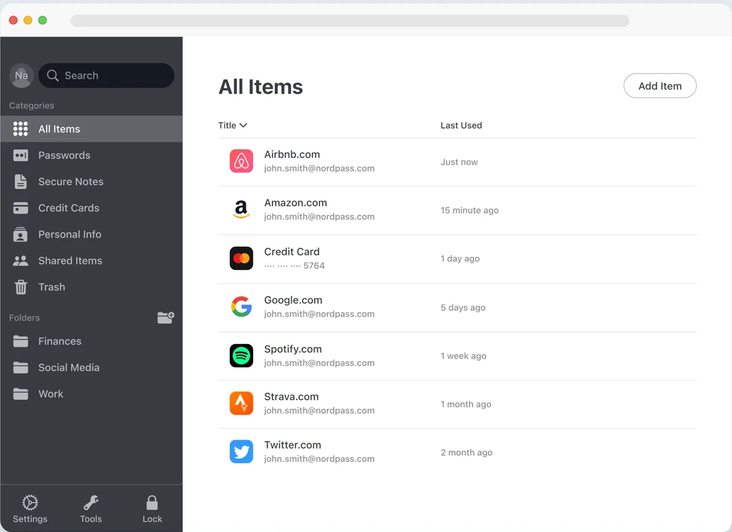
The interface is also designed to support more than passwords. Users can organize passkeys, credit-card information, secure notes, personal information, and other supported data in the vault.
For users who want a password manager that feels relatively easy to operate without sacrificing advanced security features, NordPass is a strong candidate.
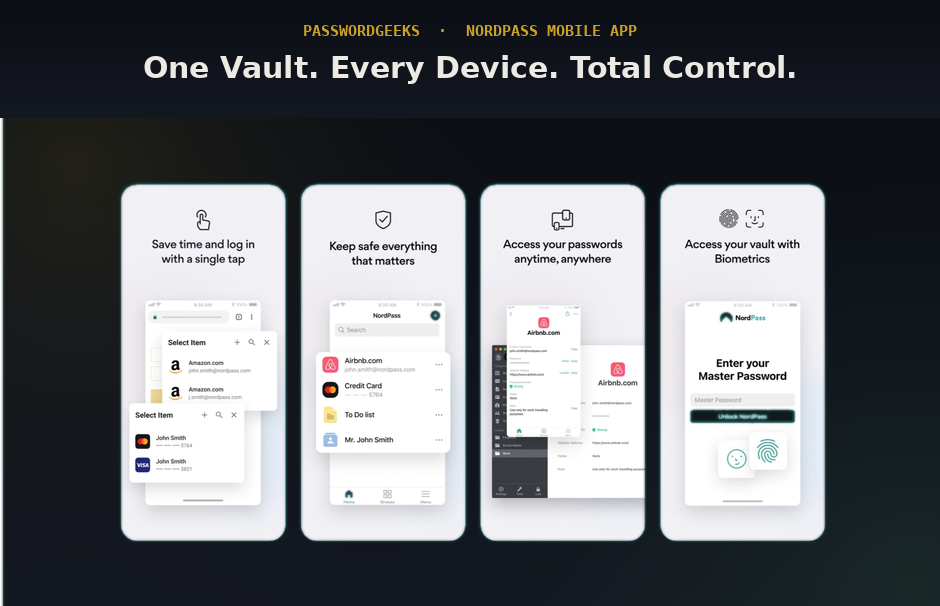
Web & Mobile App Interface
What NordPass actually looks like day to day — the web/browser vault and the mobile app.
Performance
For everyday password-management tasks, NordPass is designed to keep the workflow lightweight: open a website, identify the saved credential, and autofill the required information.
The actual experience will naturally depend on the user's device, browser, network connection, and number of stored credentials.
NordPass is available across major operating systems and browsers, allowing users to synchronize their password vault across supported devices.
For people who use a mixture of desktop and mobile devices, cross-platform synchronization can be considerably more convenient than keeping passwords isolated on a single device.
Password Health, Breach Monitoring & Email Masking
NordPass goes beyond basic password storage by providing several tools designed to identify weaknesses in an existing credential collection.
Password Health can identify weak, reused, or old passwords, helping users understand where their credential hygiene needs improvement.
The Data Breach Scanner can alert users when information associated with their credentials is discovered in a data security breach.
Email Masking is another useful privacy feature. Instead of giving an online service your primary email address, users can use a masked address where supported.
These features make NordPass more than simply an encrypted password storage application. They provide tools that can help users actively improve their security posture.
Secure Document Storage
NordPass can also be used to store sensitive documents and personal information in an encrypted vault.
Its Documents feature supports information such as passports, driver's licenses, and other sensitive records. NordPass states that documents stored through this feature are encrypted using its XChaCha20 solution.
This can be useful for users who want to keep important security-related information together rather than storing credentials and sensitive documents across several unrelated services.
NordPass Pricing 2026: Free vs. Premium vs. Family
NordPass offers a free tier and two paid plans. Here is exactly what each costs and what you get.
- Store unlimited passwords
- Autosave & autofill
- Single device only
- Basic password generator
- Everything in Free
- Multi-device access
- Password Health monitor
- Data Breach Scanner
- Email Masking
- File attachments
- 24/7 support
- Everything in Premium
- Up to 6 accounts
- Separate encrypted vaults
- Family admin dashboard
NordPass Pricing at a Glance
| Plan | Monthly Price | Annual Price | Key Features |
|---|---|---|---|
| Free | $0 | $0 | Single device, unlimited passwords, autofill |
| Premium | $1.49/mo | $17.88/year | Multi-device, Breach Scanner, Email Masking, Password Health |
| Family | $2.79/mo | $33.48/year | 6 accounts, everything in Premium, family dashboard |
Note: NordPass frequently runs promotional discounts (often 30–50% off the first year). The prices above reflect standard annual billing. Always check the official NordPass pricing page for the current promotion before purchasing.
The practical question is not simply whether the free plan works. It is whether multi-device access, Password Health, the Data Breach Scanner, Email Masking, and file attachments justify the $17.88/year Premium cost for your use case. For most users who want to actively monitor their account security, the Premium plan pays for itself the first time it flags a breached password.
Migrating to NordPass
Switching from another password manager into NordPass follows a familiar pattern:
- Export your existing vault from your current password manager as a CSV file (check that tool's export settings).
- Import into NordPass through Settings → Import, selecting the source manager from the supported list.
- Verify the import by spot-checking logins with custom fields, since not every field always maps across formats cleanly.
- Securely delete the exported CSV once you've confirmed the import — it's an unencrypted copy of your entire password list.
- Run Password Health right after migrating to immediately flag any weak or reused passwords carried over from your old vault.
Pros & Cons
Pros
- Strong XChaCha20 encryption
- Zero-knowledge architecture
- Independent security audit by Cure53 (desktop app and browser extension)
- Clean, easy-to-use interface across web, desktop, and mobile
- Password Health, Data Breach Scanner, and Email Masking included
- Passkey support and built-in authenticator
- Competitively priced Premium and Family plans
- Secure document storage for sensitive records
Cons
- Free plan is limited to a single device
- Multi-device sync requires a paid Premium plan
- Not open source, unlike Bitwarden
- Promotional prices may renew at the standard rate
- Fewer advanced admin and vault-organization options than some premium rivals
NordPass vs. Bitwarden
Bitwarden's biggest advantages are a generous free plan that works across multiple devices and a fully open-source codebase that anyone can inspect. NordPass counters with XChaCha20 encryption, a more modern interface, and built-in extras such as Email Masking and the Data Breach Scanner on its Premium plan.
If budget and open-source transparency are your top priorities, Bitwarden is hard to beat. If you prefer a polished, easy-to-use app and are happy to pay a small annual fee, NordPass is a strong alternative. Read our full Bitwarden review for more detail.
NordPass vs. 1Password
1Password stands out for its Secret Key security model, Travel Mode, and more mature tools for families and businesses. NordPass focuses on a simpler experience, XChaCha20 encryption, and a lower-cost Premium plan, making it appealing to individuals who want strong security without a long learning curve.
Teams that need granular admin controls may lean toward 1Password, while individuals and small households looking for value and simplicity may find NordPass the better fit. Our 1Password review covers its security model and pricing in full.
Who Should Use NordPass?
NordPass is a good fit for people who want a modern, easy-to-use password manager with strong encryption and useful security tools, without having to configure a complicated system.
- Individuals using several devices who want synchronized access on desktop and mobile
- Families who want separate encrypted vaults under one affordable plan
- Privacy-minded users who value Email Masking and a zero-knowledge design
- Beginners moving away from reused passwords or browser-saved logins
If you only need a password manager on a single device and want to pay nothing, the free plan may be enough. If you want multi-device sync for free or prefer open-source software, consider Bitwarden instead.
NordPass Alternatives
1Password, Bitwarden, Proton Pass, Dashlane, and Keeper are among the leading alternatives to NordPass. The best choice depends on whether you value free features, open-source transparency, privacy tools, business functionality, or overall value.
Bitwarden is well suited to users who want a generous free plan and open-source code. Proton Pass appeals to people already using the Proton privacy ecosystem. 1Password is a strong option for those who want a premium experience with advanced account protection. Compare them all in our best password managers roundup.
Frequently Asked Questions
How much does NordPass cost?
NordPass Premium costs $1.49/month when billed annually ($17.88/year). The Family plan costs $2.79/month annually ($33.48/year) for up to 6 users. The Free plan is $0 but limited to a single device. Promotional discounts are common, so check the official pricing page before buying.
Is NordPass free?
Yes, NordPass has a free tier with unlimited password storage, autosave, autofill, and a password generator — but it works on one device only. Multi-device sync requires Premium at $1.49/month.
Is NordPass Premium worth the price?
At $17.88/year, NordPass Premium includes multi-device sync, breach monitoring, password health reports, email masking, and file attachments. It is effectively required for anyone using more than one device.
Is NordPass safe?
NordPass uses 256-bit XChaCha20 encryption and a zero-knowledge architecture, meaning your Master Password and encryption keys are not sent to its servers. NordPass also states that its desktop app and browser extension have been independently audited by Cure53. As with any password manager, using a strong Master Password and enabling multi-factor authentication is essential.
What encryption does NordPass use?
NordPass uses XChaCha20, a modern stream cipher, to encrypt vault data. Encryption and decryption happen on your device, so the service itself cannot read your stored passwords.
Does NordPass support passkeys?
Yes. NordPass can store and manage passkeys alongside traditional passwords, so you can use passwordless sign-in on supported websites and apps.
Can I import passwords into NordPass from another manager?
Yes. Export your vault from your current password manager as a CSV file, then import it in NordPass under Settings → Import. Spot-check logins with custom fields afterward and securely delete the exported file.
Is NordPass better than Bitwarden?
It depends on your priorities. Bitwarden offers a more generous free plan and open-source code, while NordPass offers XChaCha20 encryption, a modern interface, and built-in tools such as Email Masking and a Data Breach Scanner.
Final Verdict: Is NordPass Worth It in 2026?
NordPass is a modern, easy-to-use password manager that pairs strong XChaCha20 encryption and a zero-knowledge design with practical tools such as Password Health, the Data Breach Scanner, and Email Masking. Passkey support, secure document storage, and cross-platform sync round out a well-rounded package.
Its main limitation is that the free plan covers only one device, so most people will want Premium. At $1.49/month billed annually, that is an accessible price for the features included. If you want a simple, secure, reasonably priced password manager, NordPass is one of the strongest options to consider in 2026.
Learn More About NordPass →