Types of Cybersecurity Attacks: A Complete Beginner's Guide (2026)
Learn what a cyber attack is, why attackers use different techniques, what systems and people they target, and how security professionals defend against them. This guide covers malware, ransomware, phishing, DDoS, MITM, SQL injection, zero-days, password attacks, XSS and more.
What Is a Cyber Attack?
A cyber attack is a deliberate attempt to compromise a computer system, network, application, account or device.
Depending on the attack, the goal may be to steal information, gain unauthorized access, manipulate data, disrupt a service or damage systems.
Cyber attacks can target individuals, businesses, governments, websites, cloud environments and critical infrastructure. Some are highly technical; others mainly exploit human trust and behavior.
The CIA Triad: What Are Attackers Trying to Affect?
The CIA triad gives beginners a useful way to understand security objectives: confidentiality, integrity and availability.
Confidentiality
Keeping sensitive information away from unauthorized people. Data theft and credential theft can compromise confidentiality.
Integrity
Keeping information accurate and protected from unauthorized changes.
Availability
Keeping systems and services accessible to authorized users. DoS and DDoS attacks commonly target availability.
Why It Matters
Knowing the affected security objective helps defenders choose appropriate controls and prioritize response.
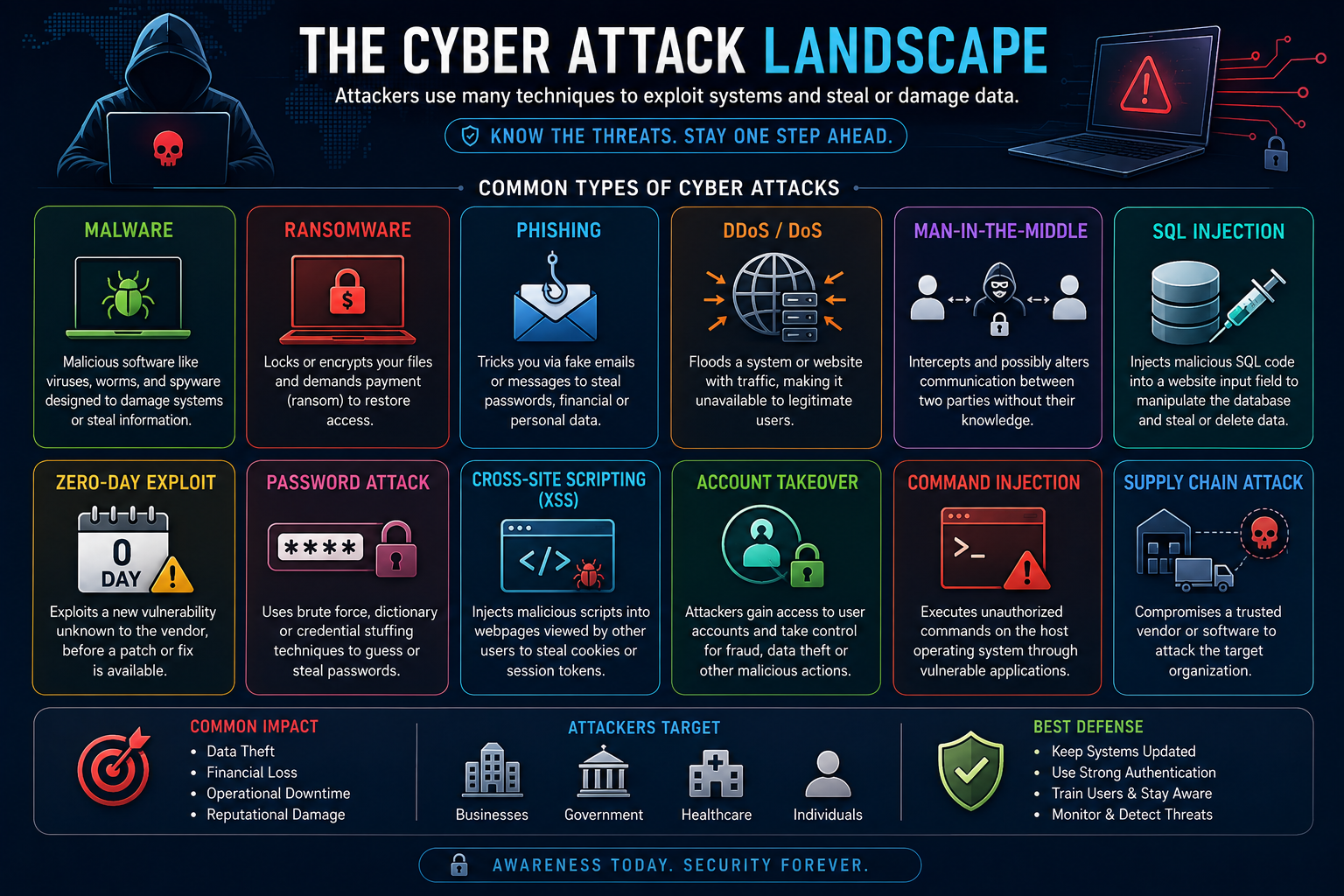
Cyber Attack Landscape
File: images/cyber-attack-landscape.png — shows an attacker targeting applications, networks, endpoints and data
How Does a Cyber Attack Happen?
There is no single attack sequence that fits every incident, but many attacks involve a progression from learning about a target to gaining access and attempting to achieve an objective.
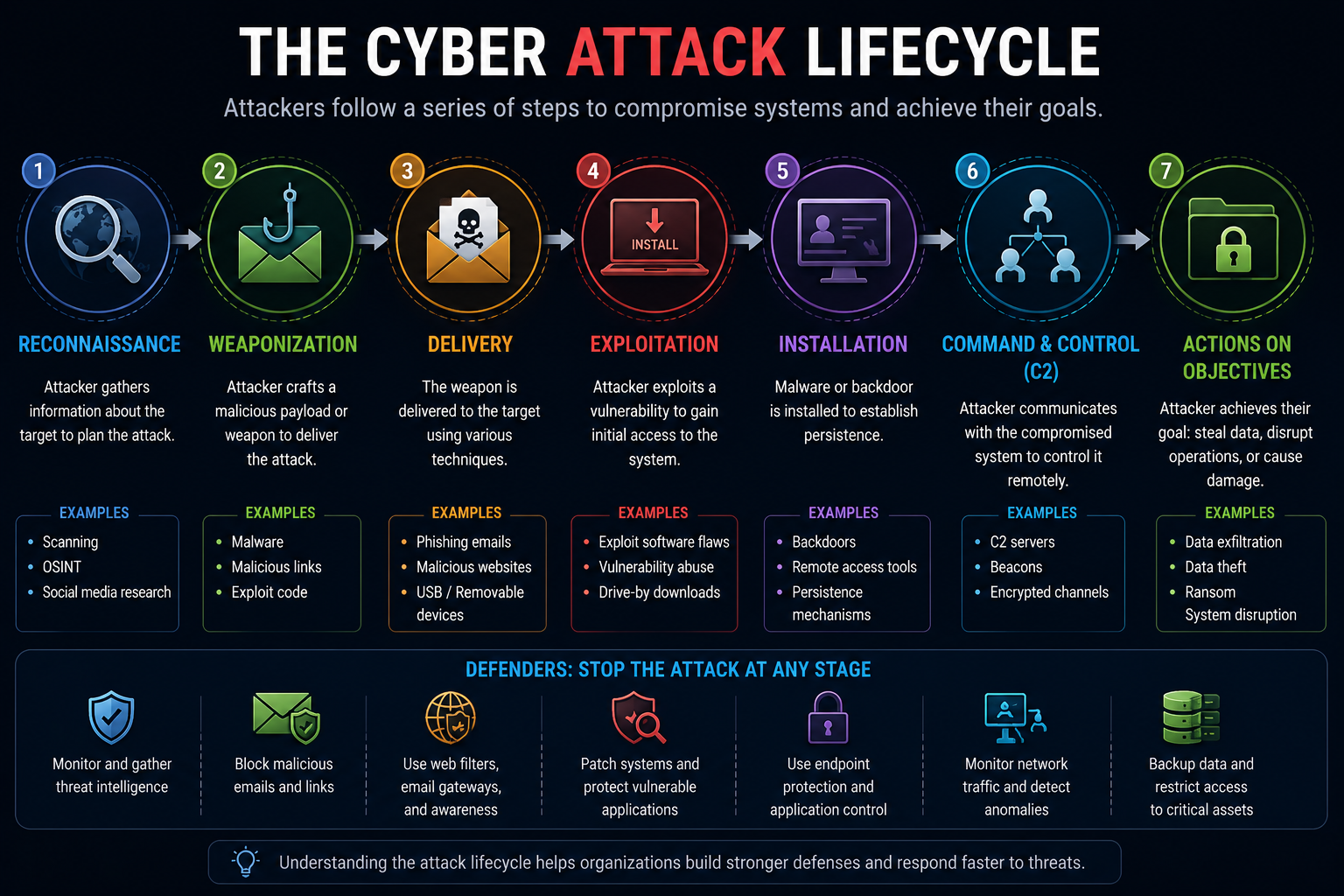
Cyber Attack Lifecycle
File: images/cyber-attack-lifecycle.png — shows Reconnaissance → Initial Access → Execution → Expansion → Objective
Common Types of Cybersecurity Attacks
The following attacks form a strong beginner foundation. They target different layers of technology and human behavior, so each requires a different defensive approach.
Malware
Malicious software used to disrupt systems, steal information, spy on users, damage files or establish unauthorized access.
Ransomware
Malware that can deny access to files or systems and is commonly associated with extortion.
Phishing
Deceptive messages that manipulate users into revealing information or performing an unsafe action.
DoS & DDoS
Attempts to make a service unavailable by overwhelming or exhausting its resources.
MITM
Interception of communication between parties, potentially allowing an attacker to observe or manipulate traffic.
SQL Injection
A web application vulnerability caused by unsafe handling of untrusted input in database queries.
Zero-Day
Exploitation of a vulnerability before defenders have an effective conventional fix available.
Password Attacks
Attempts to obtain, guess, reuse or abuse credentials through methods such as brute force and credential stuffing.
Malware
Malware is short for malicious software. It is an umbrella term for programs designed to perform harmful or unauthorized actions.
Malware can steal information, monitor users, damage files, disrupt operations, establish unauthorized access or download additional components.
Important Malware Categories
Virus
Malware that attaches to legitimate files or programs and can spread when infected content is executed.
Worm
Malware capable of spreading between systems without relying on the same user action associated with a traditional file-infecting virus.
Spyware
Software designed to monitor activity or collect information without appropriate authorization.
Trojan
Malicious software disguised as or delivered through something that appears legitimate.
Ransomware
Ransomware is malware that can prevent victims from accessing files or systems. Some campaigns also involve data theft and threats to release stolen information.
A Simplified Ransomware Scenario
Reducing Ransomware Risk
- Maintain protected, offline or otherwise resilient backups where appropriate.
- Patch operating systems and applications.
- Use MFA and least-privilege access.
- Monitor endpoint and authentication activity.
- Segment important systems where appropriate.
- Train users to recognize phishing and suspicious attachments.
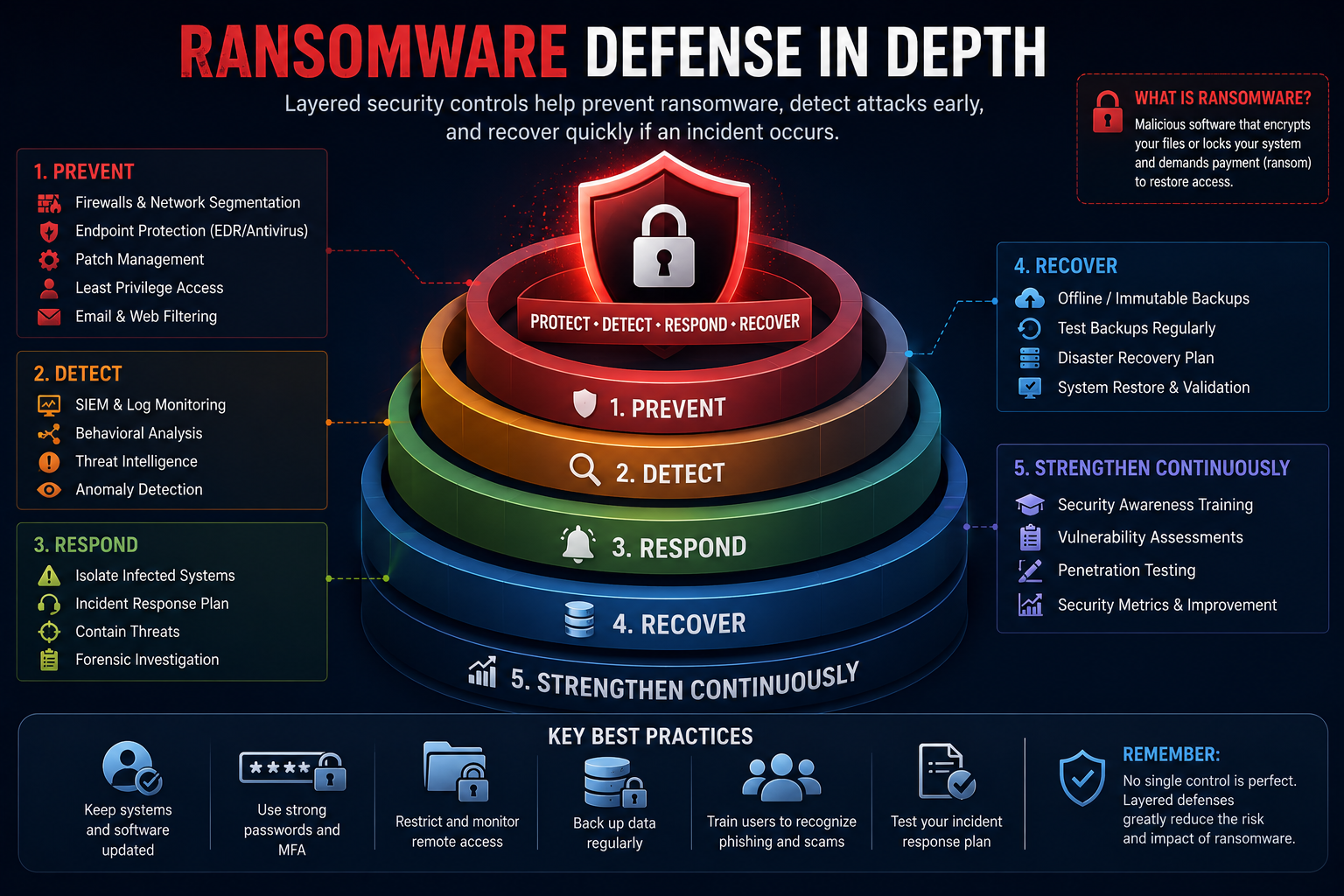
Ransomware Defense Layers
File: images/ransomware-defense-layers.png — shows email security, MFA, endpoint protection, network controls, backups and incident response
Phishing
Phishing is a social engineering technique in which attackers use deceptive messages to persuade victims to reveal information or perform an action that benefits the attacker.
A phishing campaign may imitate a bank, employer, delivery company, cloud service or even a colleague. The pressure often comes from urgency, fear, curiosity or a convincing request.
Email Phishing
Fraudulent emails that imitate legitimate organizations or individuals.
Smishing
Phishing delivered through SMS or messaging platforms.
Vishing
Voice-based social engineering, often involving fake support or financial scenarios.
Spear Phishing
A targeted phishing attempt tailored to a particular person or organization.
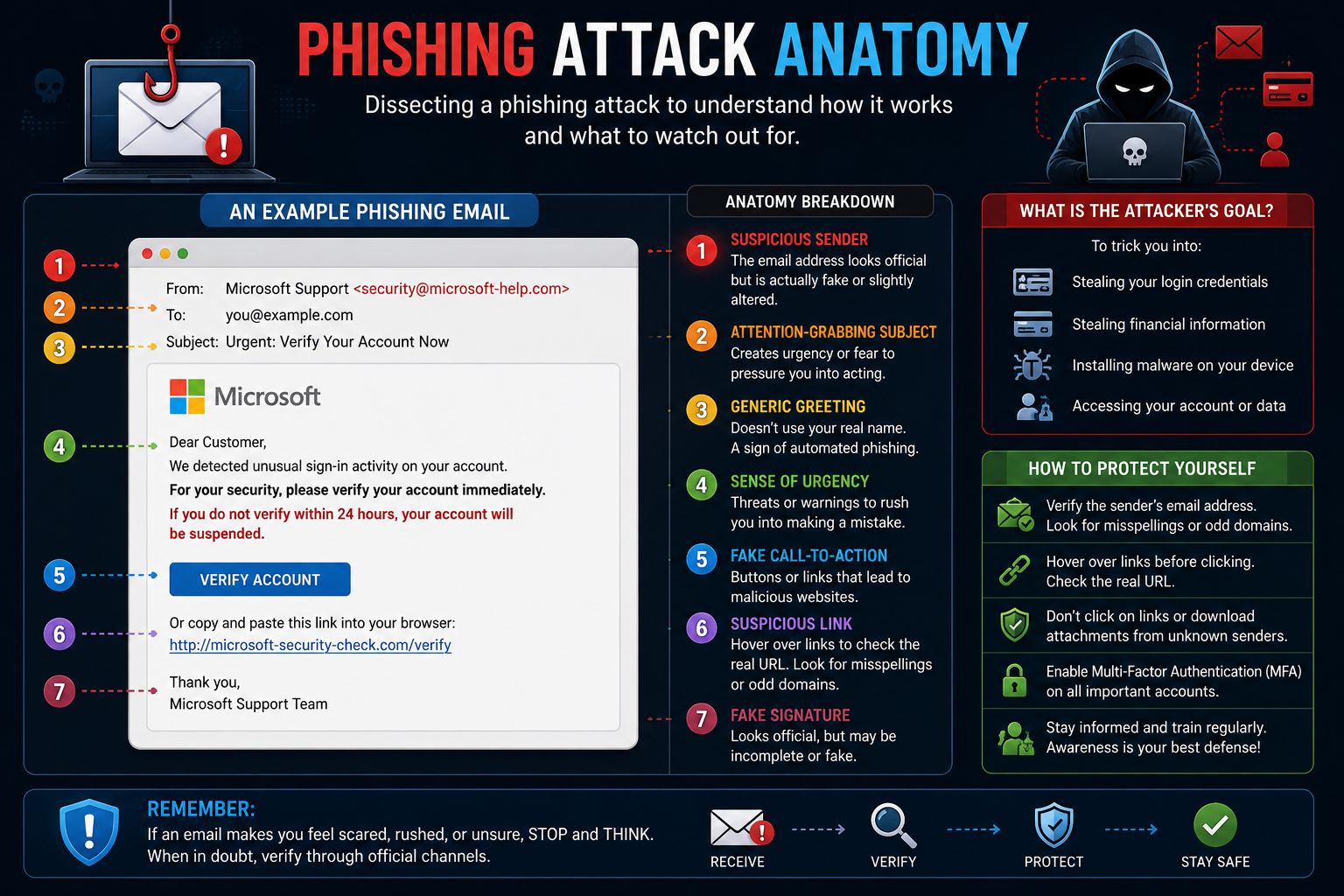
Anatomy of a Phishing Attack
File: images/phishing-attack-anatomy.png — highlights sender, urgent language, suspicious link, fake login page, and stolen credentials
DoS and DDoS Attacks
A Denial-of-Service (DoS) attack attempts to make a system or service unavailable to legitimate users. A Distributed Denial-of-Service (DDoS) attack performs this from multiple distributed systems or sources.
| Concept | Simple Explanation |
|---|---|
| DoS | Denial of service originating from a more limited source or set of sources. |
| DDoS | Multiple distributed systems participate in overwhelming the target. |
| Targets | Websites, APIs, network services, applications and infrastructure. |
| Impact | Slow performance, resource exhaustion or service unavailability. |
Man-in-the-Middle (MITM)
A Man-in-the-Middle attack occurs when an attacker positions themselves between communicating parties and attempts to observe, intercept or manipulate communication.
Encryption and proper certificate validation are important defenses because they help systems establish whether they are communicating securely with the intended service.
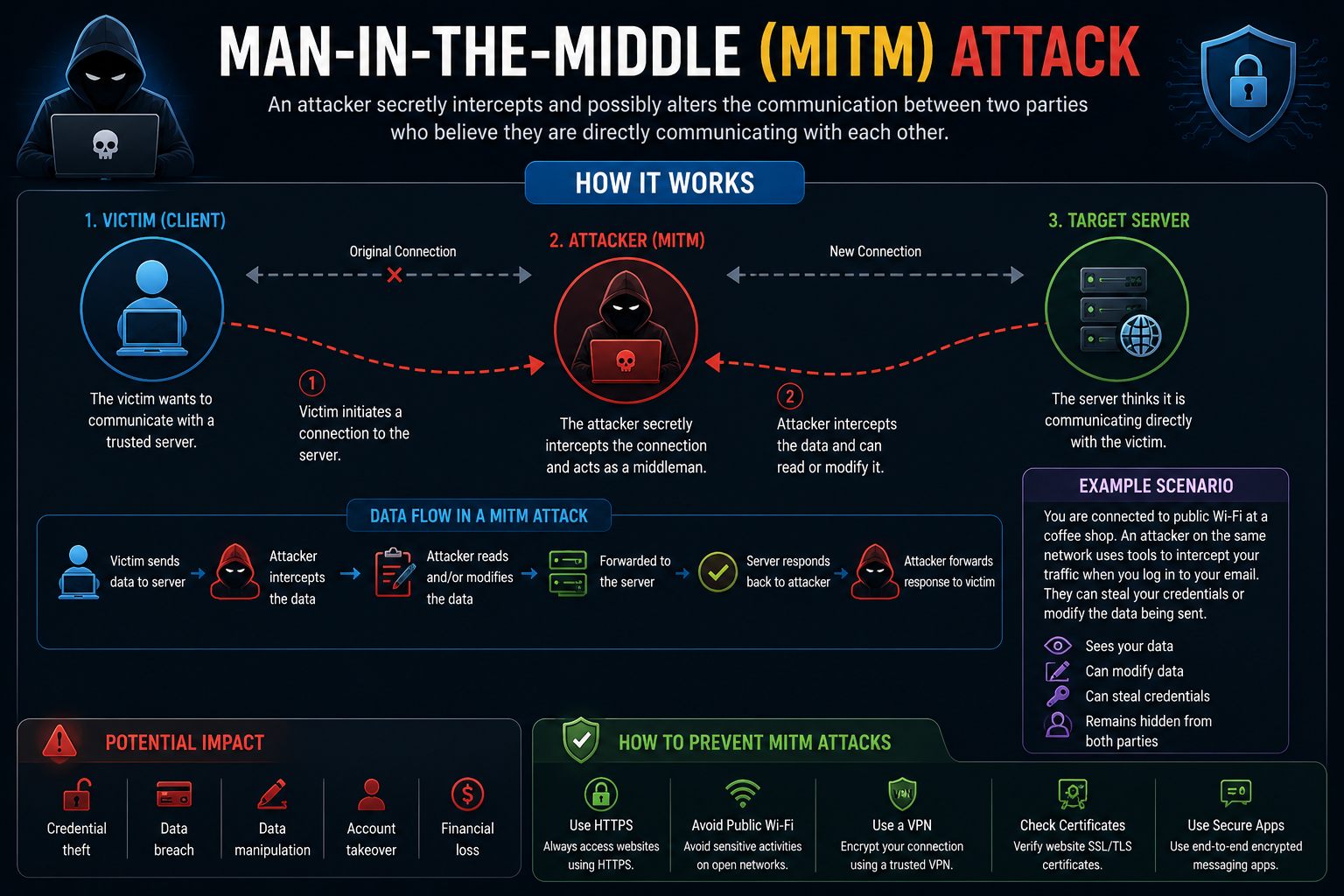
Man-in-the-Middle Attack
File: images/man-in-the-middle-attack.png — shows User ↔ Attacker ↔ Website vs a protected encrypted connection
Reducing MITM Risk
- Use HTTPS and properly configured TLS.
- Be cautious when entering sensitive information on untrusted networks.
- Keep browsers and operating systems updated.
- Do not ignore browser certificate or security warnings.
SQL Injection
SQL Injection (SQLi) is a web application vulnerability that can occur when an application improperly handles untrusted input that reaches a database query.
In a vulnerable application, input intended to be data can accidentally influence the structure or meaning of a database command.
SQL Injection in Simple Terms
Imagine a login form that sends a username and password to a database. If the application constructs its SQL query unsafely, specially crafted input may change the intended logic. Secure applications separate SQL structure from user-supplied values.
Parameterized Queries
Keep SQL structure separate from user-supplied values.
Least Privilege
Give database accounts only the permissions they need.
Validation
Apply appropriate validation based on the expected input format and purpose.
Updates
Maintain frameworks, libraries and database components.
Zero-Day Exploits
A zero-day vulnerability is a software weakness that is not yet adequately addressed by a vendor or defenders. A zero-day exploit is a technique or code used to take advantage of such a weakness.
The challenge is that defenders may have little or no time to deploy a conventional patch before exploitation occurs.
Password Attacks
Password attacks attempt to obtain, guess, reuse or abuse authentication credentials. Not every credential attack involves repeatedly guessing one password.
Brute Force
Systematically trying many possible passwords until a valid credential is found.
Credential Stuffing
Trying previously exposed username/password pairs against other services.
Password Spraying
Trying a small number of common passwords across many accounts.
Credential Phishing
Tricking users into entering credentials into a fraudulent login experience.
Learn more about password hygiene in the PasswordGeeks password manager guide.
Cross-Site Scripting (XSS)
Cross-Site Scripting is a web application vulnerability in which attacker-controlled content can be executed in a victim's browser because the application handles untrusted content unsafely.
Stored XSS
Malicious content is stored by an application and later delivered to users.
Reflected XSS
Untrusted input is reflected into a web response without safe handling.
DOM-Based XSS
Unsafe client-side JavaScript behavior causes attacker-controlled data to affect the page or script context.
Defenses
Context-aware output encoding, safe DOM APIs and appropriate security controls reduce risk.
Other Attacks Worth Learning
Account Takeover
Unauthorized control of an account through stolen credentials, session abuse or other means.
Command Injection
Unsafe input handling can allow unintended operating-system command execution.
Session Attacks
Attempts to abuse authentication sessions or session-management weaknesses.
Supply-Chain Attacks
Compromise introduced through trusted vendors, software dependencies or service providers.
API Attacks
Abuse of weaknesses in API authentication, authorization or input handling.
Social Engineering
Manipulation of people rather than direct exploitation of a technical vulnerability.
Cyber Attack Comparison
| Attack | Primary Target | Typical Goal | Key Defense |
|---|---|---|---|
| Malware | Devices / Systems | Access, disruption, theft or spying | Endpoint protection, patching, application controls |
| Ransomware | Files / Systems | Disruption and extortion | Backups, EDR, segmentation, MFA |
| Phishing | People / Accounts | Credential theft or malicious actions | Training, email security, MFA |
| DDoS | Services / Networks | Availability disruption | Filtering, rate limiting, DDoS mitigation |
| MITM | Communications | Interception or manipulation | TLS, certificate validation, secure networks |
| SQLi | Web Applications | Unauthorized database operations | Parameterized queries, least privilege |
| Zero-Day | Vulnerable Software | Exploit an unpatched weakness | Layered detection, isolation, rapid response |
| Password Attack | Accounts | Credential compromise | MFA, unique passwords, password manager |
| XSS | Web Applications / Users | Execute attacker-controlled content | Output encoding, safe DOM practices, security controls |
How Can You Defend Against Cyber Attacks?
No single security product stops every attack. Effective security combines multiple layers so that one control can compensate when another fails.
Multi-Factor Authentication
Add another verification factor so a stolen password alone is less useful to an attacker.
Patch Systems
Keep operating systems, applications, browsers and security software maintained.
Network Controls
Firewalls, segmentation and traffic monitoring can limit unnecessary communication.
Endpoint Protection
Endpoint security can help detect suspicious processes, files and behavior.
Security Monitoring
Centralized logs and SIEM platforms help analysts investigate suspicious activity.
Backups
Protected and tested backups support recovery from destructive incidents.
User Training
Security awareness reduces the likelihood of successful social engineering.
Incident Response
Prepare procedures for detection, containment, investigation and recovery.
For more on defensive strategies, read our Defensive Security Guide.
How Beginners Can Study Cyber Attacks Safely
Combine theory with controlled practice. Use systems that you own or have explicit permission to test.
Build an Isolated Lab
Use virtual machines to create a controlled environment for security learning.
Learn Networking
Understand IP addresses, ports, TCP/UDP, DNS, HTTP, routing and traffic.
Study Logs
Learn what normal authentication, network and application activity looks like.
Analyze Traffic
Use packet captures and tools such as Wireshark to understand network evidence.
For networking fundamentals, continue with the PasswordGeeks Nmap Tutorial.
Ready to continue learning?
Explore more cybersecurity guides and tutorials from PasswordGeeks.
Cybersecurity Attacks FAQ
What is a cyber attack?
A deliberate attempt to compromise a digital system, network, application, account or device for purposes such as unauthorized access, data theft, disruption or manipulation.
What is the most common cyber attack?
There is no single attack that is always most common across every environment. Phishing, credential attacks, malware and exploitation of software vulnerabilities are all important categories.
Is ransomware malware?
Yes. Ransomware is a category of malware generally associated with denying access to data or systems and demanding payment or using other forms of extortion.
What is the difference between DoS and DDoS?
DoS generally describes a denial-of-service attack from a more limited source, while DDoS involves multiple distributed systems or sources.
Is phishing a technical attack?
Phishing is primarily social engineering. It exploits human trust and decision-making, although phishing campaigns may also deliver technical payloads.
Can a VPN protect against every cyber attack?
No. A VPN can provide useful privacy and network-security benefits, but it does not replace MFA, patching, endpoint protection, secure passwords or phishing awareness.
Can beginners learn about cyber attacks safely?
Yes. Use isolated labs, intentionally vulnerable systems and environments where you have explicit permission to test. Never test random public systems without authorization.
Test Your Understanding
Answer all 5 questions below. If you get one wrong, don't worry — you'll get another chance to pick the correct answer. This chapter is only marked complete when all 5 answers are correct.
Which type of malware is specifically associated with denying access to data or systems and demanding payment?
Phishing is best classified as which type of attack?
What is the main difference between DoS and DDoS attacks?
Which defense is the most important mitigation against SQL injection?
Which statement about zero-day exploits is correct?
Chapter Complete
All 5 questions solved. This chapter is now marked complete in Module 1.