Networking for Cybersecurity: A Complete Beginner's Guide (2026)
A complete beginner-friendly guide to understanding how computers communicate. Start with packets and addresses, then learn protocols, ports, networking models, subnetting, routing, switching, network devices and the security controls used to defend modern networks.
1. What Is Computer Networking?
Computer networking is the process of connecting computing devices so they can exchange data and share resources.
A network can be as small as two computers connected together or as enormous as the global Internet. Laptops, smartphones, servers, printers, cameras, cloud systems and security appliances can all participate in networks.
Connections may be wired, such as Ethernet and fiber, or wireless, such as Wi-Fi and cellular communication. Devices need common rules so information can be transmitted, addressed, delivered and interpreted correctly.

Networking Basics
File: images/networking-basics.png — shows computers, phones, servers, router and Internet in a simple network diagram
2. Why Networking Matters in Cybersecurity
Cybersecurity is deeply connected to networking because attacks, authentication, remote access, data transfers, monitoring and defensive controls depend on network communication.
Understand Exposure
Security professionals need to know which hosts, ports, services and paths are reachable.
Read Traffic
Analysts inspect packets, connections, DNS queries, authentication traffic and unusual communication.
Control Communication
Firewalls, segmentation, VPNs, IDS/IPS and access controls restrict or monitor network activity.
Tools such as Wireshark and Nmap become much easier to understand after learning networking. Continue with the PasswordGeeks Nmap tutorial for authorized network discovery and port scanning.
3. Basic Components of a Network
Before studying individual protocols, understand the pieces that make communication possible.
End Devices
Systems that originate or receive communication: laptops, desktops, smartphones, servers, printers, cameras and virtual machines.
Intermediate Devices
Devices that move, filter or control traffic: switches, routers, firewalls, access points and gateways.
Transmission Media
The medium carries signals: copper Ethernet, fiber-optic cables and wireless radio.
Protocols
Rules that define how information is formatted, transmitted, addressed and interpreted.
4. What Is a Network Packet?
A packet is a formatted unit of data that travels across a packet-switched network. Communication is divided into manageable units that can travel through interconnected networks.
A packet commonly contains control information in headers and the actual data in a payload. Depending on the protocol, other information such as sequencing or error detection may also be present.
Header
Control information such as addresses, ports and protocol fields.
Payload
The data being carried by the protocol.
Trailer
Some protocols add information at the end for error detection or other control purposes.
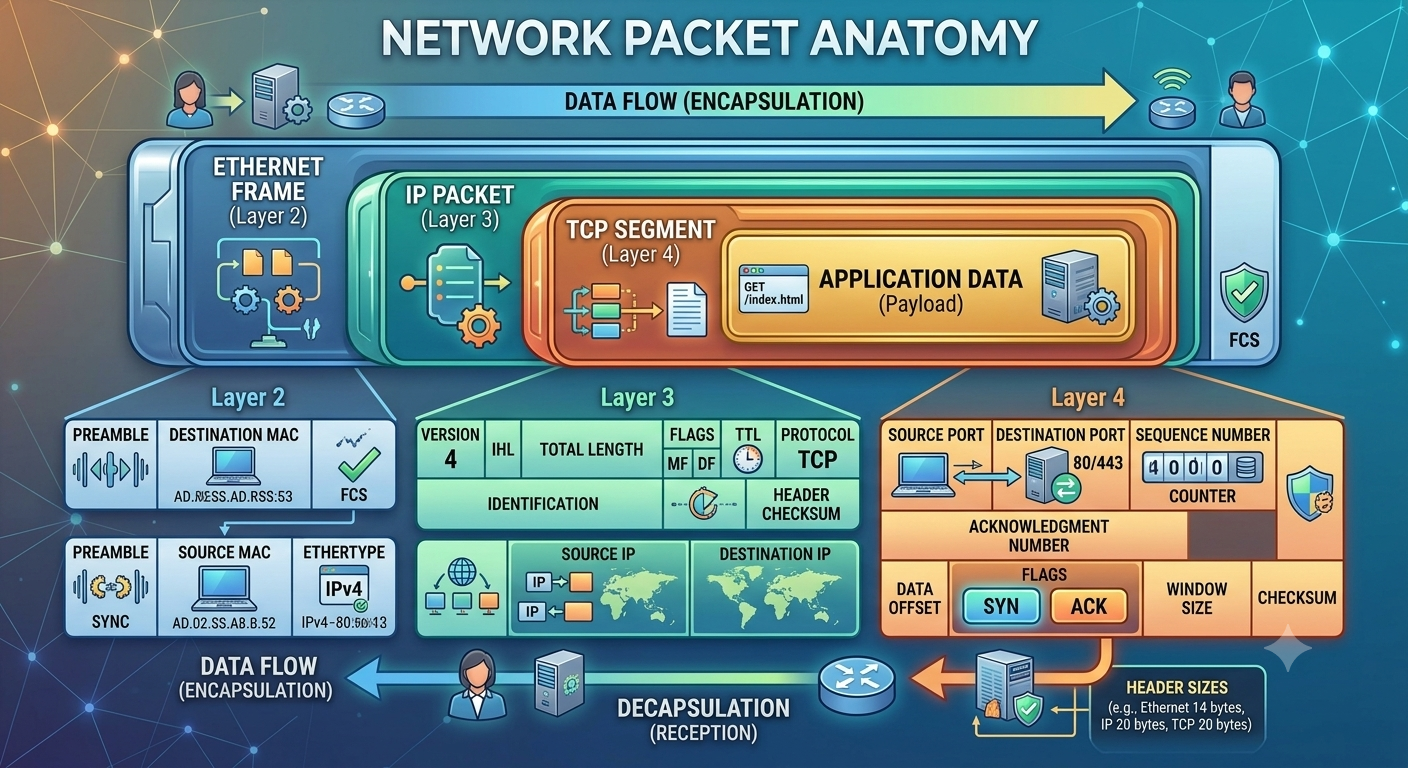
Network Packet Anatomy
File: images/network-packet-anatomy.png — shows Ethernet header → IP header → TCP/UDP header → application payload
5. IP Addresses
An IP address is a logical network address used to identify a network interface and help deliver traffic between networks.
IPv4
IPv4 uses 32 bits and is normally written as four decimal octets.
192.168.1.25
Each octet ranges from 0 to 255. IPv4 has a finite address space, which is why private addressing, subnetting and NAT are so common.
Private IPv4 Ranges
| Range | Typical Use |
|---|---|
10.0.0.0/8 |
Large private networks |
172.16.0.0/12 |
Enterprise and lab networks |
192.168.0.0/16 |
Home and small-office networks |
IPv6
IPv6 uses 128-bit addresses and provides a vastly larger address space.
2001:db8:1234:5678::10
6. MAC Addresses
A MAC address is a link-layer identifier associated with a network interface. Ethernet networks use MAC addresses for local-network delivery.
00:1A:2B:3C:4D:5E
IP Address
Logical addressing used for communication and routing across networks.
MAC Address
Link-layer addressing used primarily for local network communication.
7. What Are Network Ports?
An IP address gets traffic to a host. A port helps the operating system deliver traffic to the appropriate application or service. TCP and UDP use 16-bit port numbers from 0 through 65,535.
| Port | Service | Typical Purpose |
|---|---|---|
| 22 | SSH | Secure remote administration |
| 53 | DNS | Name resolution |
| 80 | HTTP | Web traffic |
| 443 | HTTPS | TLS-protected web traffic |
| 25 | SMTP | Mail transfer |
| 3389 | RDP | Remote desktop |
Exposed ports can reveal services that attackers may attempt to enumerate or exploit, making port awareness important in security operations.
8. What Are Network Protocols?
Protocols are agreed rules for communication. They determine how devices format, send, receive and interpret data.
IP
Logical addressing and packet forwarding between networks.
TCP
Reliable, connection-oriented transport.
UDP
Lightweight, connectionless transport.
DNS
Name resolution and other domain-name services.
HTTP / HTTPS
Web communication, with HTTPS adding TLS protection.
ICMP
Control and diagnostic messaging, commonly seen with ping.
9. TCP vs UDP
TCP and UDP operate at the transport layer and solve different communication problems.
| Feature | TCP | UDP |
|---|---|---|
| Connection | Connection-oriented | Connectionless |
| Reliability | Reliable and ordered delivery mechanisms | No built-in delivery or ordering guarantee |
| Overhead | Higher | Lower |
| Examples | HTTPS, SSH, many file/application protocols | DNS, streaming, gaming, VoIP and other latency-sensitive traffic |
TCP Three-Way Handshake
A TCP connection begins with a three-step handshake.
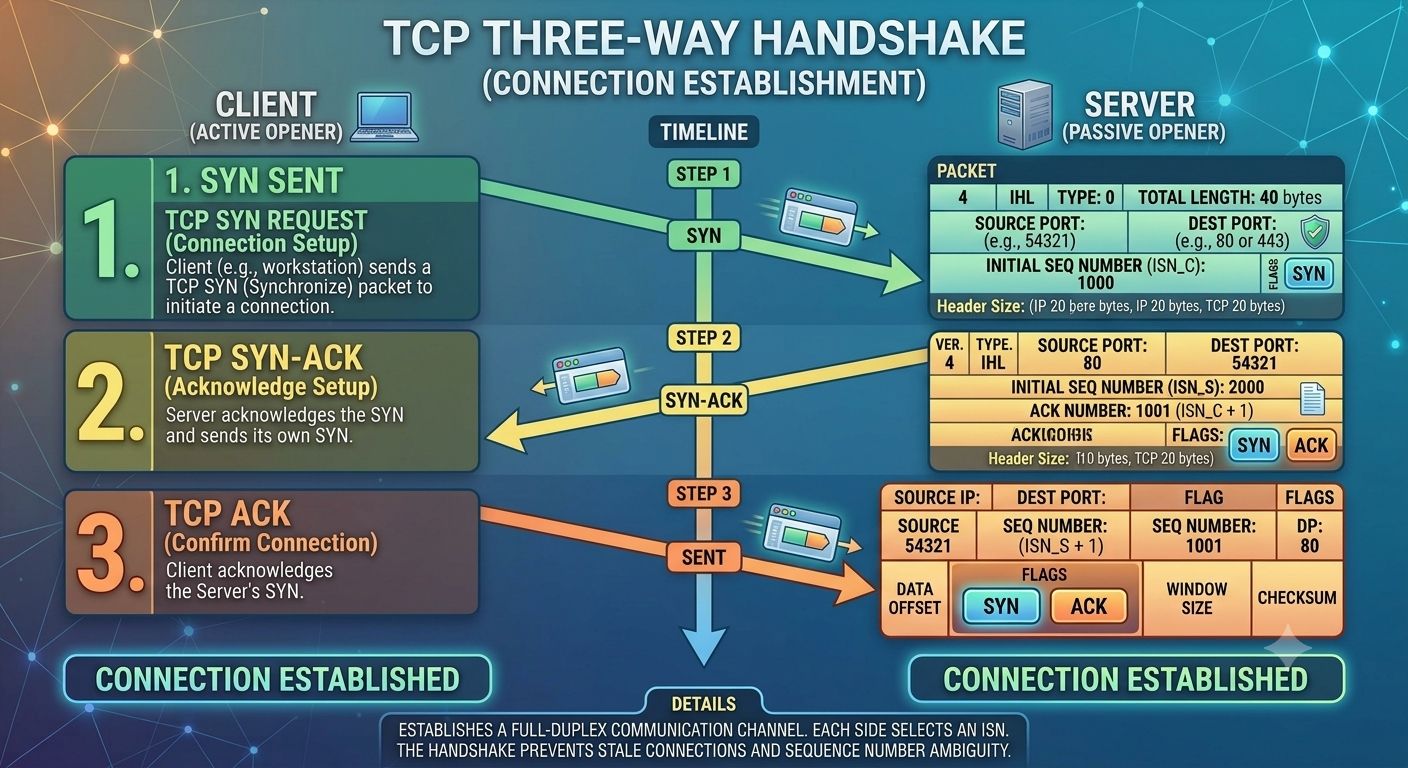
TCP Three-Way Handshake
File: images/tcp-three-way-handshake.png — shows SYN → SYN-ACK → ACK diagram
10. The OSI Model
The Open Systems Interconnection model divides communication into seven conceptual layers. It is primarily a learning and troubleshooting framework.
| Layer | Name | Purpose | Examples |
|---|---|---|---|
| 7 | Application | Services used by applications | HTTP, DNS, SMTP, SSH |
| 6 | Presentation | Data representation and related functions | Encoding, encryption concepts |
| 5 | Session | Session establishment and management | Session mechanisms |
| 4 | Transport | End-to-end transport | TCP, UDP |
| 3 | Network | Logical addressing and routing | IP, routers |
| 2 | Data Link | Frames and local delivery | Ethernet, MAC, switches |
| 1 | Physical | Bits and physical transmission | Copper, fiber, radio |

OSI Seven-Layer Model
File: images/osi-seven-layer-model.png — shows seven-layer OSI stack with protocols, devices and security controls
11. The TCP/IP Model
The TCP/IP model is a practical framework associated with the protocol suite used by the Internet.
| Layer | Examples | OSI Relationship |
|---|---|---|
| Application | HTTP, DNS, SSH, SMTP | OSI 5–7 |
| Transport | TCP, UDP | OSI 4 |
| Internet | IP, ICMP | OSI 3 |
| Network Access | Ethernet, Wi-Fi, ARP | OSI 1–2 |
The OSI model is excellent for learning and troubleshooting, while TCP/IP maps more directly to the protocols used in real networks.
12. Ethernet and Wi-Fi
Ethernet
Ethernet is widely used for wired local networking. Ethernet frames contain link-layer addressing and control information for local communication.
Wi-Fi
Wi-Fi provides wireless connectivity using radio communication. Wireless clients typically connect through an access point.
Wired
Usually provides predictable performance and a physical connection but requires cabling.
Wireless
Provides mobility and convenience while introducing additional wireless-security considerations.
13. Subnetting
Subnetting divides an IP network into smaller logical networks. It improves organization and can support routing, management and security design.
For example, an organization can separate employee systems, servers, guests and management systems instead of putting everything into one large network.
192.168.10.0/24
CIDR notation such as /24 indicates the number of bits used for the network prefix.
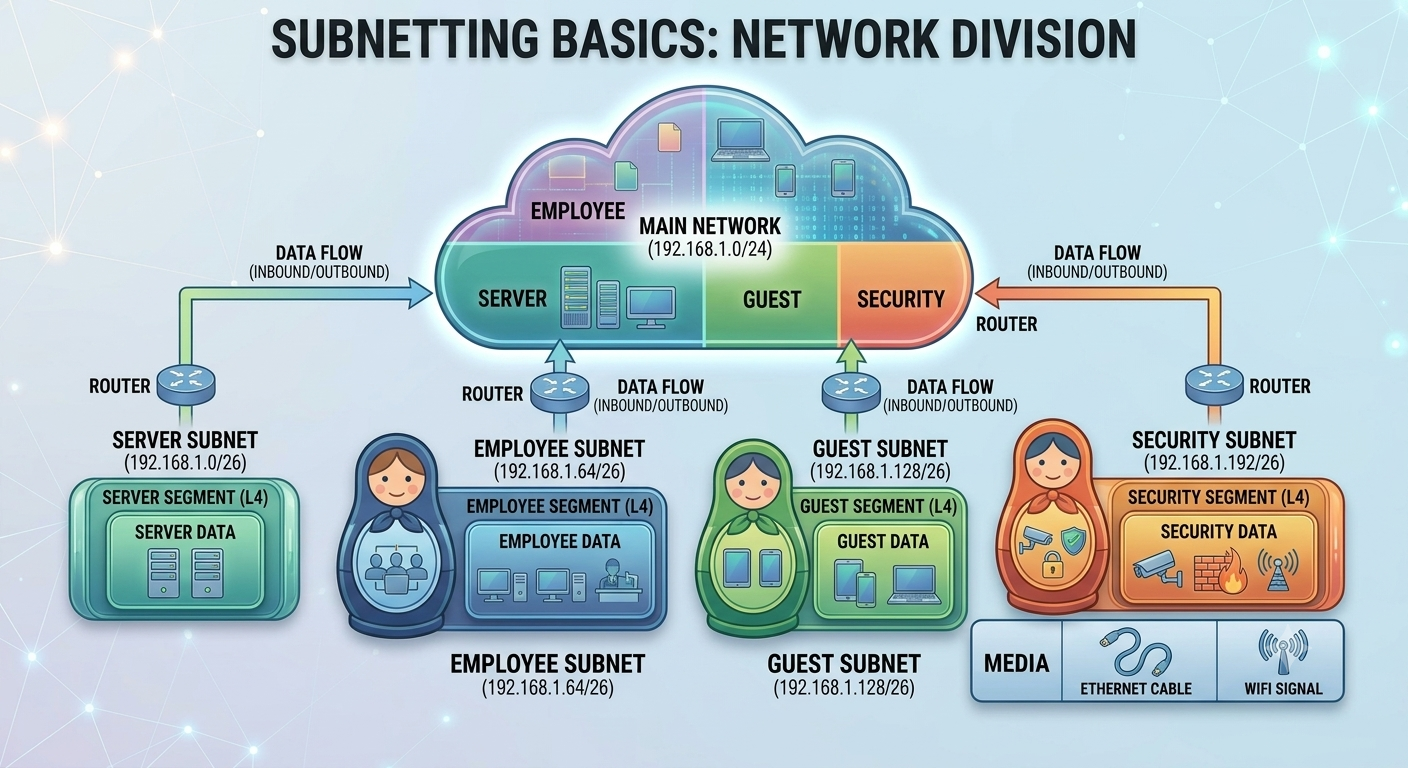
Subnetting Basics
File: images/subnetting-basics.png — shows one network divided into employee, server, guest and security subnets
14. ARP
On IPv4 local networks, Address Resolution Protocol (ARP) is used to discover the MAC address associated with an IPv4 address.
If a computer knows a local server's IP but needs its MAC address to create an Ethernet frame, ARP can provide that mapping.
15. DNS
The Domain Name System provides the distributed naming system that lets humans use names such as passwordgeeks.com while network communication ultimately uses IP addresses.
Common record types include A, AAAA, CNAME, MX and TXT.
16. DHCP
Dynamic Host Configuration Protocol allows clients to obtain network configuration automatically.
- IP address
- Subnet mask or prefix
- Default gateway
- DNS server information
- Lease duration
DHCP DORA
Discover
Client searches for DHCP servers.
Offer
Server offers configuration.
Request
Client requests the offered configuration.
Acknowledge
Server confirms the lease.
17. NAT
Network Address Translation allows private addresses to be translated to public addresses when traffic leaves a private network. It is common in home and enterprise environments.
NAT is not a replacement for a firewall. Address translation and security policy are separate concepts.
18. Routing
Routing is the process of determining where traffic should be sent so it can reach another network. Routers use routing information to select an appropriate next hop.
A routing table can contain directly connected networks, static routes and routes learned through dynamic routing protocols.
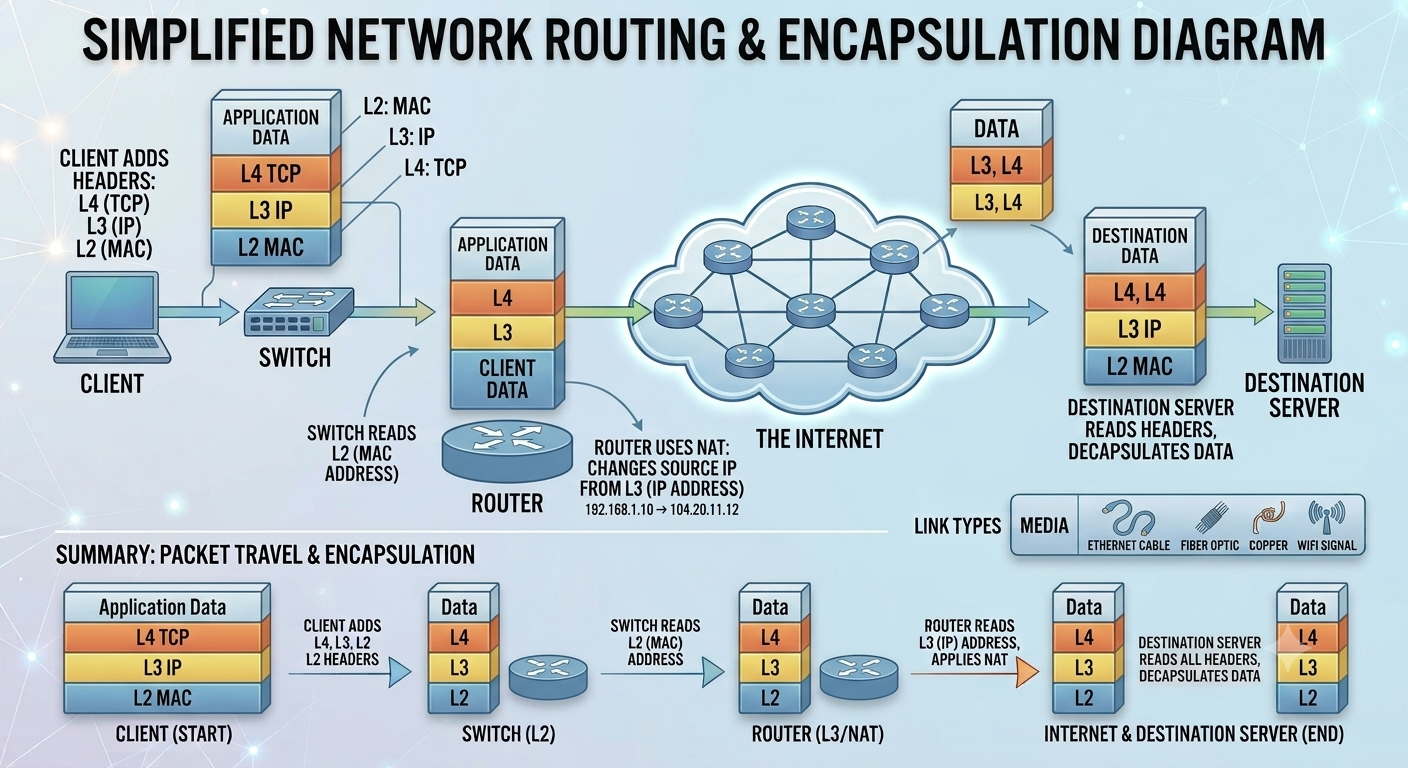
Network Routing Diagram
File: images/network-routing-diagram.png — shows client → switch → router → Internet → destination server
Default Gateway
When a host needs to reach a destination outside its local network, it generally sends traffic toward its configured default gateway.
19. Essential Networking Devices
Understanding networking devices is essential in cybersecurity because security controls are positioned around or directly on these components.
Switch
Connects devices within a local network and forwards frames using MAC information. Modern switches can also perform Layer 3 routing.
Router
Connects different IP networks and forwards packets using routing information.
Firewall
Applies security policies to network traffic and can allow, deny, inspect and log communication.
Access Point
Provides wireless clients with connectivity to a wired or wireless network infrastructure.
Hub
A basic Layer 1 device that repeats traffic to connected interfaces. Hubs are largely obsolete today.
Gateway
A gateway can provide a path between networks or systems and may perform translation or protocol functions.
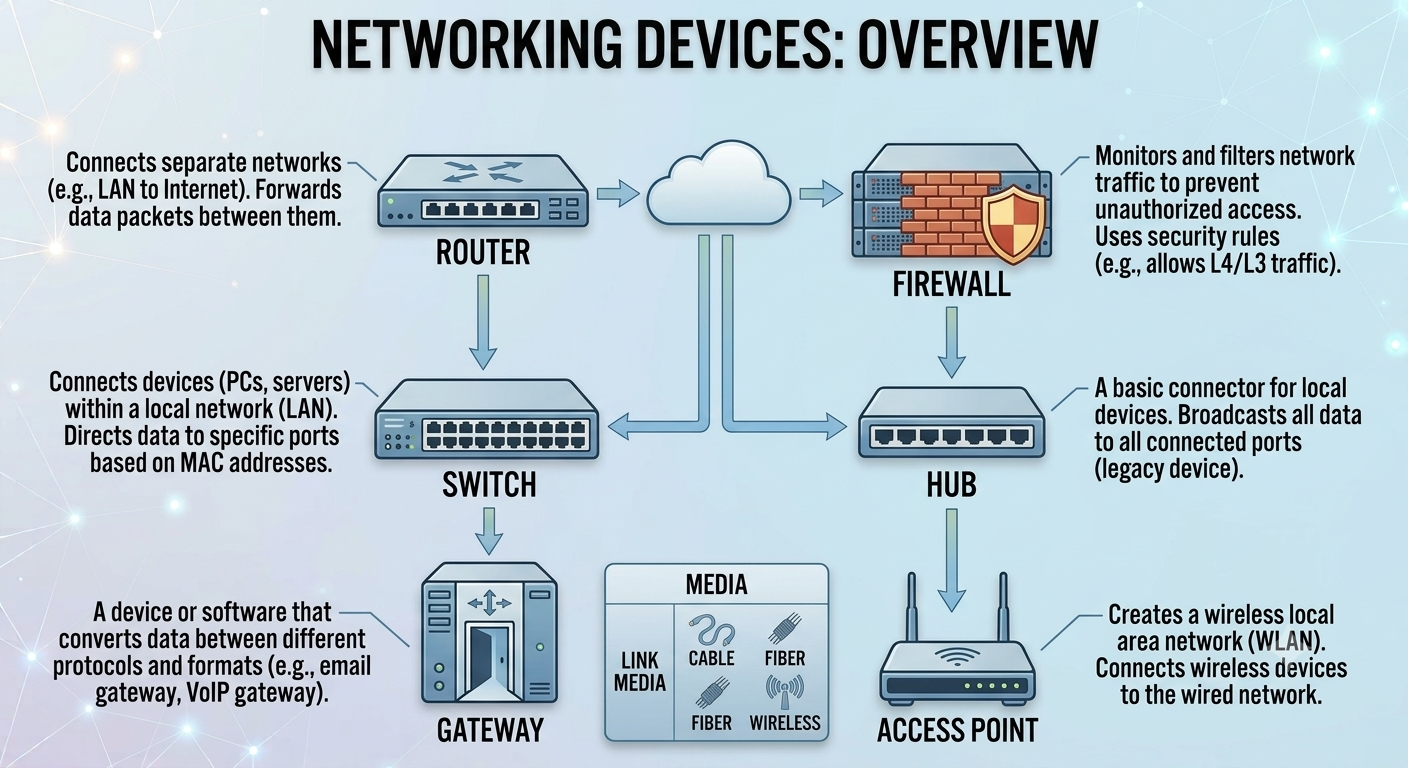
Networking Devices Overview
File: images/networking-devices-overview.png — shows router, switch, firewall, access point, hub and gateway with their roles
20. Firewalls
A firewall controls network traffic according to security policies. Depending on its design, it may inspect addresses, ports, connection state, applications, users and other attributes.
Common Firewall Criteria
- Source and destination IP addresses
- Source and destination ports
- Protocol
- Connection state
- Application or service
- User or identity
- Logging and alerting
21. IDS and IPS
Intrusion Detection Systems and Intrusion Prevention Systems analyze activity for signs of malicious or policy-violating behavior.
IDS
An IDS observes activity and generates alerts when suspicious behavior is detected. It is generally associated with detection rather than directly blocking traffic.
IPS
An IPS can operate inline and take automated action to block or disrupt traffic identified as malicious.
Detection Approaches
- Signature-based: detects known patterns.
- Anomaly-based: detects deviations from expected behavior.
- Behavior-based: evaluates activity patterns and context.
22. Network Segmentation
Network segmentation divides an environment into separate logical or physical security zones. It can reduce unnecessary communication and limit lateral movement after a compromise.
Employee Network
Workstations and normal business endpoints.
Server Network
Applications, databases and critical services.
Guest Network
Internet access without direct access to sensitive internal resources.
VLANs
Virtual LANs create logically separated broadcast domains. Inter-VLAN communication can then be controlled through routing and security policies.
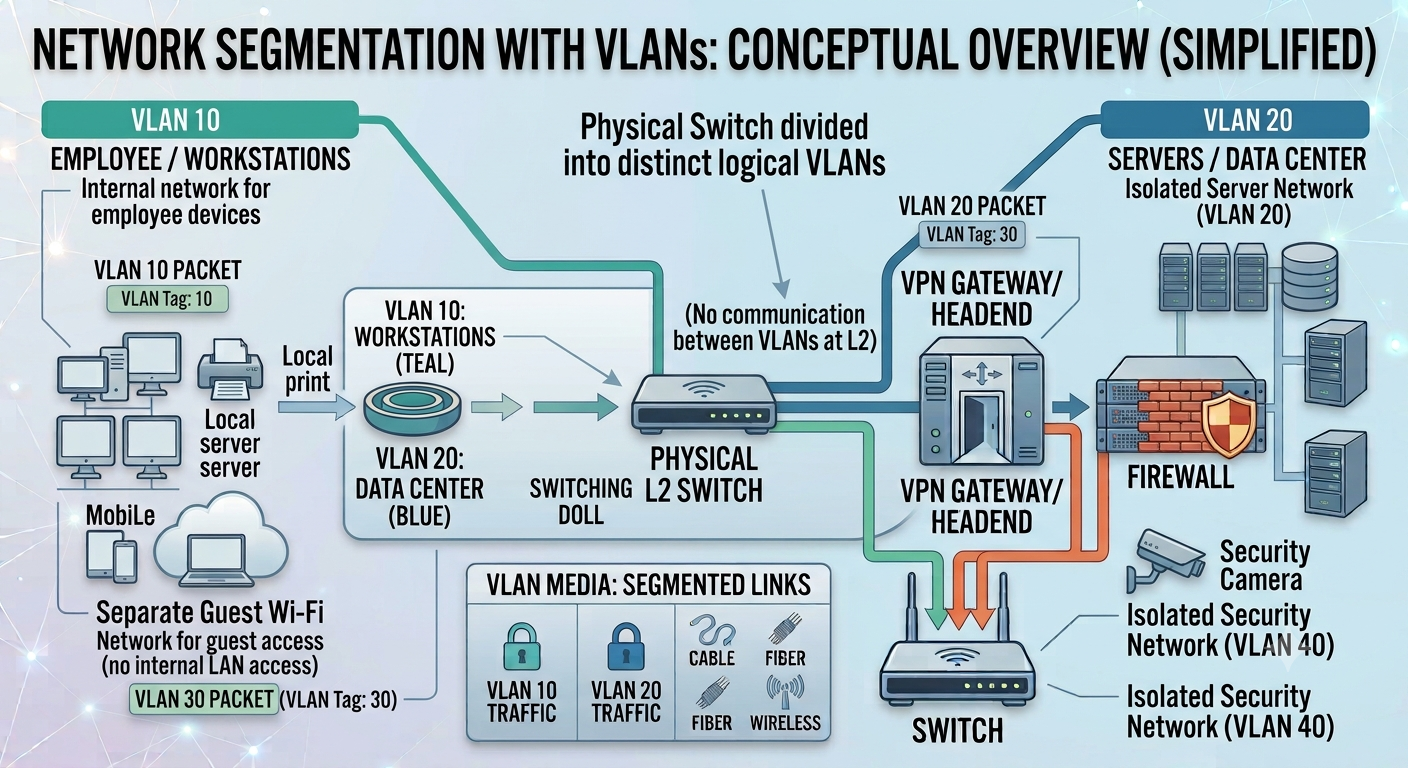
Network Segmentation with VLANs
File: images/network-segmentation-vlans.png — shows employee, server, guest and management VLANs separated by firewall policies
23. VPNs
A Virtual Private Network can establish an encrypted tunnel between endpoints, protecting traffic as it crosses an untrusted network.
Common Uses
- Remote employee access
- Site-to-site connectivity
- Secure access to internal resources
- Protecting traffic over untrusted networks
For more privacy-focused networking information, see the PasswordGeeks VPN guide.
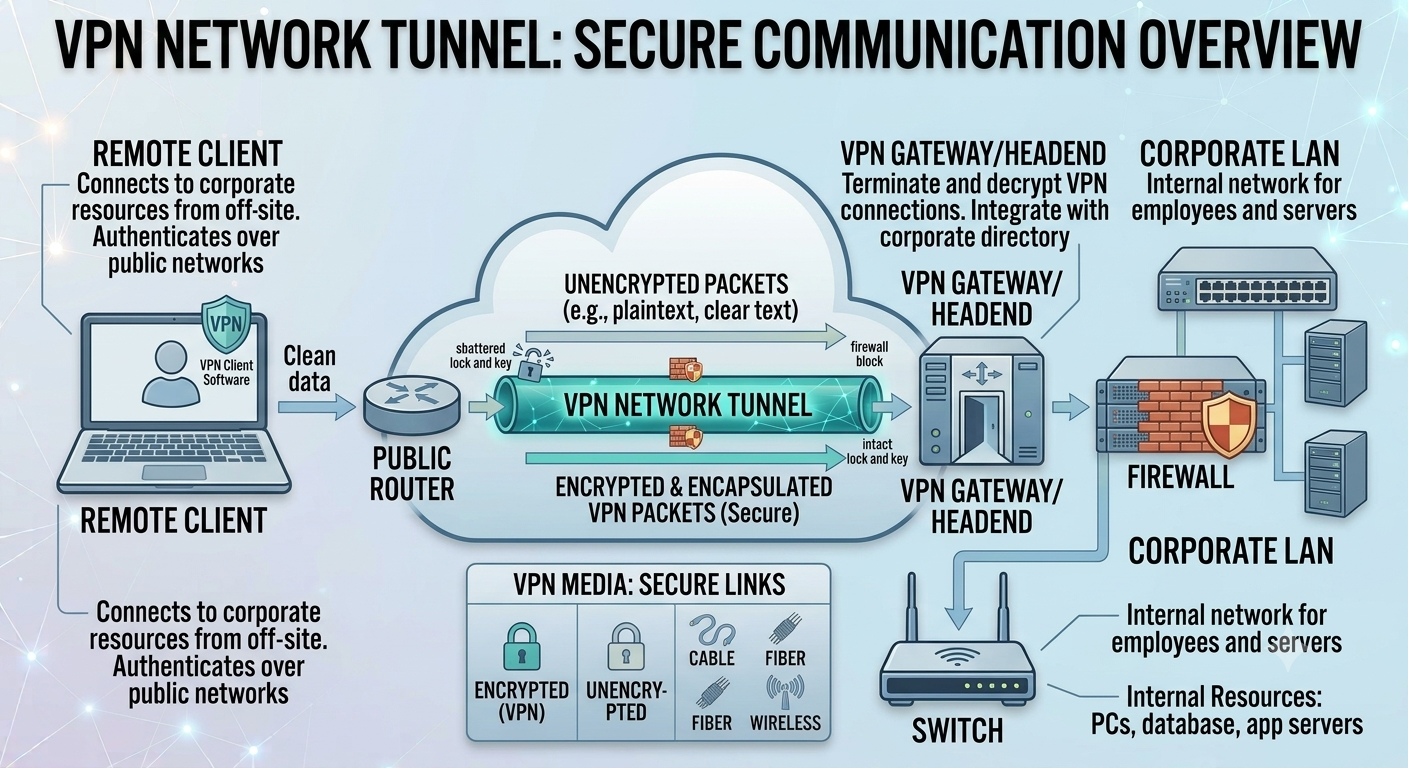
VPN Network Tunnel
File: images/vpn-network-tunnel.png — shows remote user → encrypted tunnel → VPN gateway → private network
24. Networking and Cybersecurity Attacks
Once fundamentals are understood, common cybersecurity activities become much easier to interpret.
| Activity | Networking Knowledge Needed |
|---|---|
| Network scanning | IP addresses, ports, protocols and routing |
| Packet analysis | Ethernet, IP, TCP, UDP, DNS and application protocols |
| Firewall analysis | Addresses, ports, protocols, direction and state |
| MITM investigation | ARP, DNS, routing and TLS |
| SIEM monitoring | Network logs, DNS, authentication and connection data |
| Incident response | Hosts, connections, traffic flows and network boundaries |
Port Scanning
Probing hosts to discover accessible services.
ARP Spoofing
Manipulating local address-resolution behavior to redirect traffic.
DNS Abuse
Abusing DNS or domains for phishing, redirection or command-and-control.
DoS / DDoS
Overwhelming resources so legitimate users cannot access a service.
MITM
Attempting to intercept communication between two parties.
Reconnaissance
Gathering information about hosts, services and network architecture.
25. Basic Network Troubleshooting
Networking knowledge is essential for SOC analysts because security problems can initially look like ordinary connectivity problems.
Start With the Basics
- Is the device connected?
- Does it have an IP address?
- Is the subnet configuration correct?
- Is the default gateway reachable?
- Can the device reach an external IP?
- Does DNS resolve names?
- Is the destination service listening?
- Is a firewall blocking the connection?
Useful Commands
# Windows
              ipconfig
              ping 192.168.1.1
              tracert example.com
              nslookup example.com
              arp -a
              netstat -ano

              # Linux
              ip addr
              ip route
              ping 192.168.1.1
              traceroute example.com
              dig example.com
              ip neigh
              ss -tulpen
26. Hands-On Networking Practice
Networking becomes easier once you can observe it yourself. You do not need an expensive enterprise lab.
Inspect IP Configuration
Use ipconfig on Windows or ip addr on Linux. Identify your IP, subnet, gateway and DNS.
Discover a Lab Network
In an authorized lab, use Nmap to identify hosts and services on systems you own or have permission to test.
Capture Traffic
Use Wireshark to capture your own traffic and identify Ethernet, IP, TCP, UDP, DNS and TLS packets.
Build a Virtual Network
Use VirtualBox or another hypervisor to create isolated virtual machines and observe communication between them.
Ready for network discovery? Continue with the PasswordGeeks Nmap Tutorial.
27. Networking Roadmap for Cybersecurity Beginners
- Learn network terminology and how devices communicate.
- Become comfortable with IPv4 addressing and subnetting.
- Understand TCP, UDP, ICMP, DNS, DHCP and ARP.
- Learn the OSI and TCP/IP models.
- Understand switches, routers, access points and gateways.
- Study VLANs, routing and NAT.
- Learn firewalls, IDS/IPS, VPNs and segmentation.
- Practice packet analysis with Wireshark.
- Practice authorized network discovery with Nmap.
- Connect networking knowledge to SIEM and incident response.
Ready to start learning?
Explore more cybersecurity guides and tutorials from PasswordGeeks.
28. Networking FAQ
What should I learn first in networking?
Start with devices, packets, IP addresses, MAC addresses, ports and basic protocols. Then move into TCP/UDP, OSI, subnetting, routing and switching.
Is networking necessary for cybersecurity?
Strong networking knowledge is extremely valuable for cybersecurity. SOC analysis, penetration testing, incident response, firewalls, IDS/IPS and cloud security all benefit from it.
What is the difference between a router and a switch?
A switch primarily connects devices within a local network, while a router connects different IP networks and forwards packets between them.
What is the difference between an IP and MAC address?
An IP address is a logical network-layer address used for communication and routing. A MAC address is a link-layer identifier used primarily for local delivery.
Why do cybersecurity professionals learn ports?
Ports identify destinations for applications and services. Understanding them helps analysts interpret traffic, troubleshoot systems and identify exposed services.
What is the OSI model used for?
It provides a conceptual framework for understanding network communication and is especially useful for learning and troubleshooting.
Should I learn networking before Nmap?
Yes. Nmap becomes much more useful when you understand IP addresses, ports, TCP/UDP, routing and services.
Can networking help with SOC analyst jobs?
Absolutely. SOC analysts frequently investigate network connections, DNS activity, IP addresses, ports, protocols, firewall events and IDS/IPS alerts.
Test Your Understanding
Answer all 5 questions below. If you get one wrong, don't worry — you'll get another chance to pick the correct answer. This chapter is only marked complete when all 5 answers are correct.
Which network layer address is used for logical communication and routing between different networks?
Which protocol is connection-oriented and provides reliable, ordered delivery of data?
What is the primary purpose of DNS?
Which networking device primarily connects devices within a local network and forwards frames using MAC addresses?
What is the correct order of the TCP three-way handshake?
Chapter Complete
All 5 questions solved. This chapter is now marked complete in Module 1.