Firewall Basics: What Is a Firewall and How Does It Work?
A beginner-friendly guide to firewalls, firewall rules, packet filtering, stateful inspection, proxy firewalls, circuit-level gateways, next-generation firewalls, hardware and software firewalls, cloud firewalls and host-based protection.
1. What Is a Firewall?
A firewall is a security control that monitors and controls network traffic according to a defined set of rules.
It sits between networks, devices or security zones and decides whether traffic should be allowed, rejected or dropped.
The simplest way to understand a firewall is to think of it as a security checkpoint. When network traffic arrives, the firewall examines information about that traffic and compares it with its policy. If the traffic matches an allowed rule, it can pass. If it violates policy, the firewall can block it.
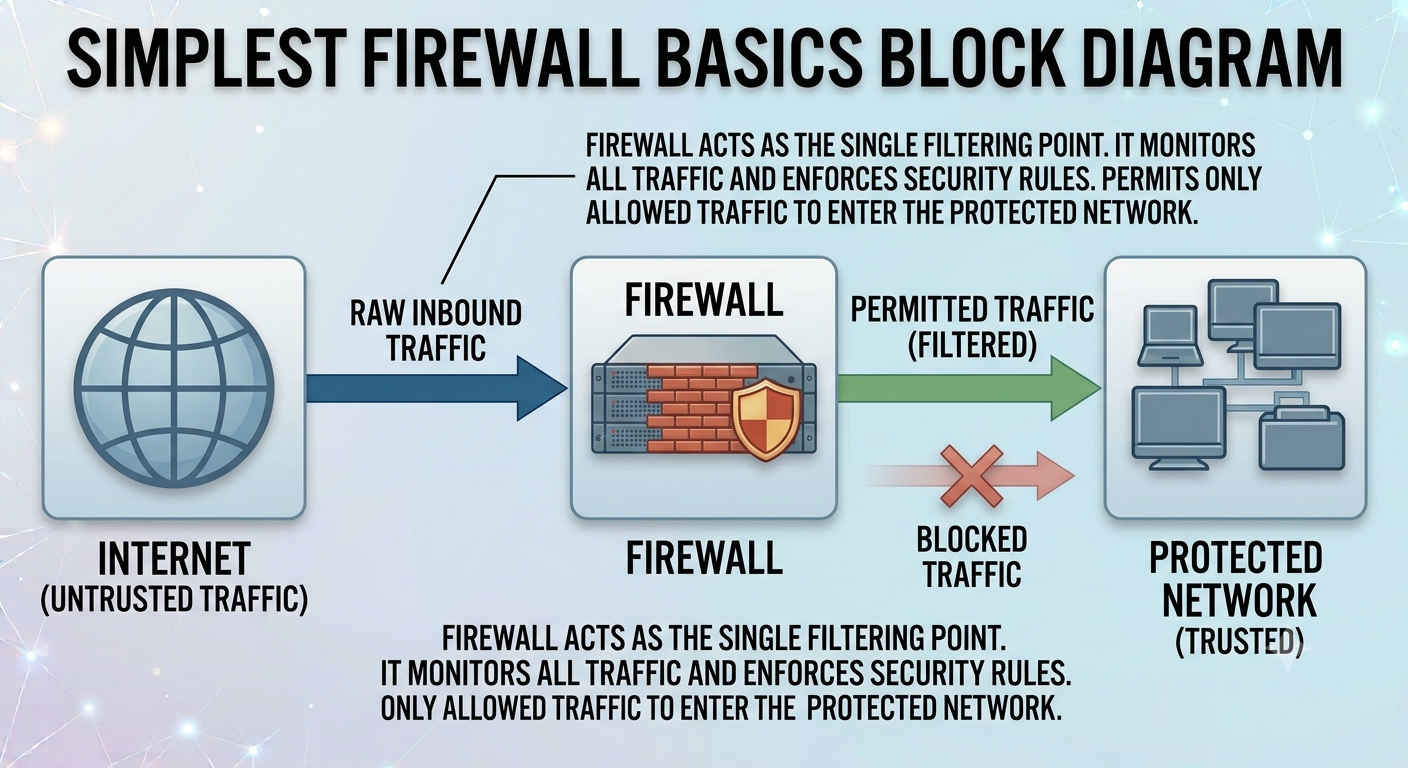
Firewall Basics Overview
File: images/firewall-basics-overview.png — shows Internet → Firewall → Protected Network
2. Why Do We Need Firewalls?
Modern networks constantly exchange traffic with other systems. A computer may communicate with websites, DNS servers, cloud services, software repositories, email systems and remote users. Without traffic controls, there is no simple policy boundary between permitted and unwanted network activity.
Control Access
Restrict which sources, destinations, ports and services are permitted to communicate.
Limit Attack Surface
Keep unnecessary services and network paths inaccessible from untrusted networks.
Monitor Traffic
Many firewalls record connection attempts, blocked traffic and other security-relevant events.
3. How Does a Firewall Work?
At a high level, a firewall receives or observes traffic, extracts relevant information, evaluates that information against its policy, and takes an action.
A connection attempt or packet reaches the firewall interface.
It may inspect source and destination IP addresses, ports, protocols, connection state, application data or other attributes.
The firewall compares the traffic with its configured policy.
The firewall may allow, deny, reject, drop, log, inspect or redirect the traffic depending on the product and policy.
Logs can later help administrators troubleshoot connectivity or investigate suspicious activity.
4. Understanding Firewall Rules
Firewall rules are the instructions that turn a firewall from a network device into a security control. A rule normally describes what traffic is being matched and what should happen when it matches.
| Rule element | What it means | Example |
|---|---|---|
| Source | Where the traffic originates | 192.168.1.50 |
| Destination | Where the traffic is going | 10.10.10.20 |
| Protocol | Protocol used by the traffic | TCP |
| Port | Logical service endpoint | 443 |
| Direction | Inbound, outbound or inter-zone | Inbound |
| Action | What the firewall should do | Allow / Deny / Drop |
| Logging | Whether the decision should be recorded | Log denied traffic |
Example: Allow HTTPS
Source: Any
              Destination: Web Server
              Protocol: TCP
              Destination Port: 443
              Action: ALLOW
              Logging: Enabled
This example represents a common policy idea: permit HTTPS traffic to a web server while leaving other services restricted. Real-world policies should be designed around the actual network architecture and security requirements rather than copied blindly.
5. A Simple Firewall Traffic Flow
Imagine a laptop on a home or office network trying to access a website over HTTPS. The connection may pass through several controls before reaching the destination.
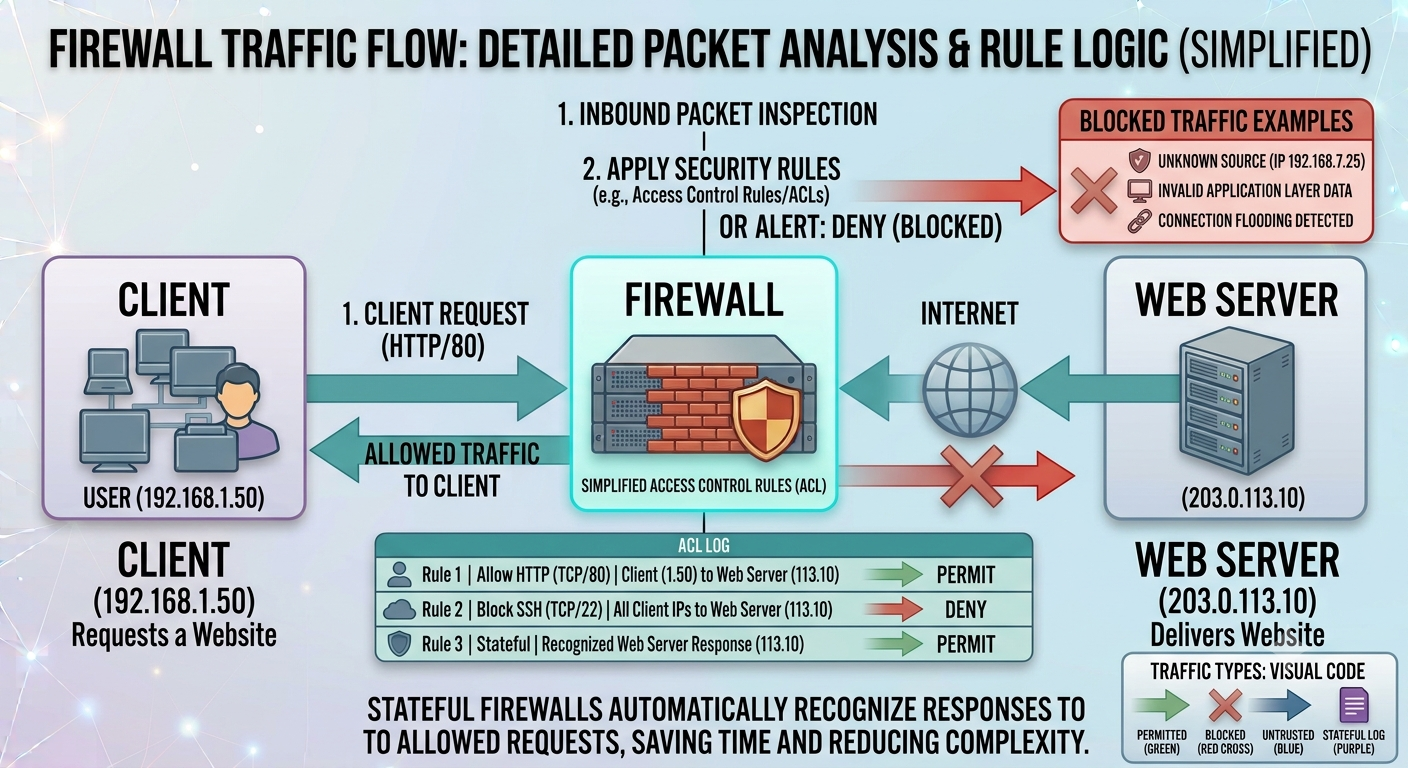
Firewall Traffic Flow
File: images/firewall-traffic-flow.png — shows Client → Firewall → Internet → Web Server
- The client creates network traffic for the destination.
- The firewall receives or evaluates the traffic.
- The firewall checks its security policy.
- If permitted, the traffic is forwarded.
- The response returns and may be evaluated again.
- The firewall can record the connection in its logs.
This is also why understanding networking fundamentals is extremely useful for cybersecurity. Concepts such as IP addresses, ports, TCP, UDP, routing and DNS make firewall behavior much easier to understand.
6. Packet Filtering Firewall
Packet filtering is one of the most basic firewall approaches. The firewall examines information in packet headers and compares it with rules. Typical fields include source IP, destination IP, protocol and port.
Simple example
A rule might say: "Allow TCP traffic to port 443 and block everything else from this source."
Advantages
- Simple concept and relatively low processing overhead.
- Useful for straightforward network access-control policies.
- Can restrict traffic based on IP addresses, protocols and ports.
Limitations
- Basic packet filtering does not understand application content.
- It may not understand whether a packet belongs to a legitimate established session.
- IP and port information alone provides limited context about user intent or application behavior.
7. Stateful Inspection Firewall
A stateful firewall goes beyond looking at individual packets in isolation. It maintains information about active connections and uses that context when making decisions.
For example, when a client establishes a legitimate TCP connection to a permitted server, the firewall can record the connection state. Return traffic that belongs to that connection can then be evaluated differently from an unsolicited connection attempt.

Stateful Firewall Connection Tracking
File: images/stateful-firewall-connection-tracking.png — shows stateful firewall tracking an established connection
8. Proxy / Application-Level Firewall
A proxy firewall acts as an intermediary between a client and the destination service. Instead of allowing the client to communicate directly with the external server, the proxy can receive the request, inspect it and create a separate connection to the destination.
Because the proxy operates closer to the application layer, it can potentially make decisions using application-specific information that a simple packet filter cannot see.
Client
Sends a request to the proxy rather than directly to the external service.
Proxy
Inspects the request, applies policy and decides whether to forward it.
Destination
Receives the proxy's request rather than necessarily seeing the original client connection.
Security benefit
The intermediary model can provide application-aware policy enforcement and additional visibility.
9. Circuit-Level Gateway
A circuit-level gateway focuses on connection and session establishment rather than deeply inspecting the content of every application request. It can validate whether a session is being established according to policy while remaining relatively lightweight.
The important distinction is that a circuit-level gateway is concerned primarily with the connection/session rather than the full application payload. This makes it different from an application proxy that can inspect application-level requests.
10. Next-Generation Firewall (NGFW)
A Next-Generation Firewall combines traditional firewall functions with additional inspection and security capabilities. Exact features vary by vendor, but an NGFW may combine traffic filtering, application awareness, deeper packet inspection, intrusion prevention, threat intelligence and malware-related controls.
IP + Port Filtering
Controls traffic using network-layer and transport-layer information.
Application Awareness
Identifies traffic using application-level characteristics rather than relying only on port numbers.
IPS & Inspection
Can integrate intrusion prevention and deeper inspection capabilities.
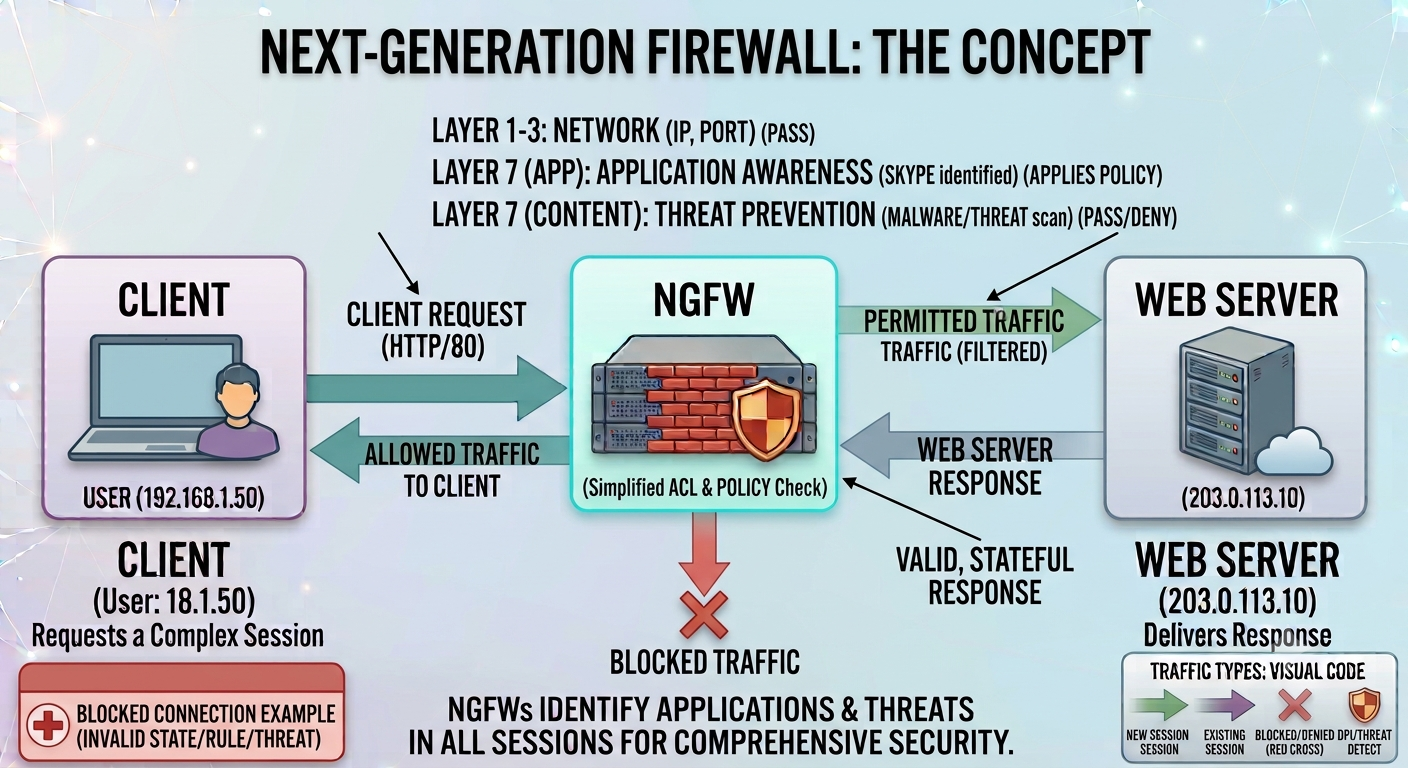
Next-Generation Firewall Layers
File: images/next-generation-firewall-layers.png — shows NGFW combining network filtering, application awareness, inspection and threat prevention
11. What Is a Web Application Firewall (WAF)?
A Web Application Firewall (WAF) is a specialized security control designed to protect web applications. It focuses on HTTP/HTTPS requests and application-layer behavior rather than serving as a general replacement for a network firewall.
A WAF can help identify and block malicious web requests, including patterns associated with attacks such as SQL injection and cross-site scripting. It is particularly useful when protecting internet-facing web applications.
12. Hardware vs Software Firewalls
Firewall types can also be classified by where the firewall runs. This classification is different from filtering-method classifications such as packet filtering or stateful inspection.
Hardware Firewall
A dedicated physical device placed between network segments. It can protect many systems behind it and is common in business networks.
Typical use: office, branch, campus or data-center network perimeter.
Software Firewall
A firewall application or operating-system component running on an individual host.
Typical use: protecting a laptop, workstation or server even when it changes networks.
13. Cloud Firewall / Firewall as a Service
A cloud firewall is a firewall capability delivered through cloud infrastructure or as a managed security service. It can protect cloud workloads, virtual networks, applications and remote connectivity without requiring the organization to install a physical appliance at every location.
Cloud environments also change the traditional idea of a single network perimeter. Organizations may have users, servers and applications distributed across multiple cloud regions and services. Firewall policies therefore need to be designed around identities, workloads, network zones and application requirements as well as IP addresses.
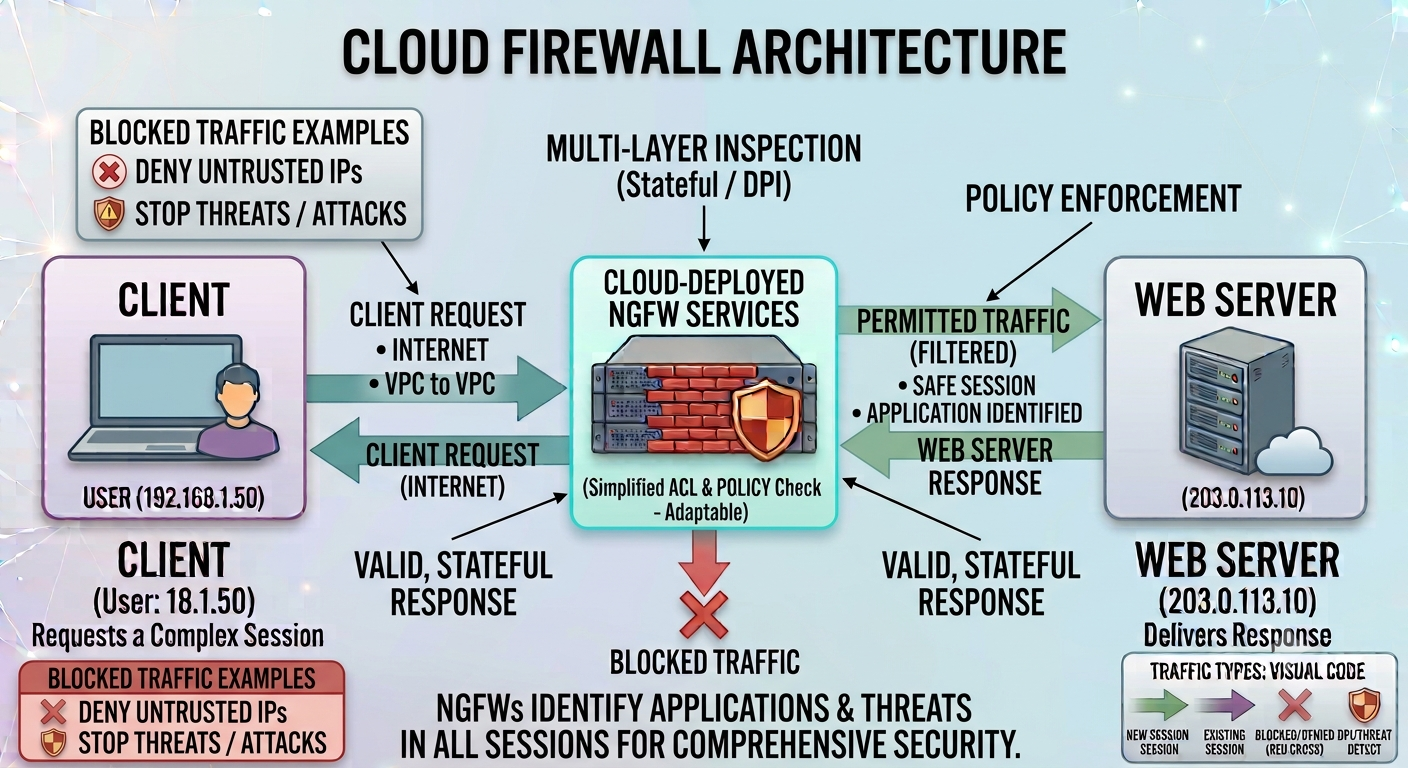
Cloud Firewall Architecture
File: images/cloud-firewall-architecture.png — shows cloud firewall protecting virtual networks and cloud workloads
14. Host-Based vs Network-Based Firewalls
| Characteristic | Host-Based Firewall | Network-Based Firewall |
|---|---|---|
| Where it operates | On an individual endpoint or server | At a network boundary or between network segments |
| Main scope | One host | Many devices or network zones |
| Useful for | Laptops, workstations, servers | Offices, data centers, branches, network perimeters |
| Mobility | Can protect the host when it moves between networks | Usually protects traffic passing through a specific network location |
| Example role | Windows/Linux endpoint firewall | Perimeter firewall protecting an internal LAN |
These two approaches are not competitors. A strong security architecture may use both. This is an example of defense in depth: multiple independent controls reduce the chance that one failure becomes a complete compromise.
15. Firewall Types Compared
| Firewall type | Primary focus | Strength | Limitation / consideration |
|---|---|---|---|
| Packet filtering | Packet headers | Simple and efficient | Limited context and application visibility |
| Stateful inspection | Traffic + connection state | Understands established sessions | More resource and state management than basic filtering |
| Proxy firewall | Application communication | Application-aware intermediary | Can introduce complexity and performance overhead |
| Circuit-level gateway | Sessions / connections | Validates session behavior without full payload inspection | Limited application-content inspection |
| NGFW | Network + application + threat controls | Broad visibility and integrated prevention | More complex and may require additional licensing |
| WAF | Web applications | Specialized HTTP/HTTPS protection | Not a general replacement for a network firewall |
| Host-based | Individual device | Protects the endpoint directly | Policy management can become difficult at scale |
| Cloud firewall | Cloud networks/workloads | Scales with cloud architecture | Requires cloud-specific policy and architecture knowledge |
16. What a Firewall Cannot Do
A common beginner mistake is treating a firewall as a complete cybersecurity solution. A firewall can enforce network policy, but it cannot solve every security problem.
It cannot fix vulnerable software
A firewall may reduce exposure, but systems still need patches and secure configuration.
It cannot stop every phishing attack
Users can still receive convincing malicious messages and may voluntarily provide credentials.
It cannot replace endpoint security
Malicious activity can originate from an already-compromised device inside the network.
It cannot guarantee safe traffic
Allowed HTTPS traffic can still carry malicious content or lead to a compromised service.
This is why firewalls work best as one component of a layered security architecture alongside endpoint security, identity controls, secure configuration, vulnerability management, monitoring, backups and incident response.
17. Firewall Best Practices
1. Start with least privilege
Allow only the traffic that is actually required. Avoid broad "allow everything" policies.
2. Document rules
Every important rule should have a clear purpose, owner and change history.
3. Remove obsolete rules
Old rules create unnecessary attack paths and make policy review harder.
4. Log intelligently
Collect useful security events without creating an unmanageable volume of noise.
5. Review regularly
Network architecture changes. Firewall rules should change with it.
6. Protect management access
Restrict administrative interfaces, use strong authentication and avoid exposing management services unnecessarily.
18. Hands-On Firewall Learning
You can learn firewall concepts without immediately buying enterprise equipment. A virtual lab is enough to begin.
Use a hypervisor and create two or more virtual machines on isolated networks.
Use a firewall platform such as pfSense or another suitable lab firewall.
Allow one service, block another and observe the difference.
Use tools such as ping, curl and Nmap in your own lab to understand how filtering changes what is reachable.
Connect an allowed service, trigger a denied connection and compare the resulting firewall events.
19. Firewall Learning Roadmap for Beginners
Networking
Learn IP addresses, MAC addresses, ports, TCP/UDP, DNS, routing, NAT and subnetting.
Firewall Fundamentals
Understand packet filtering, stateful inspection, rules, zones, interfaces and logging.
Advanced Firewalls
Learn application control, IPS, deep inspection, VPNs, threat intelligence and NGFW concepts.
Architecture
Study DMZs, segmentation, zero-trust principles, cloud networking and defense in depth.
Operations
Practice rule reviews, logging, troubleshooting, change management and incident investigation.
Security Tools
Use Wireshark, Nmap, firewall logs and SIEM platforms to understand network behavior.
If networking is new to you, start with our Networking for Cybersecurity guide before moving into more advanced firewall configuration.
Keep going — Module 1 continues
You've completed Chapter 7. Chapter 8 (AAA) and Chapter 9 (Core Security Principles) are next.
20. Frequently Asked Questions
What is a firewall in simple words?
A firewall is a security control that checks network traffic against rules and decides what traffic should be allowed or blocked.
What are the main types of firewalls?
Common filtering-method categories include packet filtering, stateful inspection, proxy firewalls, circuit-level gateways and next-generation firewalls. Firewalls can also be classified by deployment as hardware, software, cloud, host-based and network-based.
What is a stateful firewall?
A stateful firewall tracks active connections and uses connection state as part of its traffic decisions, rather than evaluating every packet entirely in isolation.
What is an NGFW?
A Next-Generation Firewall combines traditional firewall functions with additional capabilities such as application awareness, deeper inspection and, depending on the product, intrusion prevention and threat-detection features.
Is a firewall the same as antivirus?
No. A firewall primarily controls network traffic. Antivirus or endpoint security focuses on detecting and preventing malicious software and suspicious activity on devices.
Can a firewall stop hackers?
A firewall can block or restrict many unauthorized network paths, but it cannot guarantee that a system will never be compromised. Attackers can exploit allowed services, stolen credentials, vulnerable applications or compromised endpoints.
What is the difference between a firewall and a WAF?
A general network firewall controls network traffic and connections, while a Web Application Firewall specializes in inspecting HTTP/HTTPS requests and protecting web applications.
Are firewalls useful for home users?
Yes. Home routers commonly include firewall functionality, and operating systems often provide host-based firewalls. These controls can reduce unnecessary exposure and help restrict unwanted network connections.
Test Your Understanding
Answer all 5 questions below. If you get one wrong, don't worry — you'll get another chance to pick the correct answer. This chapter is only marked complete when all 5 answers are correct.
What is the basic purpose of a firewall?
Which type of firewall tracks the state of active connections and can make decisions based on whether a packet belongs to an established session?
What is a Web Application Firewall (WAF) primarily designed to protect?
Which statement best describes a host-based firewall?
Which of the following is NOT something a firewall alone can reliably prevent?
Chapter Complete
All 5 questions solved. This chapter is now marked complete in Module 1.