Know your password before someone else does.
Plain-English guides on how passwords get cracked, why length beats complexity, how 2FA and passkeys work, and what to do after a data breach — written to help you protect your accounts. Our free strength and breach checkers are further down the page.
How passwords are actually cracked
Most people picture a hacker typing guesses into a login form. In practice, that is the least common route, because websites throttle and lock out repeated failures. The real danger begins when an attacker obtains a copy of the database and can guess offline, with no rate limits at all.
Hashing: how sites should store passwords
A well-run site never stores your password. It stores a hash — the output of a one-way function. At login it hashes what you typed and compares the results. Hashes cannot be "decrypted", but they can be guessed: the attacker hashes millions of candidate passwords and looks for a match.
Salting and slow hashes
A salt is a random value added to each password before hashing, so identical passwords produce different hashes and precomputed "rainbow tables" become useless. Modern algorithms such as Argon2id, scrypt and bcrypt are deliberately slow and memory-hungry, cutting an attacker's guess rate from billions per second to thousands. Legacy fast hashes like MD5 and unsalted SHA-1 offer almost no protection once leaked.
Why your password's strength still matters
You cannot see how a website stores your password. A strong, unique password is your insurance against the sites that do it badly. If the site used a slow hash, a long random password is effectively uncrackable; if it used MD5, only length saves you.
| Storage method | Typical attacker speed | Protection |
|---|---|---|
| Plain text | Instant | None |
| Unsalted MD5 / SHA-1 | Billions per second on one GPU | Very weak |
| Salted SHA-256 | Billions per second | Weak against targeted attack |
| bcrypt (cost 12) | Thousands to tens of thousands per second | Good |
| Argon2id (recommended parameters) | Hundreds to thousands per second | Best current practice |
Speeds are order-of-magnitude illustrations; real figures vary by hardware and configuration.
Length, entropy and crack time
Each additional character multiplies the number of possibilities, so length grows strength exponentially. Adding a symbol to a short password helps far less than simply making it longer.
| Example type | Pool size | Length | ≈ Entropy | At 1B guesses/sec |
|---|---|---|---|---|
| Lowercase letters | 26 | 8 | 38 bits | Under 4 minutes |
| Letters + digits | 62 | 8 | 48 bits | About 2.5 days |
| All printable characters | 94 | 8 | 52 bits | About 2 months |
| Letters + digits | 62 | 12 | 71 bits | Tens of thousands of years |
| All printable characters | 94 | 16 | 105 bits | Far beyond any practical attack |
| Four random common words | ~7,776 per word | 4 words | ~52 bits | About 2 months |
| Six random common words | ~7,776 per word | 6 words | ~78 bits | Millions of years |
These numbers apply only to randomly generated passwords. A human-chosen password like Summer2026! meets every "complexity rule" yet is guessed almost immediately, because attackers try word + year + symbol patterns first. Randomness, not decoration, creates entropy.
Common password attacks
Brute force
Automated software tries every possible combination. Effective only against short passwords; defeated by length.
Dictionary
Tries wordlists, leaked passwords and common variations like P@ssw0rd. Defeated by randomness.
Credential stuffing
Replays email/password pairs from one breach against other sites. Defeated by unique passwords.
Phishing
Tricks you into entering credentials on a fake page. Defeated by passkeys and careful URL checks.
Password spraying
Tries a few very common passwords against thousands of accounts to avoid lockouts. Defeated by uncommon passwords and 2FA.
Keyloggers & infostealers
Malware records keystrokes or steals saved browser logins. Defeated by device hygiene and 2FA.
Credential stuffing in detail
Credential stuffing is the leading cause of account takeover for ordinary users. Attackers purchase "combo lists" containing billions of leaked email and password pairs and use bots to test them on banking, retail, streaming and social sites. A success rate of even 0.5% is profitable at that scale. The only reliable defence is never reusing a password, which is realistic only with a password manager.
Phishing in detail
Modern phishing pages are visually identical to the real thing and often use look-alike domains, QR codes or text messages. Treat any unexpected urgent message about your account as suspect, navigate to the site yourself instead of clicking links, and prefer passkeys or hardware keys, which refuse to authenticate on the wrong domain.
Passphrases vs. complex passwords
A passphrase made of several randomly chosen words is easier to remember and type than a short string of symbols, and at the same length is usually stronger. The key word is random: choose words using dice or a generator, not a favourite quote or song lyric.
- Use for: your password manager master password, device login and full-disk encryption — things you must type from memory.
- Use random 16–24+ character passwords for: everything else, generated and stored by a manager.
- Avoid: predictable substitutions (a→@, o→0), keyboard walks (qwerty), names, birthdays and appending a year.
2FA, authenticator apps and passkeys
Multi-factor authentication adds something beyond your password so that a leaked password alone is not enough. Not all second factors are equal.
| Method | Phishing resistance | Notes |
|---|---|---|
| SMS code | Low | Better than nothing; vulnerable to SIM-swap and interception. |
| Email code | Low | Only as secure as your email account. |
| Authenticator app (TOTP) | Medium | Codes can still be typed into a fake site in real time. |
| Push approval | Medium | Watch for "MFA fatigue" — never approve prompts you didn't trigger. |
| Hardware security key (FIDO2) | High | Verifies the site's domain; cannot be phished. |
| Passkey | High | Public-key credential tied to the genuine site; replaces the password. |
What is a passkey?
A passkey is a cryptographic key pair. The private key stays on your device (or in your password manager) and never leaves it; the website stores only the public key. Signing in means proving you hold the private key, typically with a fingerprint, face scan or device PIN. Because there is no shared secret, there is nothing to steal from the server, nothing to reuse and nothing to phish. Where a site offers passkeys, turn them on — and keep a recovery method.
Priority order: secure your primary email first (it resets everything else), then banking, then your password manager, cloud storage and social accounts.
Password managers explained
A password manager is an encrypted vault. You remember one strong master password; the manager generates, stores and fills a unique random password for every site. Reputable managers use a zero-knowledge design: your vault is encrypted on your device with a key derived from your master password, so the provider stores only ciphertext and cannot read it.
Why managers also reduce phishing
Because autofill matches the exact domain, a manager will not offer your bank password on a look-alike site — a useful warning sign that something is wrong.
What to look for
- Independent security audits and a public track record of handling incidents transparently
- Strong encryption (AES-256 or equivalent) and a modern key-derivation function
- Support for passkeys, TOTP and hardware keys on your own vault login
- Secure sharing, emergency access and reliable cross-device sync
- Open-source code or published security documentation, where possible
Are managers a single point of failure?
They concentrate risk, but compared with the realistic alternative — reused, memorised passwords — they dramatically lower overall exposure. Protect the vault with a long passphrase and 2FA, and store a recovery kit offline. See our password manager comparison and the Bitwarden and Proton Pass reviews.
What to do after a data breach
Seeing your email or password in a breach is common and not a reason to panic. Work through these steps in order:
- Identify what leaked. Check the notice or a breach-lookup service to see whether it was only email addresses, or passwords, financial data or identity numbers.
- Change the affected password immediately to a new unique one — and change it anywhere else you used it.
- Secure your email first. If the breached account shared a password with your email, change the email password and enable 2FA before anything else.
- Turn on 2FA or passkeys for the breached service and your critical accounts.
- Review account activity: login history, forwarding rules, connected apps, recovery email and phone numbers. Remove anything you don't recognise.
- Watch for follow-up phishing. Attackers use breach details to craft convincing messages. Don't click links; go to the site directly.
- If financial or identity data leaked, notify your bank, monitor statements, and consider a credit freeze where available in your country.
- Revoke old sessions by using "sign out of all devices" after changing the password.
What modern security guidelines say
Current guidance, such as NIST Special Publication 800-63B, has moved away from many habits people still follow. In summary:
- Favour length. Allow long passwords and passphrases (at least 64 characters) and permit all characters, including spaces.
- Drop arbitrary composition rules. Forced uppercase/symbol requirements push people toward predictable patterns.
- Stop forced periodic changes. Change passwords when there is evidence of compromise, not on a calendar.
- Screen against breached and common passwords at creation time.
- Allow paste so password managers work.
- Offer multi-factor authentication, ideally phishing-resistant methods.
This is why our checker flags breached passwords rather than merely missing symbols.
The account security checklist
- Use a password manager and let it generate a unique password for every account
- Protect the manager with a long passphrase you've never used elsewhere
- Enable 2FA or passkeys on email, banking, cloud storage, social media and your manager
- Prefer authenticator apps or security keys over SMS
- Save recovery codes offline in a safe place
- Keep your operating system, browser and apps updated
- Check your email address in a breach monitor a few times a year
- Remove old accounts you no longer use
- Be sceptical of urgent messages; type addresses yourself instead of clicking links
- Don't use public Wi-Fi for sensitive logins without a trusted VPN or mobile data
- Lock your phone and computer with a strong PIN or passphrase
Editor's Pick
Best Password Managers of 2026
We compared encryption standards, breach monitoring and cross-device syncing across the top password managers to see which are worth trusting with your logins. By the PasswordGeeks Team · Last updated Sep 2026
Learn Cybersecurity From Zero to Job-Ready
A structured 19-module course for beginners and aspiring security professionals — networking, Linux, cryptography, attacks, defensive and offensive security, SOC, cloud, forensics and career prep. Register and pay ₹499 for lifetime access.
Enroll Now — ₹499 →How our password checker works
The checker below runs three separate analyses, each answering a different question. Understanding them helps you read the results correctly rather than chasing a green dial.
1. Pattern score
The dial rewards length (8 and 12+ characters) and the presence of lowercase, uppercase, digits and symbols, and it subtracts points for repeated characters, simple sequences like 1234 or abcd, and well-known weak passwords. It is a quick heuristic, not a guarantee.
2. Entropy and crack-time estimate
Entropy measures how many guesses an attacker would need if every character were chosen at random from the character sets your password uses. We estimate it as length × log₂(pool size) and convert it into a time by assuming an attacker with strong hardware testing one billion guesses per second against a fast, unsalted hash. That is a pessimistic but realistic scenario for a leaked database.
3. Breach lookup (k-anonymity)
Your browser hashes the password with SHA-1 locally, sends only the first five characters of that hash to the Pwned Passwords service, receives every hash suffix beginning with those characters, and compares them on your device. The service never sees your full hash and cannot tell which entry, if any, was yours. If a password appears in the dataset, it is in attackers' wordlists — retire it everywhere, however "complex" it looks.
Free password strength & breach checker
Test a password's strength, estimated crack time and breach exposure. Everything runs in your browser.
Your password never leaves your device. Crack-time figures are estimates that assume 1 billion guesses per second and a random password; real passwords built from words, names or patterns fall much faster.
Weak vs. strong password: real results from our checker
Below are two example passwords run through the checker above. Neither is a real account password. Compare the dial, the entropy, the crack-time estimate and the breach status side by side.
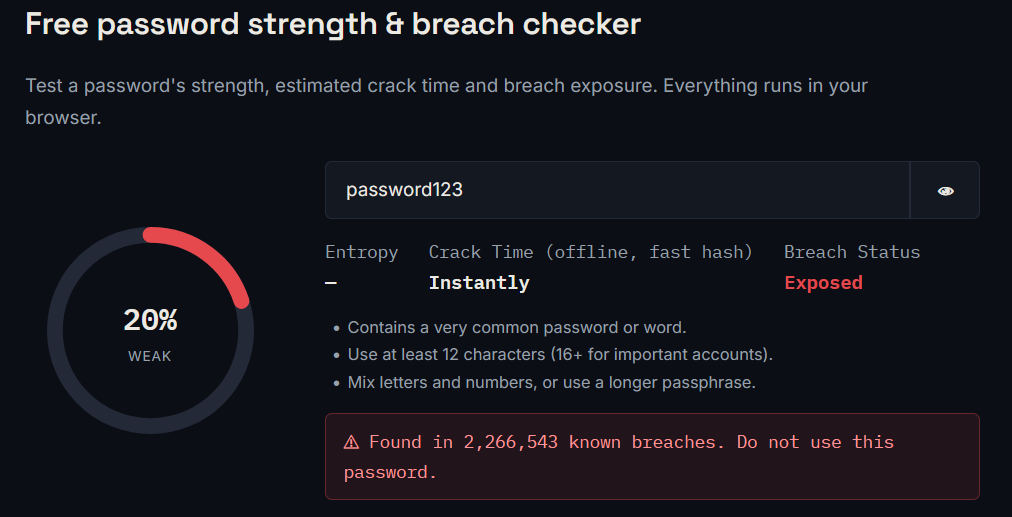
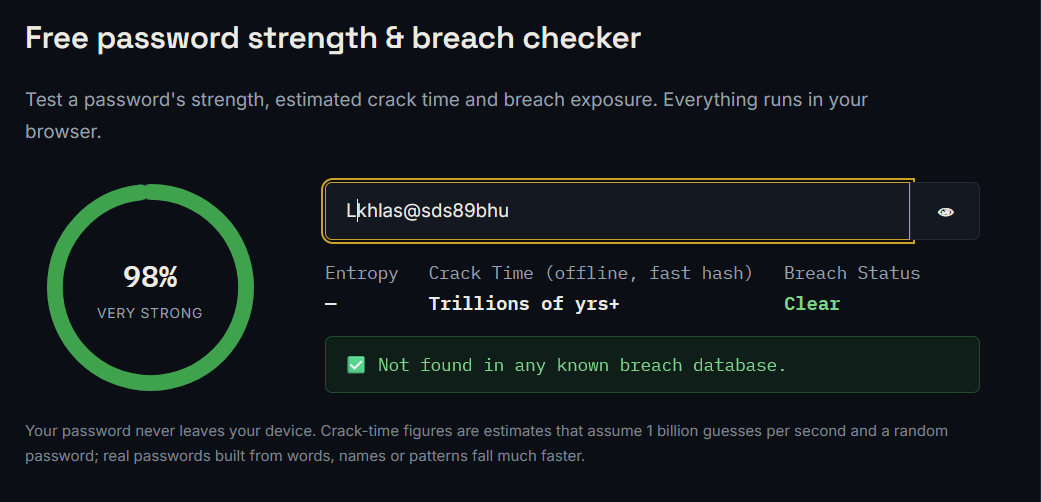
What to notice in each result
- Strength dial: a quick summary of length and character variety, not a guarantee on its own.
- Entropy: the real measure of unpredictability. Each extra bit doubles the guesses an attacker needs.
- Crack time: an estimate for an offline attack on a fast hash. Real-world time is shorter for passwords built from words or patterns.
- Breach status: a password found in a breach is unsafe however complex it looks.
More tools
Generated in your browser with a cryptographically secure random source. Nothing is transmitted or stored.
How the email breach check works
Passwords are only one half of the picture. Your email address is the username for most of your accounts, so knowing whether it has appeared in a data breach tells you which services may have lost your details and where to look for risk.
What the tool does
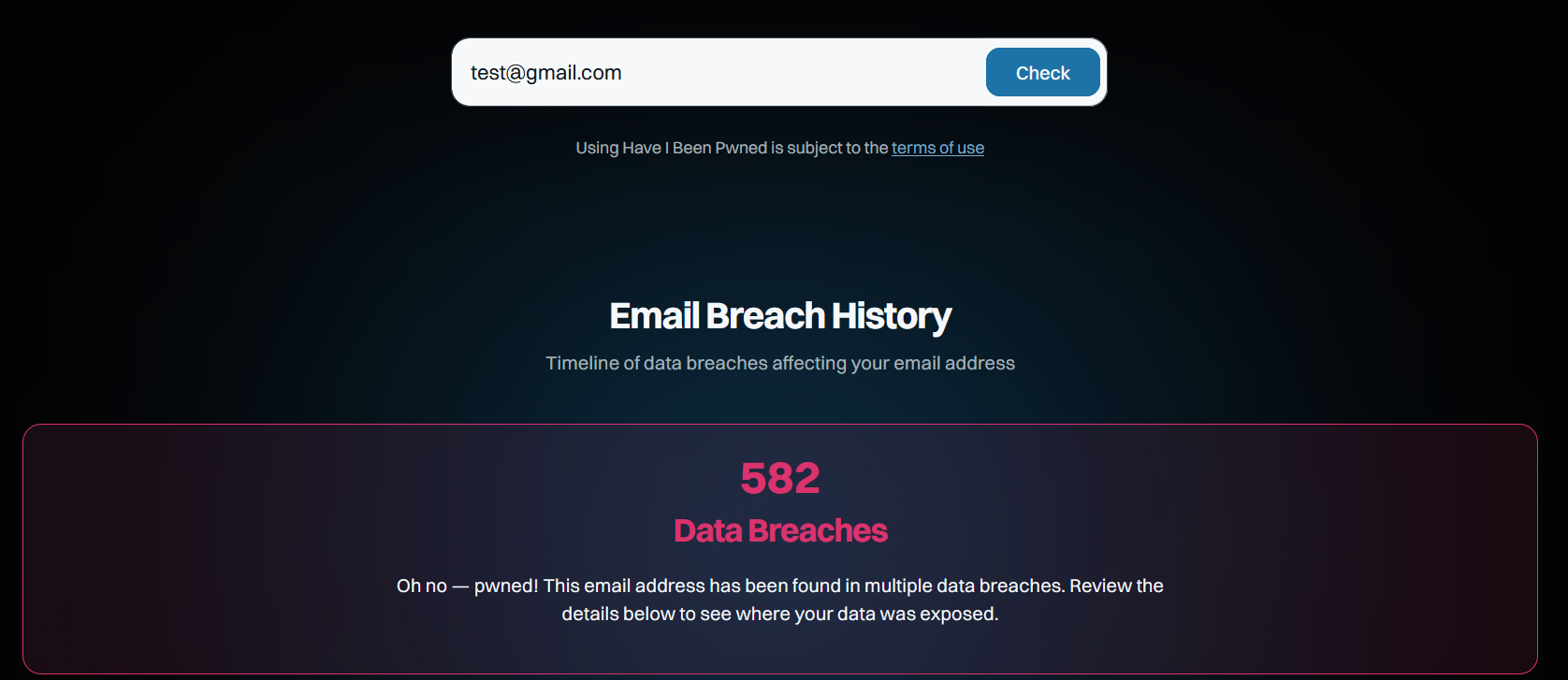
When you enter an address and press Check, our page opens the Have I Been Pwned (HIBP) lookup for that address in a new tab. HIBP, run by security researcher Troy Hunt, maintains one of the largest public collections of breached-account data and lists each incident your address appears in. We do not receive, store or log the address you type; the lookup happens on HIBP's site.
How to read the result
- No breaches found: good news, but not a guarantee. Many incidents are never made public, so keep using unique passwords and 2FA anyway.
- One or more breaches found: open each entry and check which data was exposed. Email addresses alone mainly mean spam and phishing risk; passwords, security questions or financial details need immediate action.
- Breach date: an old breach matters less only if you changed the password since. If you never did, treat it as current.
- Unfamiliar service: you may have signed up years ago or the company may have bought your data from another source. Close accounts you no longer use.
What to do if your email appears
- Change the password on the breached service, and anywhere you reused it, to a new unique one.
- Turn on 2FA or a passkey for that service and for your email account.
- Be alert for phishing that mentions the breached company; go to the site directly rather than clicking links.
- Consider signing up for breach notifications so you hear about new incidents early.
Latest reviews & tool guides
Bitwarden Review · ★ 4.9/5
Open-source, affordable and still the best all-round pick for most people.
NordVPN Review · ★ 4.8/5
Fast, well-audited and one of the more polished VPN apps we tested.
Best Antivirus 2026
Bitdefender vs Norton vs the rest — detection and system impact.
Wireshark guide
Capture and inspect live network traffic packet by packet.
Nmap guide
Discover hosts, open ports and services on a network.
Metasploit guide
Understand exploitation frameworks in a lab environment.
Notable data breaches in history
Yahoo
All 3 billion accounts were affected, the largest single-company breach on record.
Anthem
Around 80 million healthcare records were breached.
FriendFinder Networks
Roughly 412 million accounts exposed, many with weakly protected passwords.
Equifax
About 147 million people had sensitive financial and identity data exposed.
Data scraped from around 700 million profiles was later offered for sale.
National Public Data
A database exposure involved roughly 2.9 billion records, including names, addresses and Social Security numbers.
Publicly reported figures, shown for context. Lesson common to all: unique passwords and 2FA limit the damage when a company you trust is breached.
Password security glossary
- Entropy — a measure of unpredictability, in bits; each extra bit doubles the guesses needed.
- Hash — a one-way function that turns a password into a fixed-length fingerprint.
- Salt — random data added before hashing so identical passwords yield different hashes.
- Rainbow table — precomputed hash lookups; defeated by salting.
- k-anonymity — a technique that lets you query a dataset without revealing the exact item you're looking up.
- TOTP — time-based one-time passwords, the six-digit codes in authenticator apps.
- FIDO2 / WebAuthn — open standards behind security keys and passkeys.
- Zero-knowledge — a design where the provider cannot read your encrypted data.
- Credential stuffing — automated reuse of leaked logins on other sites.
- SIM swapping — taking over a phone number to intercept SMS codes.
- Infostealer — malware that harvests saved passwords, cookies and tokens.
Frequently asked questions
Is it safe to check my password on this site?
Yes. Strength is calculated in your browser, and for breach checks only the first five characters of a SHA-1 hash are sent, using the same k-anonymity method as Have I Been Pwned. Your full password is never transmitted.
How long should my password be?
At least 12 characters for ordinary accounts and 16 or more for email, banking and your password manager. Length contributes more than symbols.
How often should I change my passwords?
Not on a schedule. Change a password when a service reports a breach, when you suspect compromise, or when you discover it was reused. Regular forced changes tend to produce weaker passwords.
Is my password "Strong" if the dial is green but it was found in a breach?
No. A breached password is in attackers' wordlists, so it is unsafe regardless of how complex it looks. The breach result always takes priority.
Are passkeys better than passwords?
Generally yes. They resist phishing, cannot be reused and leave nothing reusable on the server. Use them where supported and keep a recovery option.
Do I really need a password manager?
If you have more than a handful of accounts, it is the only practical way to keep unique random passwords everywhere.
Is a VPN the same as antivirus?
No. A VPN encrypts your connection and masks your IP address; antivirus scans your device for malware. They address different risks.
Is SMS two-factor authentication still worth using?
Yes, if it's the only option — it blocks most automated attacks. Where possible, upgrade to an authenticator app, security key or passkey.
About PasswordGeeks & our editorial standards
PasswordGeeks is an independent resource on password security and everyday cybersecurity. Our goal is to give readers accurate, practical guidance they can act on, and tools that respect their privacy.
- Accuracy. Technical claims are checked against primary sources such as standards bodies, vendor documentation and published security research, and articles are reviewed and updated when guidance changes.
- Independence. Ratings are based on features, security design, usability and value. Some pages contain affiliate links; if you buy through them we may earn a commission at no extra cost to you, and this never determines a rating.
- Privacy. Our checker runs in your browser. See our Privacy Policy for details on analytics and advertising cookies.
- Corrections. Spotted an error? Contact us and we'll investigate and update the page.
Information on this site is educational and does not replace professional security advice for your organisation.